cancel
Showing results for 
Search instead for 
Did you mean: 

We've captured the moments from FabCon & SQLCon that everyone is talking about, and we are bringing them to the community, live and on-demand. Starts on April 14th. Register now

Reply
Anonymous
Not applicable

Automatic Grouping?

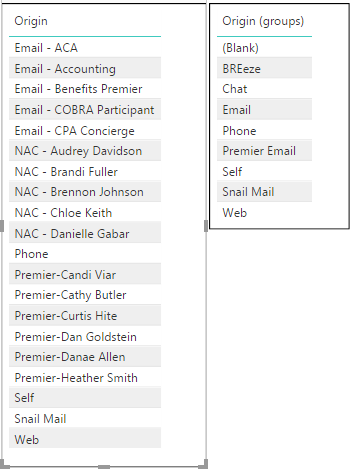
I have a column that I made groups for to shrink the list and easier identify the categories:

1.PNG

Everything that starts with NAC or Email is just grouped together under Email in the table on the right. Same thing with Premier Email. At any given time, a new hire can take place and a new person may be added with the NAC or Premier prefix you see in the left table. Whenever this happens, is there way to have the new person added to the group I've created or do they always have to be added manually afterwards? I refreshed my dataset yesterday and a new NAC person was added, so on the table on the right they had their own category. I had to edit my groups to add that person to the correct group and I'm not sure if there is a way to have them automatically grouped there. Otherwise I'd always have to go in and check and update this as needed. Thanks!

3 REPLIES 3
Anonymous
Not applicable

Whats the requirement say all the Origin Starts with NAC Or Email goes to Group Email.

 If this is what you want simpally create a conditional statement with If / Switch so that even if you new origin is added and it starts with NAC or Email, is hould satisfy the condition and get into Group Email.


Some thing like below

if(find("NAC",Origin,1,0)=TRUE(),"EMAIL",<Anothet If condition>)


Actually valid use of Find and If should resolve your purpose.


Let me know if it works.


Thansk

Swapnil

RMDNA
Solution Sage
Solution Sage

@Anonymous,


Is "Origin (groups)" a column in the data, or a group you created manually using "Create New Group?"


If it's the latter, why not create conditional rules in Power Query to assign them to the proper Origin Group as them come in?

Anonymous
Not applicable

@RMDNA Would that be done from the query editor? I'm not 100% sure about how to go about doing that. And yes, it's a group that I created manually from another column.

Helpful resources

Announcements
New to Fabric survey Carousel

New to Fabric Survey

If you have recently started exploring Fabric, we'd love to hear how it's going. Your feedback can help with product improvements.

Power BI DataViz World Championships carousel

Power BI DataViz World Championships - June 2026

A new Power BI DataViz World Championship is coming this June! Don't miss out on submitting your entry.

Join our Fabric User Panel

Join our Fabric User Panel

Share feedback directly with Fabric product managers, participate in targeted research studies and influence the Fabric roadmap.

March Power BI Update Carousel

Power BI Community Update - March 2026

Check out the March 2026 Power BI update to learn about new features.