cancel
Showing results for 
Search instead for 
Did you mean: 

Try your skills in the Power BI Dataviz World Championship! Round one ends June 26. Join now

Reply
CougDevil
New Member

Auto refresh data from Sharepoint Excel File

I've created a report that is connected to an Excel file in Sharepoint, and I need it to autorefesh each morning. When I try to schedule a refresh online though, it is all greyed out and won't let me selection any options. Is there something different I need to be doing to schedule a refresh? 

1 REPLY 1
vicky_
Super User
Super User

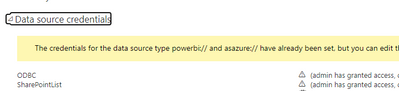
Just above where scheduled refresh is located, there's a section for credentials. Make sure you've logged in there.

vicky__0-1683239345466.png


Helpful resources

Announcements
Fabric Data Days is here Carousel

Fabric Data Days 2026

Don't miss out on Data Days, June 15 through August 7. Learn Fabric, Power BI, SQL, AI and more.

Power BI DataViz World Championships carousel

Power BI DataViz World Championships - June 2026

A new Power BI DataViz World Championship is coming this June! Don't miss out on submitting your entry.