Join us at FabCon Atlanta from March 16 - 20, 2026, for the ultimate Fabric, Power BI, AI and SQL community-led event. Save $200 with code FABCOMM.
Register now!The Power BI Data Visualization World Championships is back! Get ahead of the game and start preparing now! Learn more
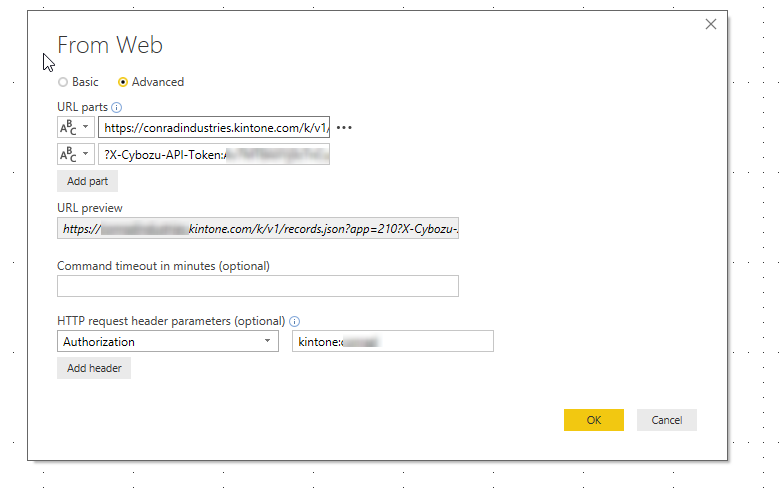
I am trying to setup a connection using the Web Connector.
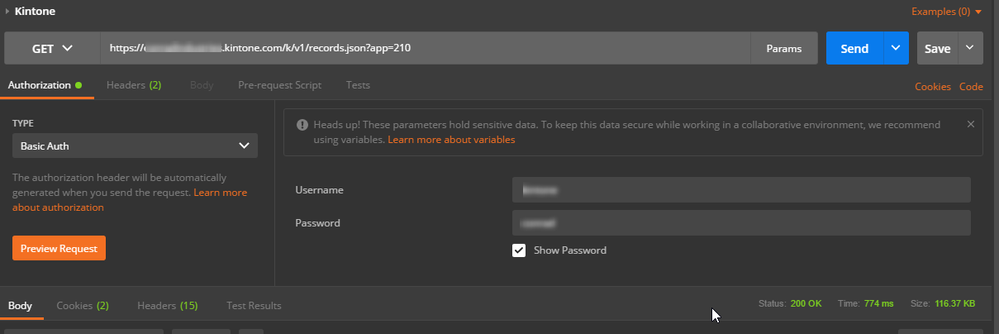
I have a successful attempt in Postman - but I'm struggling to format the request properly in Power BI. This isn't my normal forte - any help would be great!
~h
Hi @heathernicole,
You can have a look at below similar samples:
Pull data from a REST API Authentication
Get Data from Twitter API with Power Query
From the second image you provided, the value of basic authentication used for this API is the highlighted part. But looks different from the one you typed in URL Headers in desktop.
Best regards,
Yuliana Gu
Ok - so I've noticed something different when trying to connect.
Here's a better view with matching data so it makes more sense.
It switched my images - but I have my settings based on the requirements from Kintone docs for BASIC Authentication ( https://developer.kintone.io/hc/en-us/articles/212495188/#userauthentication )
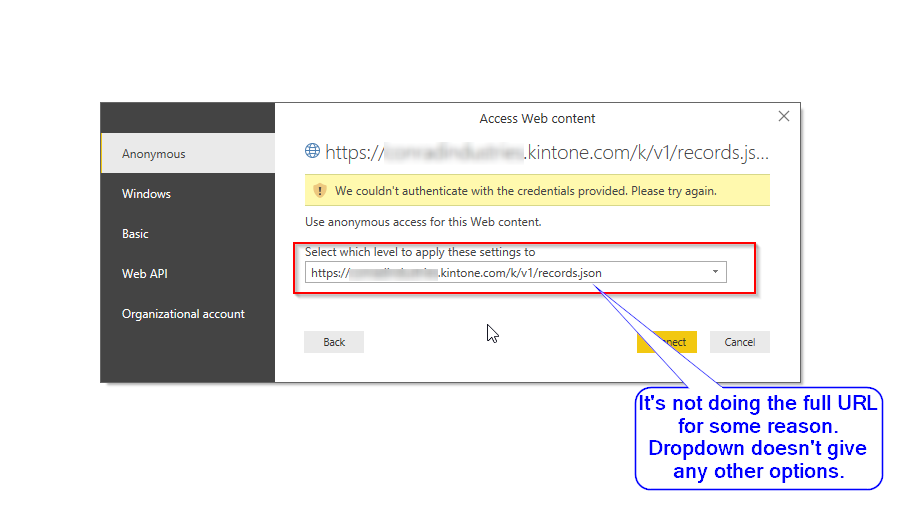
But when I go to select Anonymous - per another Power BI community post (https://community.powerbi.com/t5/Integrations-with-Files-and/Pull-data-from-a-REST-API-Authenticatio...
I get a credentials error. However I noticed in the dropdown - it doesn't specify the app id number anymore (210) and it doesn't give me the option. Hence why the credentials aren't working. The API token is specific to that app in Kintone.
Any ideas why it's altering the URL or something I'm missing?
Thanks in advance!
Altered URL after selecting Anonymous
Settings
It is - that one is created by Postman - I didn't put it there.
The Power BI Data Visualization World Championships is back! Get ahead of the game and start preparing now!
| User | Count |
|---|---|
| 39 | |
| 37 | |
| 33 | |
| 32 | |
| 29 |
| User | Count |
|---|---|
| 133 | |
| 88 | |
| 85 | |
| 68 | |
| 64 |