cancel
Showing results for 
Search instead for 
Did you mean: 

We've captured the moments from FabCon & SQLCon that everyone is talking about, and we are bringing them to the community, live and on-demand. Starts on April 14th. Register now

Reply
BWL
Helper II
Helper II

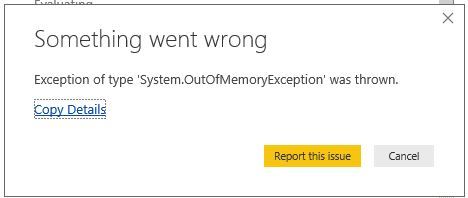
August update System.OutOfMemoryException

Dear all,


After the August update my reports give the error SystemOutOfMemoryException. 
But when I  refresh it seperatly everythings works fine.


Is this a bug that will be fixed with the next update, or is something in my model?


OutofException.JPG


3 REPLIES 3
Anonymous
Not applicable

Hi @BWL,


It seems like your report contains multiple query tables with correspondent records.


Can you please provide more detail informations to help use clarify your scenario? (E.g. have many records your report has? which 'bit' of power bi desktop you used? 32 or 64? system memory amount? operate steps...)


Regards,

Xiaoxin Sheng

Hi @Anonymous,


I use the 32 bit version, because the model is build on different MS 32 Acces databases (and Oracle DB.)

Further, 32 GB RAM and Windows Server 2008 R2 Standard. 

Model contains:

 - 13 reports.


and:


NameRowsColumnsOther
 Table 1 73014 
 Table 2 762 
 Table 3 314 
 Table 4 8916 
 Table 5 1.64126 
 Table 6 93 
 Table 7 62 
 Table 8 101.0196 
 Table 9 1.321.14725Append query; 
 Table 10 66.0839 
 Table 11 398.70739 Append query;  and 2 invoked custom functions


What would be the best solution? 


Kind regards,

BWL

Anonymous
Not applicable

Hi @BWL,


it seems like you are exceed to memory limit of 32 bit application, I'd like to suggest you to use power bi desktop 64 bit version to handling your report. 


In addition, if you have any advanced operations in query editor(reference query, custom function, combine, merge), you can refer to below link to use buffer function to reduce memory cost of calculation.

Loop Computation in Power Query 


Regards,
Xiaoxin Sheng

Helpful resources

Announcements
New to Fabric survey Carousel

New to Fabric Survey

If you have recently started exploring Fabric, we'd love to hear how it's going. Your feedback can help with product improvements.

Power BI DataViz World Championships carousel

Power BI DataViz World Championships - June 2026

A new Power BI DataViz World Championship is coming this June! Don't miss out on submitting your entry.

Join our Fabric User Panel

Join our Fabric User Panel

Share feedback directly with Fabric product managers, participate in targeted research studies and influence the Fabric roadmap.

March Power BI Update Carousel

Power BI Community Update - March 2026

Check out the March 2026 Power BI update to learn about new features.