cancel
Showing results for 
Search instead for 
Did you mean: 

The Power BI Data Visualization World Championships is back! Get ahead of the game and start preparing now! Learn more

Reply
GE
New Member

Aug 2022 Date Slicer (Between) Bad Change - Adds Date Picker object breaking 100's of reporfined

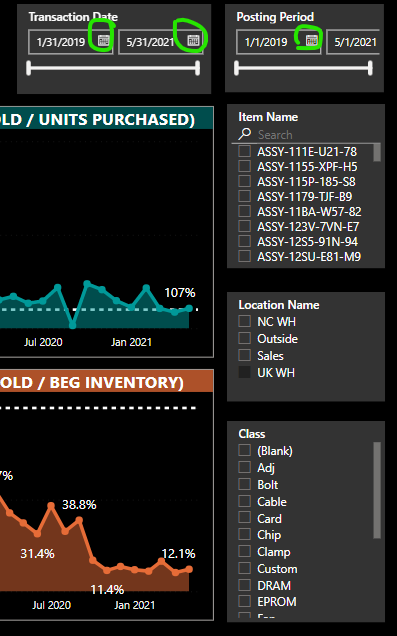
I just noticed this unwelcome change in the August 2022 release. The Date Slicer with Between mode now displays a Date Picker Object next to the Date characters. Previously you could simply click on the Date characters to invoke the Date Picker. By adding the explicit Date Picker object, this adds +20 pixels width for each date, a total of +40 pixels. The minimum width of a Date Slicer was always 180 pixels, now it's ballooned to 220 pixels. If I leave all my previously developed and deployed Date Slicers at 180, the rightmost date gets truncated along with the Date Picker and the right border. If I have to expand the width to 220, this means rearranging all the slicers on the right side of every page to keep them in alignment. Can we please revert back to the old way so I don't have to re-do every single page I've every developed and deployed? At the very least, make the visible Date Picker a toggle?Date Picker Problem in Date Slicer.png

2 REPLIES 2
GE
New Member

I hestitate to consider this as a "Solution" that should be "accepted". It's an obvious workaround, but not practical whatsoever, as hundreds of users cannot be asked, nor are they able, to downgrade their Power BI going back a year . Even if they could, this would break even more reports that have included newer features. So in one sense, the support person did their job, by correctly determining that my company and all its users are all hosed and MSFT isn't going to do anything about it.

Anonymous
Not applicable

Hi @GE ,

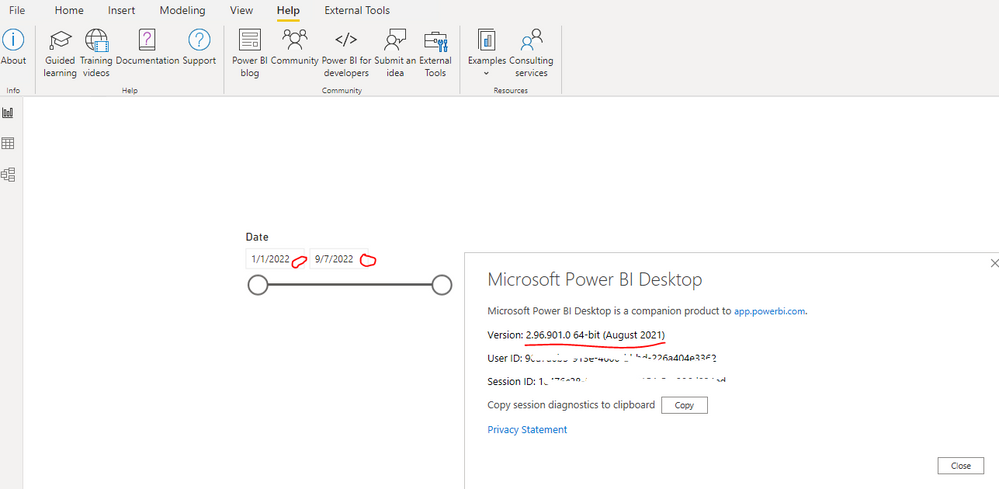
Base on my research, there is no option setting to toggle on/off the display of the Date Picker Object. And as far I know, Date Picker Object always display in recent Power BI Desktop version. Do you remember which version of Power BI Desktop the Date Picker Object not display in? If yes, you can revert back to the previous version..... You can refer the following links to uninstall the current version and install the older version...

Previous monthly updates to Power BI Desktop and the Power BI service

Power BI – 2021 previous versions


As I checked the previous versions of Power BI Desktop, the slicer with Between option not display the Date Picker Object in the version is 2.96.901.0 64-bit (August 2021). You may download this version and republish the report to Service....

yingyinr_0-1662539568546.png

Best Regards

Helpful resources

Announcements
Power BI DataViz World Championships

Power BI Dataviz World Championships

The Power BI Data Visualization World Championships is back! Get ahead of the game and start preparing now!

November Power BI Update Carousel

Power BI Monthly Update - November 2025

Check out the November 2025 Power BI update to learn about new features.

FabCon Atlanta 2026 carousel

FabCon Atlanta 2026

Join us at FabCon Atlanta, March 16-20, for the ultimate Fabric, Power BI, AI and SQL community-led event. Save $200 with code FABCOMM.