Join us at FabCon Atlanta from March 16 - 20, 2026, for the ultimate Fabric, Power BI, AI and SQL community-led event. Save $200 with code FABCOMM.
Register now!Get Fabric Certified for FREE during Fabric Data Days. Don't miss your chance! Request now
Hi!
I'm having some issues with something im trying to create.
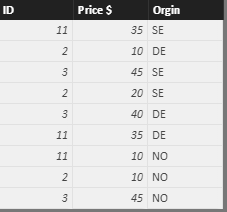
I need to identify the German (DE) ID's where the price doesn't match the Swedish (SE) price for the same ID. The Norweigan (NO) are irrelevant.
I've been sitting with alot of different dax formulas but I can't seem to find a solution.
Help would be greatly appreciated!
Solved! Go to Solution.
Hi @tex628,
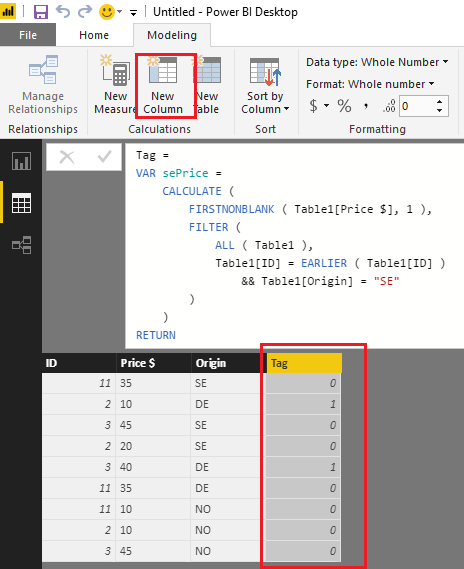
Based on my test, you should be able to use the formula below to create a calculate column in your table to identify the German (DE) ID's where the price doesn't match the Swedish (SE) price for the same ID .
Tag =
VAR sePrice =
CALCULATE (
FIRSTNONBLANK ( Table1[Price $], 1 ),
FILTER (
ALL ( Table1 ),
Table1[ID] = EARLIER ( Table1[ID] )
&& Table1[Origin] = "SE"
)
)
RETURN
IF ( Table1[Origin] = "DE" && Table1[Price $] <> sePrice, 1, 0 )
Then you can use the tag column as visual level filter or as Slicer to show the result on the report.
Here is the sample pbix file for your reference. ![]()
Regards
Hi @tex628,
Based on my test, you should be able to use the formula below to create a calculate column in your table to identify the German (DE) ID's where the price doesn't match the Swedish (SE) price for the same ID .
Tag =
VAR sePrice =
CALCULATE (
FIRSTNONBLANK ( Table1[Price $], 1 ),
FILTER (
ALL ( Table1 ),
Table1[ID] = EARLIER ( Table1[ID] )
&& Table1[Origin] = "SE"
)
)
RETURN
IF ( Table1[Origin] = "DE" && Table1[Price $] <> sePrice, 1, 0 )
Then you can use the tag column as visual level filter or as Slicer to show the result on the report.
Here is the sample pbix file for your reference. ![]()
Regards
You just want to identify these and not do any further visualization or calculation?
Try this,
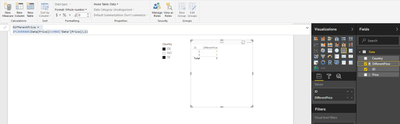
Create a slicer with Country (Orgin) and select SE AND DE
Create a table visual where you put ID on values and define a new measure that will identify the ID's like this:
DifferentPrice =
IF(AVERAGE(Data[Price])<>MAX('Data'[Price]);1)
All done!
Br,
Magnus
The price row will sometimes deal with mix of string and integer values so I cant get the datatype right and therefore im having issues using your solution. I trying different workarounds now.
Br, Johannes
I'm not sure this needs Power BI. Can't you just do this manually? it's a very small dataset
I'm not able to use the accual dataset here. The one im working with contains over 50 000 rows. Sorry that I have to use a stand-in!
Check out the November 2025 Power BI update to learn about new features.
Advance your Data & AI career with 50 days of live learning, contests, hands-on challenges, study groups & certifications and more!