Hi Guys,
I have four related tables:
- masterdata_ragwear: stores article information, one side
- article_states: stores one kind of status of articles, one-to-one relation to masterdata_ragwear
- article_filenames: stores sub-items of masterdata_ragwear, many side of the relationship, sub-items are unique
- filetree_ragwear: stores statuses of these sub-itmes, many side of article_filenames, can store multiple values for each status
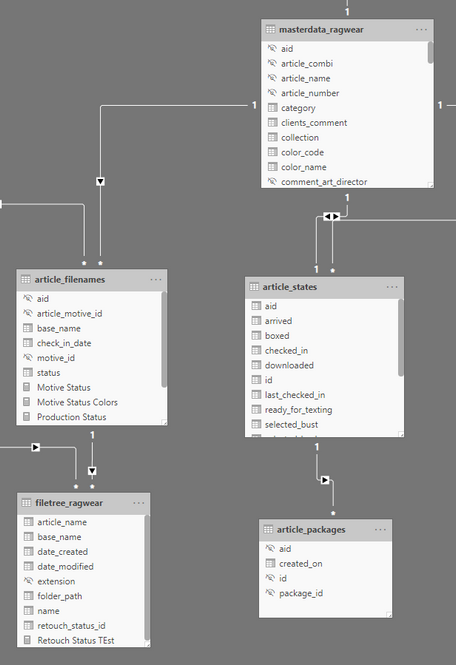
I'd like to be able to aggregate statuses of the items of masterdata_ragwear based on multiple criterias coming from the filetree_ragwear and article_states tables and return string values based on the evaluation. This is working until I'm referencing measure values but breaks when I try to assign a custom value to it.
Doesn't work if I'm assigning "Not checked in" to the measure:
Motive Status =
VAR selectedAid =
SELECTEDVALUE(masterdata_ragwear[aid])
VAR mStatus =
SWITCH(
    TRUE(),
        ISBLANK([Production Status]),
        "Not checked in",

        ISBLANK([Retouch Status]),
        [Production Status],

        [Retouch Status]
)
RETURN
CALCULATE(mStatus, selectedAid=article_filenames[aid])
Works, because (?) I'm assigning column values:
Production Status =
VAR CheckIns = VALUES(article_states[checked_in])
VAR StatusOut =
    IF(
        NOT ISBLANK(CheckIns),
        VALUES(article_filenames[status])
    )

RETURN
CALCULATE(StatusOut, KEEPFILTERS(CheckIns))
Here's some sample data from each table:
masterdata_ragwear
id, aid, order_number, type. reason. spice_comment, seasonarticle_number, article_name, collection, color_code, color_name, category, physical_sample, recolor_needed, priority, online_shop, gender, ean, quality, clients_comment, comment_logistics, comment_production, comment_art_director, comment_post_production, comment_finance, article_combi, folder, filename, needs_text, deadline, delivery_date, is_fake, fake_ean
| 428 | a000000016135 | 00000199 | normal | | | SS20 | 2011-50005 | HEAVEN A WHITE | X | 7000 | WHITE | Shorts | 1 | 0 | | | Woman | 4251731826148 | | | | | | | | 2011-50005-7000 | RAG_2011-50005_7000 | RAG_2011-50005_7000 | 0 | | | 0 | |
article_states
id, aid, sent, arrived, checked_in, shoot_bust, shoot_model, shoot_laydown, selected_bust, selected_model, selected_laydown, downloaded, ready_for_texting, boxed, sent_back, last_checked_in
| 16121 | a000000016139 | | | Thursday, January 23, 2020 | | | | | | | | 0 | | | |
| 16117 | a000000016135 | | | Thursday, January 23, 2020 | | | | | | | | 0 | | | |
| 16120 | a000000016138 | | | | | | | | | | | 0 | | | |
| 16119 | a000000016137 | | | | | | | | | | | 0 | | | |
| 16118 | a000000016136 | | | | | | | | | | | 0 | | | |
article_filesnames
aid, article_motive_id, motive_id, base_name, status
| a000000016135 | 203438 | 242 | RAG_2011-50005_7000_f | new |
| a000000016135 | 203433 | 247 | RAG_2011-50005_7000_b | new |
| a000000016135 | 203434 | 245 | RAG_2011-50005_7000_d | new |
| a000000016135 | 203435 | 244 | RAG_2011-50005_7000_e | new |
| a000000016135 | 203436 | 248 | RAG_2011-50005_7000_a | new |
| a000000016135 | 203437 | 246 | RAG_2011-50005_7000_c | new |
| a000000016135 | 204431 | 487 | RAG_2011-50005_7000_g | new |
filetree_ragwear
name, extension, date_modified, date_created, folder_path, base_name, article_name, retouch_status_id
| RAG_2011-50005_7000_g.jpg | .jpg | 1/24/2020 7:42:16 PM | 1/24/2020 7:42:16 PM | Q:\Ragwear\02_Model\010-Originals\_sent-to-retouch\20200124_01\RAG_2011-50005_7000\ | RAG_2011-50005_7000_g | RAG_2011-50005_7000 | 2 |
| RAG_2011-50005_7000_e.jpg | .jpg | 1/24/2020 7:42:16 PM | 1/24/2020 7:42:16 PM | Q:\Ragwear\02_Model\010-Originals\_sent-to-retouch\20200124_01\RAG_2011-50005_7000\ | RAG_2011-50005_7000_e | RAG_2011-50005_7000 | 2 |
| RAG_2011-50005_7000_d.jpg | .jpg | 1/24/2020 7:42:15 PM | 1/24/2020 7:42:15 PM | Q:\Ragwear\02_Model\010-Originals\_sent-to-retouch\20200124_01\RAG_2011-50005_7000\ | RAG_2011-50005_7000_d | RAG_2011-50005_7000 | 2 |
| RAG_2011-50005_7000_c.jpg | .jpg | 1/24/2020 7:42:16 PM | 1/24/2020 7:42:16 PM | Q:\Ragwear\02_Model\010-Originals\_sent-to-retouch\20200124_01\RAG_2011-50005_7000\ | RAG_2011-50005_7000_c | RAG_2011-50005_7000 | 2 |
| RAG_2011-50005_7000_b.jpg | .jpg | 1/24/2020 7:42:15 PM | 1/24/2020 7:42:15 PM | Q:\Ragwear\02_Model\010-Originals\_sent-to-retouch\20200124_01\RAG_2011-50005_7000\ | RAG_2011-50005_7000_b | RAG_2011-50005_7000 | 2 |
| RAG_2011-50005_7000_a.jpg | .jpg | 1/24/2020 7:42:16 PM | 1/24/2020 7:42:16 PM | Q:\Ragwear\02_Model\010-Originals\_sent-to-retouch\20200124_01\RAG_2011-50005_7000\ | RAG_2011-50005_7000_a | RAG_2011-50005_7000 | 2 |
Any help would be hugely appreciated!


