Join us at FabCon Atlanta from March 16 - 20, 2026, for the ultimate Fabric, Power BI, AI and SQL community-led event. Save $200 with code FABCOMM.
Register now!The Power BI Data Visualization World Championships is back! Get ahead of the game and start preparing now! Learn more
Hi,
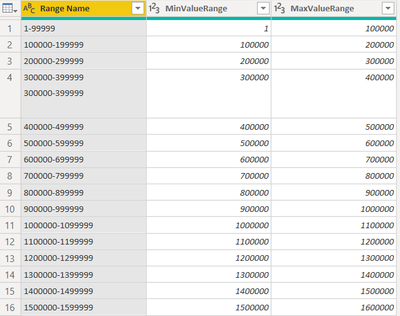
I have a table with sales value. i created another table with price ranges as shown below with price ranges
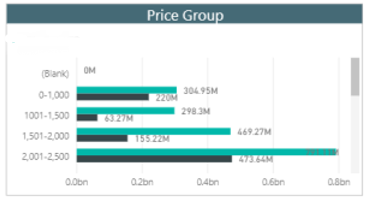
So i wanted to create a visulization with price ranges in one column and sales in other column in a way that sales is distributed according to price ranges. I want end result to be somthing like shown below:
Solved! Go to Solution.
Hi @Mkhubaib ,
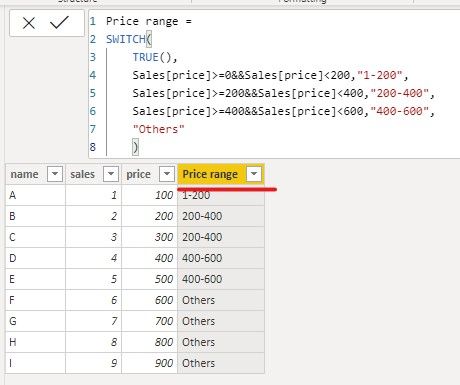
You can directly add the Price range column to the Sales table.
We create a sample and use SWITCH function to meet your requirement.
Price range =
SWITCH(
TRUE(),
Sales[price]>=0&&Sales[price]<200,"1-200",
Sales[price]>=200&&Sales[price]<400,"200-400",
Sales[price]>=400&&Sales[price]<600,"400-600",
"Others"
)
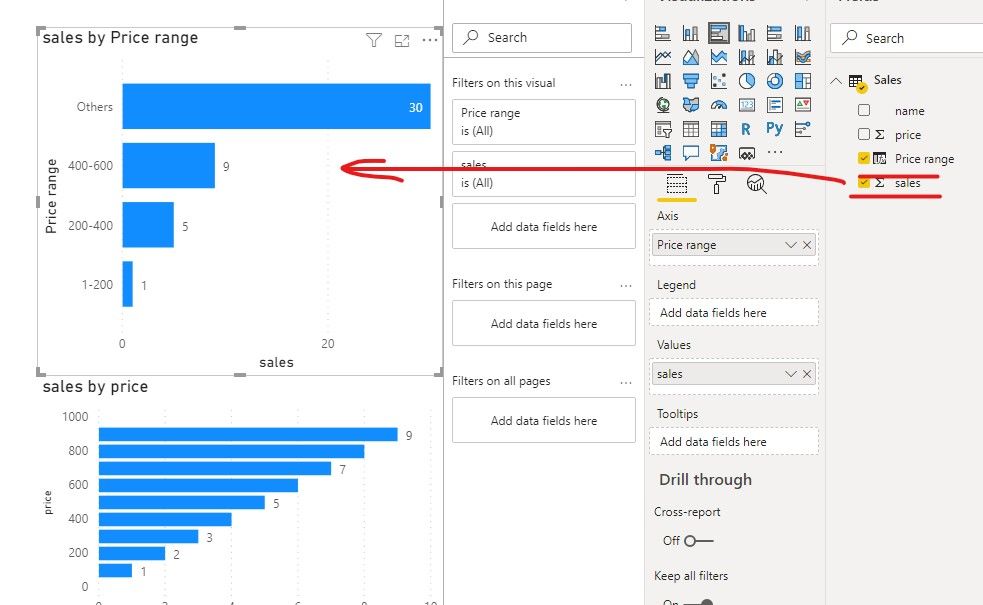
Then we can create a column chart using price range and sales amount.
If it doesn’t meet your requirement, could you please show the exact expected result based on some fake data?
Best regards,
Community Support Team _ zhenbw
If this post helps, then please consider Accept it as the solution to help the other members find it more quickly.
BTW, pbix as attached.
@Mkhubaib , these buckets not matching with the data you shared. Is it on different data
Refer, if these can help
https://www.daxpatterns.com/dynamic-segmentation/
https://www.daxpatterns.com/static-segmentation/
https://www.poweredsolutions.co/2020/01/11/dax-vs-power-query-static-segmentation-in-power-bi-dax-po...
https://radacad.com/grouping-and-binning-step-towards-better-data-visualization
Hi @Mkhubaib ,
You can directly add the Price range column to the Sales table.
We create a sample and use SWITCH function to meet your requirement.
Price range =
SWITCH(
TRUE(),
Sales[price]>=0&&Sales[price]<200,"1-200",
Sales[price]>=200&&Sales[price]<400,"200-400",
Sales[price]>=400&&Sales[price]<600,"400-600",
"Others"
)
Then we can create a column chart using price range and sales amount.
If it doesn’t meet your requirement, could you please show the exact expected result based on some fake data?
Best regards,
Community Support Team _ zhenbw
If this post helps, then please consider Accept it as the solution to help the other members find it more quickly.
BTW, pbix as attached.
Hi @Mkhubaib
Highly reccomend to use this technique https://docs.microsoft.com/en-us/power-bi/create-reports/desktop-grouping-and-binning
Check out the November 2025 Power BI update to learn about new features.
Advance your Data & AI career with 50 days of live learning, contests, hands-on challenges, study groups & certifications and more!
| User | Count |
|---|---|
| 58 | |
| 45 | |
| 42 | |
| 20 | |
| 18 |
| User | Count |
|---|---|
| 172 | |
| 110 | |
| 91 | |
| 55 | |
| 45 |