Don't miss your chance to take exam DP-600 or DP-700 on us!
Request nowLearn from the best! Meet the four finalists headed to the FINALS of the Power BI Dataviz World Championships! Register now
Hello
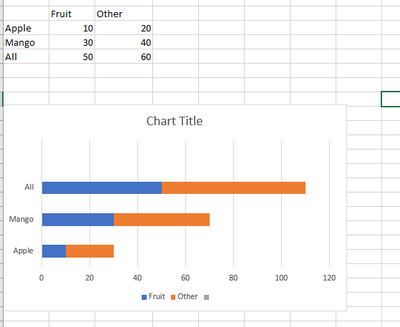
I'm using for stack bar chart - one measure with multiple variables and filter conditions.
how to match variable name to column name in chart.
Countx = count(product)
Chart Measure =
Var _Apple = calculate ([CountX], type ='Apples' and Product = "Fruit" and Date =today()
Var_Raisins = Calculate([CountX], type ='Raisins' and Product = "Other" and year(Date) =year(today())
Var_all = Calculate([CountX], year(Date) <=year(today())
-- i 'm doing of union all counts.
var _U1 = union(_Apple,_Raisins, All)
return
addcolumns( _u1 , "apples", _Apple) ...?
Solved! Go to Solution.
@refint650 , You can check if calculation group can help
Calculation Groups- Measure Slicer, Measure Header Grouping, Measure to dimension conversion. Complex Table display : https://youtu.be/qMNv67P8Go0
If this does not help
Can you share sample data and sample output in table format? Or a sample pbix after removing sensitive data.
@refint650 , You can check if calculation group can help
Calculation Groups- Measure Slicer, Measure Header Grouping, Measure to dimension conversion. Complex Table display : https://youtu.be/qMNv67P8Go0
If this does not help
Can you share sample data and sample output in table format? Or a sample pbix after removing sensitive data.
Share feedback directly with Fabric product managers, participate in targeted research studies and influence the Fabric roadmap.
Check out the February 2026 Power BI update to learn about new features.
| User | Count |
|---|---|
| 49 | |
| 40 | |
| 37 | |
| 14 | |
| 13 |
| User | Count |
|---|---|
| 85 | |
| 69 | |
| 37 | |
| 28 | |
| 27 |