Join us at FabCon Atlanta from March 16 - 20, 2026, for the ultimate Fabric, Power BI, AI and SQL community-led event. Save $200 with code FABCOMM.
Register now!The Power BI Data Visualization World Championships is back! Get ahead of the game and start preparing now! Learn more
Hi Team,
I have a sharepoint list which has 12 differnt columns for the reqpective months (eg : Jan, Feb,..., Dec)
The data comes from a powerapp.
I want to show these 12 columns in my Power BI report so that data for particular month can be shown, I have used unpivot columns method here so that 1 record became 12 entries.
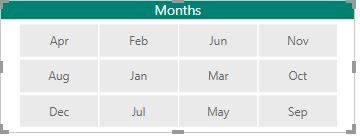
And I am able to show the 12 months in filter as shown in attached pic,
But these are not in sequence, they are either in ascending/ descending order.
Is there any way in which i can arrange these months in the sequence within the Power BI report.
Thanks
Solved! Go to Solution.
Hi @abd3127,
I'd like to suggest you create a sort table with 'month' and 'sort order' columns(remember to setting 'sort by column' property), then create relationship with original table and use related month column to create visuals.
Regards,
Xiaoxin Sheng
Hi @abd3127,
I'd like to suggest you create a sort table with 'month' and 'sort order' columns(remember to setting 'sort by column' property), then create relationship with original table and use related month column to create visuals.
Regards,
Xiaoxin Sheng
Check out the November 2025 Power BI update to learn about new features.
Advance your Data & AI career with 50 days of live learning, contests, hands-on challenges, study groups & certifications and more!
| User | Count |
|---|---|
| 56 | |
| 42 | |
| 41 | |
| 20 | |
| 19 |