cancel
Showing results for 
Search instead for 
Did you mean: 

The Power BI Data Visualization World Championships is back! Get ahead of the game and start preparing now! Learn more

Reply
Anonymous
Not applicable

Arima forecasting model

Hello,


I have visited the following url: 


https://community.powerbi.com/t5/R-Script-Showcase/ARIMA-forecasting/td-p/124237/highlight/false


where we can find a project named forecast_ARIMA_ShowCase.pbix

and the script that goes with the project 


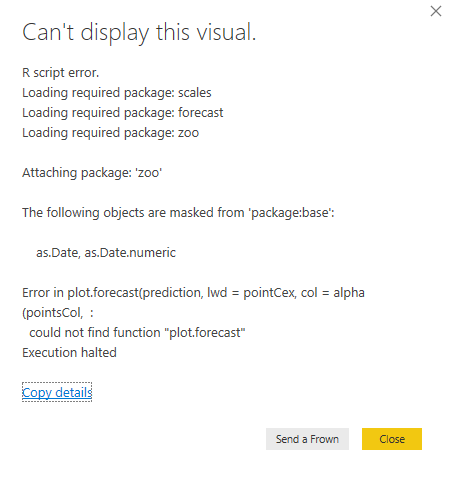
I have open the project and I the following error (see the attached image capture)

I have try to install the packages scales, forecast and zoo but I am still getting the same error.


does someone know how to solve that issue?

Regards,

Capture20191127A.PNG

1 ACCEPTED SOLUTION
mwegener
Most Valuable Professional

Hi @Anonymous ,


change line 558-559 to this.


plot(forecast(prediction, lwd=pointCex, col=alpha(pointsCol,transparency), fcol=alpha(forecastCol,transparency), flwd = pointCex, shaded=fillConfidenceLevels,
main = "", sub = pbiInfo, col.sub = infoTextColor, cex.sub = cexSub, xlab = labTime, ylab = labValue, xaxt = "n"))
 
 
If I answered your question, please mark my post as solution, this will also help others.
Please give Kudos for support.
Did I answer your question?
Please mark my post as solution, this will also help others.
Please give Kudos for support.

Marcus Wegener works as Full Stack Power BI Engineer at BI or DIE.
His mission is clear: "Get the most out of data, with Power BI."
twitter - LinkedIn - YouTube - website - podcast - Power BI Tutorials


View solution in original post

4 REPLIES 4
mwegener
Most Valuable Professional

Hi @Anonymous ,


change line 558-559 to this.


plot(forecast(prediction, lwd=pointCex, col=alpha(pointsCol,transparency), fcol=alpha(forecastCol,transparency), flwd = pointCex, shaded=fillConfidenceLevels,
main = "", sub = pbiInfo, col.sub = infoTextColor, cex.sub = cexSub, xlab = labTime, ylab = labValue, xaxt = "n"))
 
 
If I answered your question, please mark my post as solution, this will also help others.
Please give Kudos for support.
Did I answer your question?
Please mark my post as solution, this will also help others.
Please give Kudos for support.

Marcus Wegener works as Full Stack Power BI Engineer at BI or DIE.
His mission is clear: "Get the most out of data, with Power BI."
twitter - LinkedIn - YouTube - website - podcast - Power BI Tutorials


Hi, my file only has 45 lines, can you please share with me the fixed file?

mwegener
Most Valuable Professional

Hi @nicolasrarevalo ,


forecastArima.png


try the attached file.


Did I answer your question?
Please mark my post as solution, this will also help others.
Please give Kudos for support.

Marcus Wegener works as Full Stack Power BI Engineer at BI or DIE.
His mission is clear: "Get the most out of data, with Power BI."
twitter - LinkedIn - YouTube - website - podcast - Power BI Tutorials


Anonymous
Not applicable

Hello


I have made the proposed changes at line 558-559 and now it works.

As I am a beginer in R, it will remain me to understand the script.


Thank you very much.


Helpful resources

Announcements
Power BI DataViz World Championships

Power BI Dataviz World Championships

The Power BI Data Visualization World Championships is back! Get ahead of the game and start preparing now!

December 2025 Power BI Update Carousel

Power BI Monthly Update - December 2025

Check out the December 2025 Power BI Holiday Recap!

FabCon Atlanta 2026 carousel

FabCon Atlanta 2026

Join us at FabCon Atlanta, March 16-20, for the ultimate Fabric, Power BI, AI and SQL community-led event. Save $200 with code FABCOMM.