Join us at FabCon Atlanta from March 16 - 20, 2026, for the ultimate Fabric, Power BI, AI and SQL community-led event. Save $200 with code FABCOMM.
Register now!The Power BI Data Visualization World Championships is back! Get ahead of the game and start preparing now! Learn more
HI All,
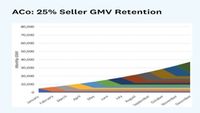
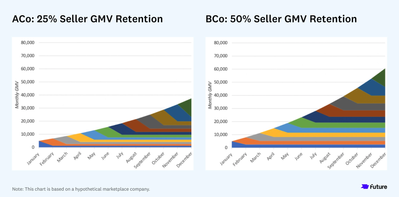
How i create below chart chart by using single Masure without using conditional format.
plz suggest any other chart
I got this solution from sream chart in custom visual but i am unable show month on month transaction.
Hi @Chiyanmurali ,
Check if the X-axis is on categorical or continuous, this should be on categorical to give you the full values in the axis.
Regards
Miguel Félix
Proud to be a Super User!
Check out my blog: Power BI em PortuguêsHi @MFelix ,
I have tried but nothing happen.
I am looking for below chart format, but I can’t find similar model using single measure expect this Stream Graph.
Kindly let me know if there is any other default option to bring this visual.
Can you please share a mockup data or sample of your PBIX file. You can use a onedrive, google drive, we transfer or similar link to upload your files.
If the information is sensitive please share it trough private message.
Regards
Miguel Félix
Proud to be a Super User!
Check out my blog: Power BI em PortuguêsThe Power BI Data Visualization World Championships is back! Get ahead of the game and start preparing now!
| User | Count |
|---|---|
| 39 | |
| 38 | |
| 38 | |
| 28 | |
| 27 |
| User | Count |
|---|---|
| 124 | |
| 88 | |
| 73 | |
| 66 | |
| 65 |