cancel
Showing results for 
Search instead for 
Did you mean: 

Data Days is here! Join us now for 60+ days of learning, challenges, and connection. Learn more

Reply
vanessa
Post Patron
Post Patron

Area Chart

Hi,


I want to create an area chart which has month (
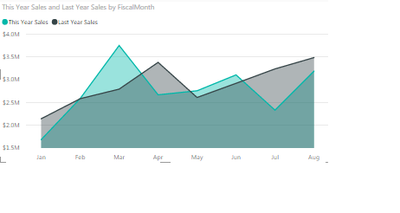
this comes from a date column from which only the month is being pulled into the chart) on X axis and total sales on Y axis. The graph will have 2 areas: 1 for current year and 2nd for previous year. 

Something like this:

AreaGraph.png

6 REPLIES 6
ankitpatira
Community Champion
Community Champion

@vanessa so what is your question here ?

@ankitpatira

So can I achieve this?

The image i uploaded is of the Retail Analysis Sample dashboard.

I have just 1 column for date. And I want to display 2 areas: 1 for current year and 1 for the previous year.

Is it possible ?


@vanessa You certainly can do that. Go to query editor in power bi desktop, select your date column right click and duplicate. Then select duplicated column, under Transform tab select Date dropdown, Year and Year which will extract out year out of date. Then simply use extracted year column under Legend section of Area chart along with Category and Axis values.

@ankitpatira

I want the current year to be selected dynamically using YEAR(today()) and comparing it to the year from the date field. the aprroach you mentioned will be like a static selection. won't it?

@vanessa in that case create conditional column via query editor as where year value in year column is equal to 2016 then current year else previous year and use that conditional column in legend area. unfortunately that will also be somewhat static as you would have to update that condition column each year but currently you can't use measure (like you proposed) under Legend area of Area chart.

@ankitpatira

Is there any way i can use a dynamic filter for the graph under visual filter ?

I want to display the area graph for year greater than equal to previous year. Is it possible? or can we only use a static filter in powerbi by hardcoding the value?

Helpful resources

Announcements
Fabric Data Days is here Carousel

Fabric Data Days 2026

Don't miss out on Data Days, June 15 through August 7. Learn Fabric, Power BI, SQL, AI and more.

May Power BI Update Carousel

Power BI Monthly Update - May 2026

Check out the May 2026 Power BI update to learn about new features.

Power BI DataViz World Championships carousel

Power BI DataViz World Championships - June 2026

A new Power BI DataViz World Championship is coming this June! Don't miss out on submitting your entry.