Get certified for free when you join Fabric Data Days 2026 and dive into Fabric, Power BI, SQL, AI, and other essential data skills.
Join nowJuly 7 - July 17 | Round 2 of the Power BI Dataviz World Championships. Don't miss your chance! Learn more
Hi guys,
I posted this before but until now I got no solution for my problem with ArcGIS in Power BI..
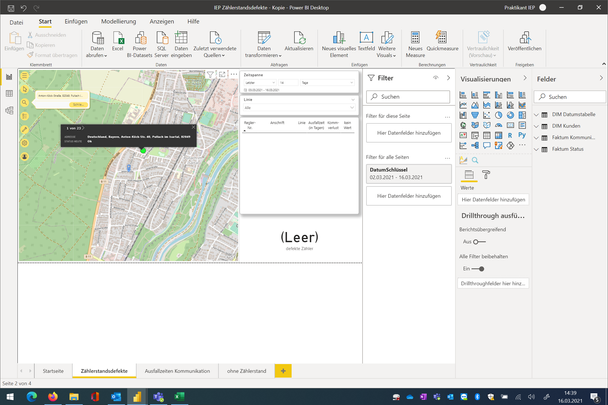
So I have to map all our customers (all are in the same postal code zone) - there are many different streets (and street numbers) within this postal code but five of them aren´t displayed correctly in ArcGIS, I filtered one of them in Power Query and made a screenshot for a better understanding. As you can see in the screenshot: when I´m looking for the street with the magnifying glass icon, ArcGIS can locate the street. When the exact same street is in my address column ArcGIS isn´t able to display it right. Also we have abou 20 customers in the street and all are being displayed in this same wrong spot.
Please can somebody help me out as I´m working on this for long time now..
Thanks to everybody in advance and cheers.
@IEPMost
Please check if there is any province, state, street names that confusing the mapping. This is often happens for different countries.
Paul Zheng _ Community Support Team
If this post helps, please Accept it as the solution to help the other members find it more quickly.
Hi @Anonymous
I already checked everything.. all my addresses are in the same country. Any further tips?
Cheers
Join us in Barcelona for FabCon and SQLCon, the Fabric, Power BI, SQL, and AI community event. Save €200 with code FABCMTY200.
Join Data Days 2026: 60 days of free live/on-demand sessions, challenges, study groups, and certification opportunities.
| User | Count |
|---|---|
| 30 | |
| 28 | |
| 26 | |
| 23 | |
| 17 |
| User | Count |
|---|---|
| 57 | |
| 41 | |
| 31 | |
| 24 | |
| 20 |