FabCon is coming to Atlanta
Join us at FabCon Atlanta from March 16 - 20, 2026, for the ultimate Fabric, Power BI, AI and SQL community-led event. Save $200 with code FABCOMM.
Register now!- Power BI forums
- Get Help with Power BI
- Desktop
- Service
- Report Server
- Power Query
- Mobile Apps
- Developer
- DAX Commands and Tips
- Custom Visuals Development Discussion
- Health and Life Sciences
- Power BI Spanish forums
- Translated Spanish Desktop
- Training and Consulting
- Instructor Led Training
- Dashboard in a Day for Women, by Women
- Galleries
- Data Stories Gallery
- Themes Gallery
- Contests Gallery
- QuickViz Gallery
- Quick Measures Gallery
- Visual Calculations Gallery
- Notebook Gallery
- Translytical Task Flow Gallery
- TMDL Gallery
- R Script Showcase
- Webinars and Video Gallery
- Ideas
- Custom Visuals Ideas (read-only)
- Issues
- Issues
- Events
- Upcoming Events
The Power BI Data Visualization World Championships is back! Get ahead of the game and start preparing now! Learn more
- Power BI forums
- Forums
- Get Help with Power BI
- Desktop
- Apply a color based on year (differentiate each y...
- Subscribe to RSS Feed
- Mark Topic as New
- Mark Topic as Read
- Float this Topic for Current User
- Bookmark
- Subscribe
- Printer Friendly Page

- Mark as New
- Bookmark
- Subscribe
- Mute
- Subscribe to RSS Feed
- Permalink
- Report Inappropriate Content
Apply a color based on year (differentiate each year with different color)
Hi,
I have created a matix visual and I want to color each year to differenciate with other years

Solved! Go to Solution.

- Mark as New
- Bookmark
- Subscribe
- Mute
- Subscribe to RSS Feed
- Permalink
- Report Inappropriate Content
There @haider378
You can try using the conditional formatting function to add background colors to the value fields.
My sample table:
If the table is next, you may need to use unpivot to transform the table.
Select Product Group and Range Column, and then select Other Columns.
Then you can get a new table like the first one.
Create an array visual by this table, rotate the Row subtotals.
Then use conditional formmating:
1. Format by rule
Color measurement:
Rule Color =
Var _Range = MAX('Table'[Range])
Return
SWITCH(TRUE(),_Range="2017-18",1,_Range="2018-19",2,_Range="2019-20",3,4)
Result:
2.Format by field value
Color measurement:
Field Value Color =
Var _Range = MAX('Table'[Range])
Return
SWITCH(TRUE(),_Range="2017-18","Red",_Range="2018-19","Green",_Range="2019-20","Blue","Yellow")
For more information, see this blog: Conditonal Format in Power BI
You can download the pbix file from this link: File
Best regards
Rico Zhou
If this post helps,then consider Accepting it as the solution to help other members find it faster.
- Mark as New
- Bookmark
- Subscribe
- Mute
- Subscribe to RSS Feed
- Permalink
- Report Inappropriate Content
thank you so much for your detailed answar😊 appriciated
- Mark as New
- Bookmark
- Subscribe
- Mute
- Subscribe to RSS Feed
- Permalink
- Report Inappropriate Content
Hi @haider378
I am so glad to solve your problem. Could you kindly accept the helpful reply as a solution? More people will benefit from it.
Best Regards,
Rico Zhou
- Mark as New
- Bookmark
- Subscribe
- Mute
- Subscribe to RSS Feed
- Permalink
- Report Inappropriate Content
There @haider378
You can try using the conditional formatting function to add background colors to the value fields.
My sample table:
If the table is next, you may need to use unpivot to transform the table.
Select Product Group and Range Column, and then select Other Columns.
Then you can get a new table like the first one.
Create an array visual by this table, rotate the Row subtotals.
Then use conditional formmating:
1. Format by rule
Color measurement:
Rule Color =
Var _Range = MAX('Table'[Range])
Return
SWITCH(TRUE(),_Range="2017-18",1,_Range="2018-19",2,_Range="2019-20",3,4)
Result:
2.Format by field value
Color measurement:
Field Value Color =
Var _Range = MAX('Table'[Range])
Return
SWITCH(TRUE(),_Range="2017-18","Red",_Range="2018-19","Green",_Range="2019-20","Blue","Yellow")
For more information, see this blog: Conditonal Format in Power BI
You can download the pbix file from this link: File
Best regards
Rico Zhou
If this post helps,then consider Accepting it as the solution to help other members find it faster.

- Mark as New
- Bookmark
- Subscribe
- Mute
- Subscribe to RSS Feed
- Permalink
- Report Inappropriate Content
Hi @Anonymous
No doubt your solution works, but is there any way to apply the same background to row headers as well?
In your case, can the bg color be applied to 2017-18,2018-19?


- Mark as New
- Bookmark
- Subscribe
- Mute
- Subscribe to RSS Feed
- Permalink
- Report Inappropriate Content
HI @Anonymous
I was wondering if its possible to change the color for the "ROWS". I mean in your example should be: "ProductPage".
I have this:
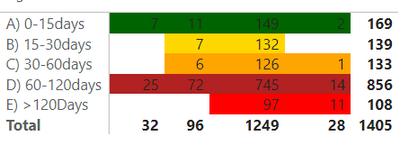
and i want to change the color of the rows (I mean the text in the first column, A) 0-15Days.... etc.
Im using matrix chart, if i use table chat, will work, but i need use matrix.


- Mark as New
- Bookmark
- Subscribe
- Mute
- Subscribe to RSS Feed
- Permalink
- Report Inappropriate Content
Hi @haider378
Do you want to change the color of the background behind the years in the Product Group column? if soI'm afraid you can't in a matrix. You can however change the colour of the values in the rows for example (this is a mock up)
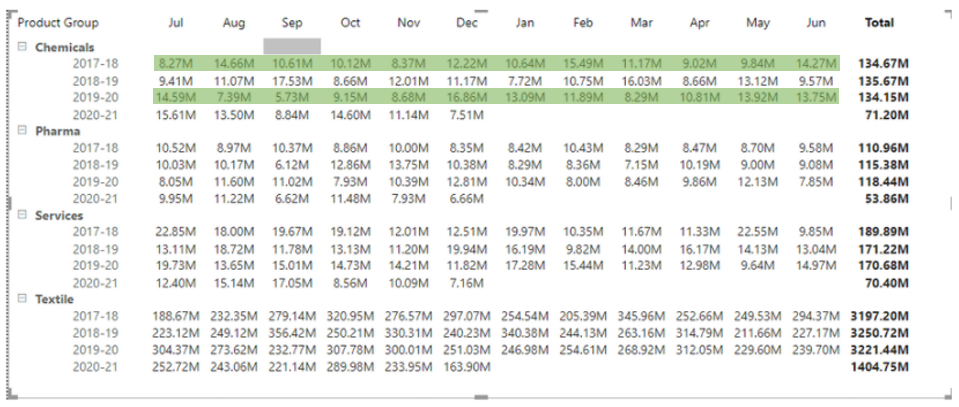
is that what you are after?
regards
Phil
Did I answer your question? Then please mark my post as the solution.
If I helped you, click on the Thumbs Up to give Kudos.
Blog :: YouTube Channel :: Connect on Linkedin
Proud to be a Super User!
Helpful resources

Power BI Dataviz World Championships
The Power BI Data Visualization World Championships is back! Get ahead of the game and start preparing now!

Power BI Monthly Update - November 2025
Check out the November 2025 Power BI update to learn about new features.

FabCon Atlanta 2026
Join us at FabCon Atlanta, March 16-20, for the ultimate Fabric, Power BI, AI and SQL community-led event. Save $200 with code FABCOMM.

| User | Count |
|---|---|
| 59 | |
| 46 | |
| 42 | |
| 23 | |
| 18 |


| User | Count |
|---|---|
| 193 | |
| 124 | |
| 101 | |
| 67 | |
| 49 |


