cancel
Showing results for 
Search instead for 
Did you mean: 

Learn from the best! Meet the four finalists headed to the FINALS of the Power BI Dataviz World Championships! Register now

Reply
Josh_BI_UK
Helper II
Helper II

Append vs Merge using Power Query

Original question posted by @actzikas within a wrong thread. This post aims to answer actzikas question:


"Could you bring into two tables as a source? 
= Table.SelectColumns(Table 1, {"OwnerId", "Type", "CreatedDate", "Creator_Role__c"})
and somehow have another Table.SelectColumns for Table 2" link to original post 


1 ACCEPTED SOLUTION
Josh_BI_UK
Helper II
Helper II

Hi @actzikas ,


I hope I'm interpreting your question, right? From the looks of it you wish to Join or Combine two tables into one query?


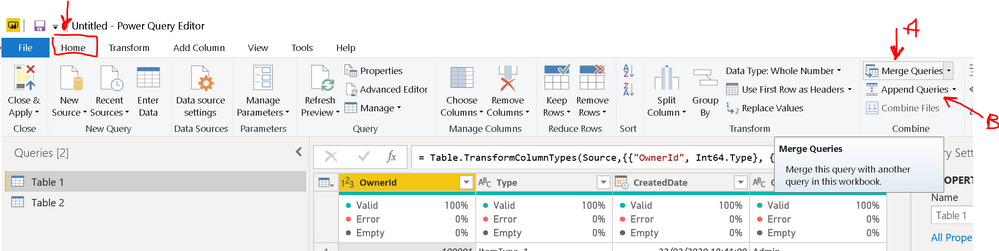
As you haven't stated what columns [Table 2] contains or what your output table might look like - I’ll signpost you to a great video by @reza_rad (links below) where he explains the difference between the two types of combining query options available in Power BI; A: "Merge", and B:"Append".


Power_BI_Help_Merge_option.PNG


If I may also suggest using the functions already accessible on the Home menu. It is much easier than writing your own "M" script (however, it can be done via the "Table.NestedJoin" function for merge or for append “Table.Combine”.)


Links to more info

Reza Rad Blog on:

Append vs. Merge in Power BI and Power Query: https://radacad.com/append-vs-merge-in-power-bi-and-power-query


Reza YouTube Video:

Append vs Merge in Power BI and Power Query: https://www.youtube.com/watch?v=qXH4WjCykLc


Microsoft Docs - Power Query functions reference:

Append (Table.Combine): https://docs.microsoft.com/en-us/powerquery-m/table-combine
Merge (Table.Join): https://docs.microsoft.com/en-us/powerquery-m/table-join

View solution in original post

1 REPLY 1
Josh_BI_UK
Helper II
Helper II

Hi @actzikas ,


I hope I'm interpreting your question, right? From the looks of it you wish to Join or Combine two tables into one query?


As you haven't stated what columns [Table 2] contains or what your output table might look like - I’ll signpost you to a great video by @reza_rad (links below) where he explains the difference between the two types of combining query options available in Power BI; A: "Merge", and B:"Append".


Power_BI_Help_Merge_option.PNG


If I may also suggest using the functions already accessible on the Home menu. It is much easier than writing your own "M" script (however, it can be done via the "Table.NestedJoin" function for merge or for append “Table.Combine”.)


Links to more info

Reza Rad Blog on:

Append vs. Merge in Power BI and Power Query: https://radacad.com/append-vs-merge-in-power-bi-and-power-query


Reza YouTube Video:

Append vs Merge in Power BI and Power Query: https://www.youtube.com/watch?v=qXH4WjCykLc


Microsoft Docs - Power Query functions reference:

Append (Table.Combine): https://docs.microsoft.com/en-us/powerquery-m/table-combine
Merge (Table.Join): https://docs.microsoft.com/en-us/powerquery-m/table-join

Helpful resources

Announcements
Power BI DataViz World Championships carousel

Power BI DataViz World Championships - June 2026

A new Power BI DataViz World Championship is coming this June! Don't miss out on submitting your entry.

Join our Fabric User Panel

Join our Fabric User Panel

Share feedback directly with Fabric product managers, participate in targeted research studies and influence the Fabric roadmap.

March Power BI Update Carousel

Power BI Community Update - March 2026

Check out the March 2026 Power BI update to learn about new features.