cancel
Showing results for 
Search instead for 
Did you mean: 

The Power BI Data Visualization World Championships is back! Get ahead of the game and start preparing now! Learn more

Reply
jmhoskinson
Helper I
Helper I

Append in DAX

I want to create a table appending the ID and Type columns of two separate data sources. I want to include all records of each ID, not just distinct ones. I'm trying to avoid Power Query since the dataset is extremely large. I've read through forums and am not seeing anything that fits my exact situation. 

1 ACCEPTED SOLUTION
AlB
Community Champion
Community Champion

@jmhoskinson 

That should be a JOIN operation rather than an append, either on SQL or DAX. Check this out:

https://www.sqlbi.com/articles/from-sql-to-dax-joining-tables/


Please always show your sample data in text-tabular format in addition to (or instead of) the screen captures. That allows people trying to help to readily copy the data and run a quick test, plus it increases the likelihood of your question being answered. Just use 'Copy table' in Power BI and paste it here.

View solution in original post

6 REPLIES 6
jamesfgriffiths
Frequent Visitor

You could use a combination of UNION and SELECTCOLUMNS creating a calculated table which I did to solve a similar situation.

'calculated table name' = UNION(
SELECTCOLUMNS('Table 1',"ID", [Id],"Type",[Type],"Activity Date",[Activity Date],"Team",[Team],"Product",null),
SELECTCOLUMNS('Table 2',"ID", [Id],"Type",[Type],"Activity Date",[Activity Date],"Team",null,"Product",[Product])
)
Hope this helps
jmhoskinson
Helper I
Helper I

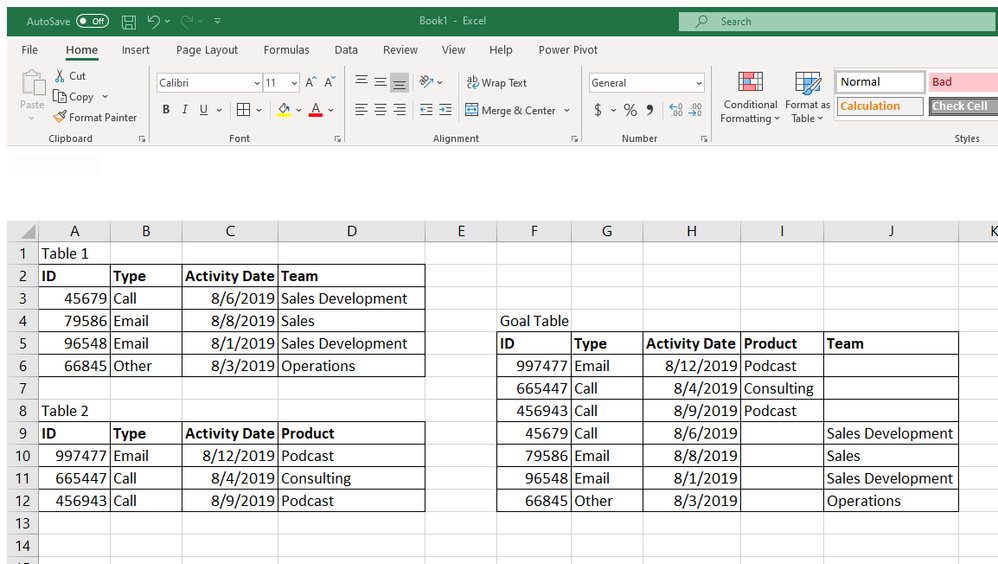
Hope this helps @AlB Basically, I'm looking to append like you can do in Power Query.

Example.png

Anonymous
Not applicable

Hi @jmhoskinson ,

I'm having a similar requirement now.
Could you share how you acheived this?


Thanks in advance!

AlB
Community Champion
Community Champion

@jmhoskinson 

That should be a JOIN operation rather than an append, either on SQL or DAX. Check this out:

https://www.sqlbi.com/articles/from-sql-to-dax-joining-tables/


Please always show your sample data in text-tabular format in addition to (or instead of) the screen captures. That allows people trying to help to readily copy the data and run a quick test, plus it increases the likelihood of your question being answered. Just use 'Copy table' in Power BI and paste it here.

AlB
Community Champion
Community Champion

Hi @jmhoskinson 

Try UNION(Table1, Table2). See this for details

Sorry, forgot to mention that the tables don't have the same number of columns and the tables don't have a relationship.

Helpful resources

Announcements
Power BI DataViz World Championships

Power BI Dataviz World Championships

The Power BI Data Visualization World Championships is back! Get ahead of the game and start preparing now!

December 2025 Power BI Update Carousel

Power BI Monthly Update - December 2025

Check out the December 2025 Power BI Holiday Recap!

FabCon Atlanta 2026 carousel

FabCon Atlanta 2026

Join us at FabCon Atlanta, March 16-20, for the ultimate Fabric, Power BI, AI and SQL community-led event. Save $200 with code FABCOMM.