Join the FabCon + SQLCon recap series. Up next: Power BI, Real-Time Intelligence, IQ and AI, and Data Factory take center stage. All sessions are available on-demand after the live show. Register now
I have few columns of same table
Table A
ColumnX1 ColumnX2 ColumnX3 ColumnY1 ColumnY2 ColumnY3
A B C D E F
I wanted them as :
ColumnX A B C
ColumnY D E F
I can not create a sperate table and append it because there are so many columns and i cant create too many tables.
Solved! Go to Solution.
@Anonymous,
To achieve your requirement, you may follow steps below:
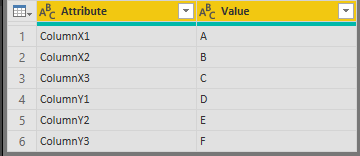
Firstly, click ColumnX1, ColumnX2, ColumnX3, ColumnY1, ColumnY2, ColumnY3-> click Transform-> Unpivot Columns.
Then click Split Column by number of Characters.
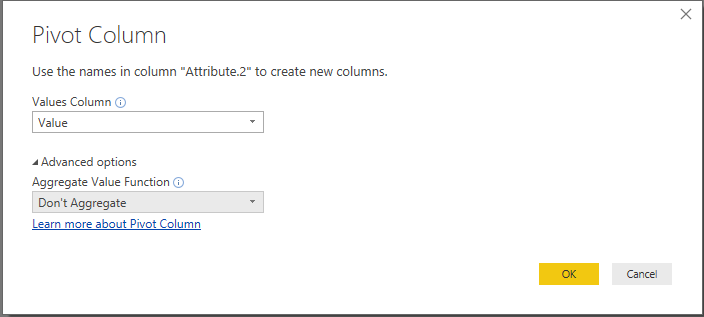
Finally click Attribute.2 then click Pivot Column:
The result is like below:
Community Support Team _ Jimmy Tao
If this post helps, then please consider Accept it as the solution to help the other members find it more quickly.
@Anonymous,
To achieve your requirement, you may follow steps below:
Firstly, click ColumnX1, ColumnX2, ColumnX3, ColumnY1, ColumnY2, ColumnY3-> click Transform-> Unpivot Columns.
Then click Split Column by number of Characters.
Finally click Attribute.2 then click Pivot Column:
The result is like below:
Community Support Team _ Jimmy Tao
If this post helps, then please consider Accept it as the solution to help the other members find it more quickly.
@Anonymous
Please see if this helps
You can see the Steps from Query Editor in attached file
let
Source = Excel.CurrentWorkbook(){[Name="Table1"]}[Content],
#"Changed Type" = Table.TransformColumnTypes(Source,{{"ColumnX1 ", type text}, {"ColumnX2 ", type text}, {"ColumnX3 ", type text}, {"ColumnY1", type text}, {"ColumnY2", type text}, {"ColumnY3", type text}}),
#"Demoted Headers" = Table.DemoteHeaders(#"Changed Type"),
#"Changed Type1" = Table.TransformColumnTypes(#"Demoted Headers",{{"Column1", type text}, {"Column2", type text}, {"Column3", type text}, {"Column4", type text}, {"Column5", type text}, {"Column6", type text}}),
#"Transposed Table" = Table.Transpose(#"Changed Type1"),
#"Extracted First Characters" = Table.TransformColumns(#"Transposed Table", {{"Column1", each Text.Start(_, 7), type text}}),
#"Grouped Rows" = Table.Group(#"Extracted First Characters", {"Column1"}, {{"all", each _[Column2], type list}}),
#"Extracted Values" = Table.TransformColumns(#"Grouped Rows", {"all", each Text.Combine(List.Transform(_, Text.From), ","), type text}),
#"Split Column by Delimiter" = Table.SplitColumn(#"Extracted Values", "all", Splitter.SplitTextByDelimiter(",", QuoteStyle.Csv), {"all.1", "all.2", "all.3"}),
#"Changed Type2" = Table.TransformColumnTypes(#"Split Column by Delimiter",{{"all.1", type text}, {"all.2", type text}, {"all.3", type text}})
in
#"Changed Type2"
Check out the April 2026 Power BI update to learn about new features.
If you have recently started exploring Fabric, we'd love to hear how it's going. Your feedback can help with product improvements.
A new Power BI DataViz World Championship is coming this June! Don't miss out on submitting your entry.
| User | Count |
|---|---|
| 39 | |
| 37 | |
| 31 | |
| 22 | |
| 14 |
| User | Count |
|---|---|
| 67 | |
| 58 | |
| 30 | |
| 27 | |
| 25 |