Get Fabric or SQL Certified for Free.
Get certified for free when you join Fabric Data Days 2026 and dive into Fabric, Power BI, SQL, AI, and other essential data skills.
Join now- Power BI forums
- Get Help with Power BI
- Desktop
- Service
- Report Server
- Power Query
- Mobile Apps
- Developer
- DAX Commands and Tips
- Custom Visuals Development Discussion
- Health and Life Sciences
- Power BI Spanish forums
- Translated Spanish Desktop
- Training and Consulting
- Instructor Led Training
- Dashboard in a Day for Women, by Women
- Galleries
- Data Stories Gallery
- Themes Gallery
- Contests Gallery
- QuickViz Gallery
- Quick Measures Gallery
- Visual Calculations Gallery
- Fabric Apps Gallery
- Notebook Gallery
- Translytical Task Flow Gallery
- TMDL Gallery
- R Script Showcase
- Webinars and Video Gallery
- Ideas
- Custom Visuals Ideas (read-only)
- Issues
- Issues
- Events
- Upcoming Events
July 7 - July 17 | Round 2 of the Power BI Dataviz World Championships. Don't miss your chance! Learn more
- Power BI forums
- Forums
- Get Help with Power BI
- Desktop
- Re: Annotation using a FactEvent Table? Is this Po...
- Subscribe to RSS Feed
- Mark Topic as New
- Mark Topic as Read
- Float this Topic for Current User
- Bookmark
- Subscribe
- Printer Friendly Page


- Mark as New
- Bookmark
- Subscribe
- Mute
- Subscribe to RSS Feed
- Permalink
- Report Inappropriate Content
Annotation using a FactEvent Table? Is this Possible?
Hi All,
I am looking to annotate a line graph - I have been able to do this using the EVENT & NOTE Dax as detailed in a number of posts, however this doesn't quite give me the functionality that I need.
EVENT = IF(LEN([NOTE]),[TOTAL METRIC],BLANK())
Note = SWITCH(
max(DimDate[Date]),
VALUE("01/01/2017"),"PUT TEXT HERE",
BLANK()
)
The NOTE is hardcoded to text events.
Am I able to use a FactEvent table to link to the data and make the notes dynamic and appear in the graph on the specific date? This is much easier to maintain plus we have a lot of events!
Any help much appreciated.
Thanks
Annie
Solved! Go to Solution.


- Mark as New
- Bookmark
- Subscribe
- Mute
- Subscribe to RSS Feed
- Permalink
- Report Inappropriate Content
Hi Annie,
If you have an Event table, you can establish relationship with the DimDate. Then add it to the Tooltip. Please check out the demo here.
The measures could be:
Note =
SWITCH (
    MIN ( 'DimDate'[Date] ),
    MIN ( 'DimDate'[Date] ), MIN ( 'Event'[Event] ),
    BLANK ()
)
Event = IF ( LEN ( [Note] ) > 0, SUM ( FactEvent[Value] ), BLANK () )
Best Regards,
Dale
If this post helps, then please consider Accept it as the solution to help the other members find it more quickly.
- Mark as New
- Bookmark
- Subscribe
- Mute
- Subscribe to RSS Feed
- Permalink
- Report Inappropriate Content
Hi @AJP,
Could you please provide more details? Please share a dummy sample. I can't see any connection between EVENT and Note. Do you want to put them as tips in a visual?
Best Regards,
Dale
If this post helps, then please consider Accept it as the solution to help the other members find it more quickly.
- Mark as New
- Bookmark
- Subscribe
- Mute
- Subscribe to RSS Feed
- Permalink
- Report Inappropriate Content
Hi Dale,
Thank you for replying. I have tried to add a screenshot but I can't do it - Sorry!
The note looks at the date table and line graph and then pulls back any associated text for that date.
So in my line graph on the 1st Jan 2017 there is a note along side the value in the hover-over tool tip that states EVENT 1. You can change the line marker to highlight that an event took place on that date.
(I followed this - https://community.powerbi.com/t5/Webinars-and-Video-Gallery/Annotating-Specific-Events-in-Line-Chart...)
Note = SWITCH(
max(DimDate[Date]),
VALUE("01/01/2017"),"EVENT 1",
BLANK()
)
The Event basicially sees if there is a note (LEN bigger than 0) and brings back the note text which sits in the tool tip.
My issue is I want to record a number of events so using the note DAX i would have to do the following all hard coded
Note = SWITCH(
max(DimDate[Date]),
VALUE("01/01/2017"),"",
VALUE("02/01/2017"),"EVENT 2",
VALUE("03/01/2017"),"EVENT 3",
VALUE("04/01/2017"),"EVENT 4",
VALUE("05/01/2017"),"EVENT 5",
BLANK()
)
Do you know if it is possible to replace the VALUE("01/01/2017"),"EVENT 1", with an event table like below
Date Event
01/01/2017 EVENT 1
02/01/2017 EVENT 2
03/01/2017 EVENT 3
04/01/2017 EVENT 4
05/01/2017 EVENT 5
So essentially a reference table rather than hard coded text?
I am not very good at explaining things technically, but i hope this makes it a little clearer
Thanks
Annie
- Mark as New
- Bookmark
- Subscribe
- Mute
- Subscribe to RSS Feed
- Permalink
- Report Inappropriate Content
Hi Annie,
If you have an Event table, you can establish relationship with the DimDate. Then add it to the Tooltip. Please check out the demo here.
The measures could be:
Note =
SWITCH (
    MIN ( 'DimDate'[Date] ),
    MIN ( 'DimDate'[Date] ), MIN ( 'Event'[Event] ),
    BLANK ()
)
Event = IF ( LEN ( [Note] ) > 0, SUM ( FactEvent[Value] ), BLANK () )
Best Regards,
Dale
If this post helps, then please consider Accept it as the solution to help the other members find it more quickly.


- Mark as New
- Bookmark
- Subscribe
- Mute
- Subscribe to RSS Feed
- Permalink
- Report Inappropriate Content
Hello,
Would you be able to upload the sample file again please.
This is a really useful topic, but sadly the file has been removed.
Thanks
- Mark as New
- Bookmark
- Subscribe
- Mute
- Subscribe to RSS Feed
- Permalink
- Report Inappropriate Content
Dale,
I have a matrix visual on my page, that I am using to filter my line chart. If I click on an item name, the line chart shows filters to the revenue for that item only. I want the chart to also filter to only show the event and note for that item as well. How would you adjust the Note or Event measures to work for this? 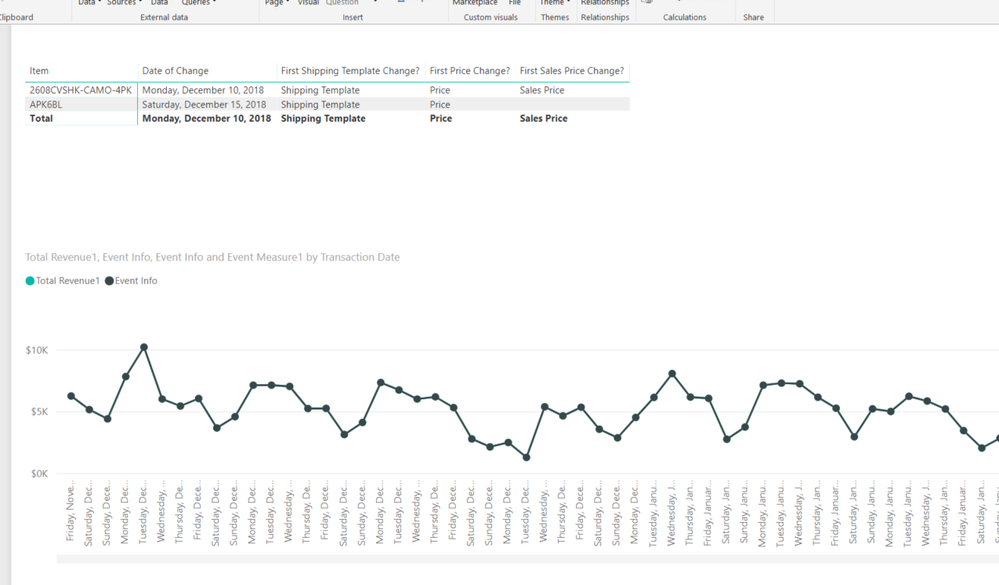
- Mark as New
- Bookmark
- Subscribe
- Mute
- Subscribe to RSS Feed
- Permalink
- Report Inappropriate Content
Did you solve this problem?
- Mark as New
- Bookmark
- Subscribe
- Mute
- Subscribe to RSS Feed
- Permalink
- Report Inappropriate Content
Hi @Anonymous,
I would suggest you create a new post in this forum.
Best Regards,
If this post helps, then please consider Accept it as the solution to help the other members find it more quickly.
- Mark as New
- Bookmark
- Subscribe
- Mute
- Subscribe to RSS Feed
- Permalink
- Report Inappropriate Content
Dale - that works perfectly! Thank you! 🙂
- Mark as New
- Bookmark
- Subscribe
- Mute
- Subscribe to RSS Feed
- Permalink
- Report Inappropriate Content
Hi All,
I am looking to annotate a line graph - I have been able to do this using the EVENT & NOTE Dax as detailed in a number of posts, however this doesn't quite give me the functionality that I need.
EVENT = IF(LEN([NOTE]),[TOTAL METRIC],BLANK())
Note = SWITCH(
max(DimDate[Date]),
VALUE("01/01/2017"),"PUT TEXT HERE",
BLANK()
)
The NOTE is hardcoded to text events.
Am I able to use a FactEvent table to link to the data and make the notes dynamic and appear in the graph on the specific date? This is much easier to maintain plus we have a lot of events!
Any help much appreciated.
Thanks
Annie

Helpful resources

FabCon & SQLCon – Barcelona 2026
Join us in Barcelona for FabCon and SQLCon, the Fabric, Power BI, SQL, and AI community event. Save €200 with code FABCMTY200.

Fabric Community Sticker Challenge - Barcelona 2026
If you love stickers, then you will definitely want to check out our community sticker challenge, Barcelona edition!

Power BI Monthly Update - July 2026
Check out the July 2026 Power BI update to learn about new features.

Power BI DataViz World Championships - June 2026
A new Power BI DataViz World Championship is coming this June! Don't miss out on submitting your entry.

| User | Count |
|---|---|
| 29 | |
| 23 | |
| 23 | |
| 23 | |
| 14 |


| User | Count |
|---|---|
| 48 | |
| 33 | |
| 20 | |
| 18 | |
| 16 |


