cancel
Showing results for 
Search instead for 
Did you mean: 

July 7 - July 17 | Round 2 of the Power BI Dataviz World Championships. Don't miss your chance! Learn more

Reply
TTKellogg
New Member

Analyze Data based on Multiple Criteria

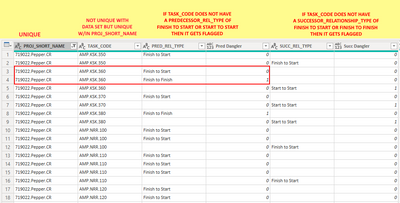
Hi.  I really need some help!  I have a list with multiple projects in it (Proj_Short_Name).  Within each project there are task_code.  The task_code are unique within a project but are reused across multiple projects.  I need to be able to flag Task_Codes that are missing a specific Predecessor_Relationship_Type or a specific Successor_Relationship_Type.  So within a Project_Short_Name I need to be able to look at the Task_Code and if the task code does not have aPredecessor_Relationship_Type that is a Finish to Start relationship or a Start to Start relationship then it is flagged.  I am not sure if I should somehow make a list where is the project short name and task code are the same, then combine the Predecessor Relationship Types into one list then I can flag it that way? In the sample below, the Task Code AMP.KSK.360 should not be flagged because it does have an existing Finish to Start relationship.  I am just not sure how to check for multiple rows and if its the same project and the same activity then check all of its relationships before flagging.


TTKellogg_1-1626804763012.png


1 ACCEPTED SOLUTION

Hi @Taffalaffa ,


Use the following two measures:


Pred Dangler = 
VAR A = { "Finish to Start", "Start to Start" }
VAR B =
    CALCULATETABLE (
        VALUES ( 'Starting Data'[PRED_REL_TYPE]),
        FILTER (
           ALL( 'Starting Data'),
            'Starting Data'[PROJ_SHORT_NAME] = EARLIER( 'Starting Data'[PROJ_SHORT_NAME] )
                && 'Starting Data'[TASK_CODE] = EARLIER ( 'Starting Data'[TASK_CODE] )
        )
    )
RETURN
    IF ( COUNTROWS ( EXCEPT ( A, B ) ) > 0, 0, 1 )


Succ Dangler = 
VAR A = { "Finish to Start", "Finish to Finish" }
VAR B =
    CALCULATETABLE (
        VALUES ( 'Starting Data'[PRED_REL_TYPE] ),
        FILTER (
            ALL('Starting Data'),
            'Starting Data'[PROJ_SHORT_NAME] = EARLIER ( 'Starting Data'[PROJ_SHORT_NAME] )
                && 'Starting Data'[TASK_CODE] = EARLIER ( 'Starting Data'[Task_Code] )
        )
    )
RETURN
    IF ( COUNTROWS ( EXCEPT ( A, B ) ) > 0, 0, 1 )


If this post helps, then please consider Accept it as the solution to help the other members find it more quickly.


Best Regards,

Dedmon Dai

View solution in original post

4 REPLIES 4
v-deddai1-msft
Community Support
Community Support

Hi @TTKellogg ,


You can use the following two calculated column:


Pred Dangler =
VAR A = { "Finish to Start", "Start to Start" }
VAR B =
    CALCULATETABLE (
        VALUES ( Table[PRED_REL_TYPE] ),
        FILTER (
            Table,
            Table[PROJ_SHORT_NAME] = MAX ( Table[PROJ_SHORT_NAME] )
                && Table[TASK_CODE] = MAX ( Table[TASK_CODE] )
        )
    )
RETURN
    IF ( COUNTROWS ( EXCEPT ( A, B ) ) > 0, 0, 1 )


Succ Dangler =
VAR A = { "Finish to Start", "Finish to Finish" }
VAR B =
    CALCULATETABLE (
        VALUES ( Table[SUCC_REL_TYPE] ),
        FILTER (
            Table,
            Table[PROJ_SHORT_NAME] = MAX ( Table[PROJ_SHORT_NAME] )
                && Table[TASK_CODE] = MAX ( Table[TASK_CODE] )
        )
    )
RETURN
    IF ( COUNTROWS ( EXCEPT ( A, B ) ) > 0, 0, 1 )


If this post helps, then please consider Accept it as the solution to help the other members find it more quickly.


Best Regards,

Dedmon Dai


Hi Dedmon,

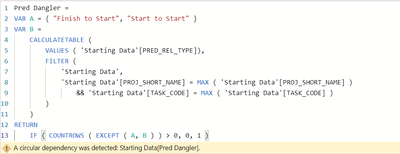
Thank you for the reply.  I think that this is super close but I get an error with your code.  It is saying there is a cirrcular dependency but I am not sure why...

Danglers.pbix 


Taffalaffa_0-1627343404059.png

Taffalaffa_1-1627343514026.png


Hi @Taffalaffa ,


Use the following two measures:


Pred Dangler = 
VAR A = { "Finish to Start", "Start to Start" }
VAR B =
    CALCULATETABLE (
        VALUES ( 'Starting Data'[PRED_REL_TYPE]),
        FILTER (
           ALL( 'Starting Data'),
            'Starting Data'[PROJ_SHORT_NAME] = EARLIER( 'Starting Data'[PROJ_SHORT_NAME] )
                && 'Starting Data'[TASK_CODE] = EARLIER ( 'Starting Data'[TASK_CODE] )
        )
    )
RETURN
    IF ( COUNTROWS ( EXCEPT ( A, B ) ) > 0, 0, 1 )


Succ Dangler = 
VAR A = { "Finish to Start", "Finish to Finish" }
VAR B =
    CALCULATETABLE (
        VALUES ( 'Starting Data'[PRED_REL_TYPE] ),
        FILTER (
            ALL('Starting Data'),
            'Starting Data'[PROJ_SHORT_NAME] = EARLIER ( 'Starting Data'[PROJ_SHORT_NAME] )
                && 'Starting Data'[TASK_CODE] = EARLIER ( 'Starting Data'[Task_Code] )
        )
    )
RETURN
    IF ( COUNTROWS ( EXCEPT ( A, B ) ) > 0, 0, 1 )


If this post helps, then please consider Accept it as the solution to help the other members find it more quickly.


Best Regards,

Dedmon Dai

This is fantastic! Thank you so much for your help!

Helpful resources

Announcements
FabCon and SQLCon Barcelona 2026

FabCon & SQLCon – Barcelona 2026

Join us in Barcelona for FabCon and SQLCon, the Fabric, Power BI, SQL, and AI community event. Save €200 with code FABCMTY200.

July Power BI Update Carousel

Power BI Monthly Update - July 2026

Check out the July 2026 Power BI update to learn about new features.

60 days of Data Days Carousel

Data Days 2026

Join Data Days 2026: 60 days of free live/on-demand sessions, challenges, study groups, and certification opportunities.

Power BI DataViz World Championships carousel

Power BI DataViz World Championships - June 2026

A new Power BI DataViz World Championship is coming this June! Don't miss out on submitting your entry.

Top Solution Authors