Don't miss your chance to take the Fabric Data Engineer (DP-600) exam for FREE! Find out how by attending the DP-600 session on April 23rd (pacific time), live or on-demand.
Learn moreJoin the FabCon + SQLCon recap series. Up next: Power BI, Real-Time Intelligence, IQ and AI, and Data Factory take center stage. All sessions are available on-demand after the live show. Register now
Hello,
I'm relatively new to Power BI and am struggling with an analysis scenario and wondering if anyone has a suggestion on how to handle it.
I've detailed my calculation steps below which are based on sample data. The real data has thousands of records for each year.
Any suggestions on how to handle this would be appreciated.
Many thanks
Geoff
Solved! Go to Solution.
Hi @GCC
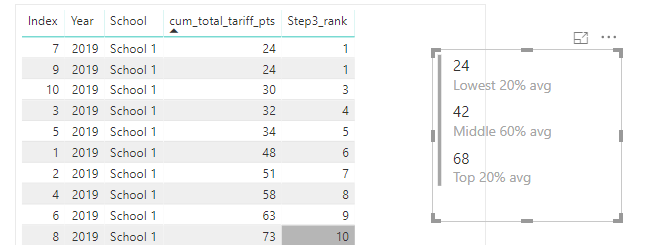
You may try below measures.
Step1 = COUNTROWS(FILTER(ALLSELECTED('Table'),'Table'[Year]=MAX('Table'[Year])&&'Table'[School]=MAX('Table'[School])))
Step3_rank = RANKX(FILTER(ALLSELECTED('Table'),'Table'[Year]=MAX('Table'[Year])&&'Table'[School]=MAX('Table'[School])),CALCULATE(SUM('Table'[cum_total_tariff_pts])),,ASC,Skip)
Lowest 20% avg = CALCULATE(AVERAGE('Table'[cum_total_tariff_pts]),FILTER(ALLSELECTED('Table'),'Table'[Year]=MAX('Table'[Year])&&'Table'[School]=MAX('Table'[School])&&[Step3_rank]<=[Step1]*0.2))
Middle 60% avg = CALCULATE(AVERAGE('Table'[cum_total_tariff_pts]),FILTER(ALLSELECTED('Table'),'Table'[Year]=MAX('Table'[Year])&&'Table'[School]=MAX('Table'[School])&&[Step3_rank]<=[Step1]*0.2+[Step1]*0.6&&[Step3_rank]>[Step1]*0.2))
Top 20% avg = CALCULATE(AVERAGE('Table'[cum_total_tariff_pts]),FILTER(ALLSELECTED('Table'),'Table'[Year]=MAX('Table'[Year])&&'Table'[School]=MAX('Table'[School])&&[Step3_rank]>[Step1]*0.2+[Step1]*0.6))
Regards,
Hi @GCC
You may try to create measures as below:
Step1 = COUNTROWS(ALLEXCEPT('Table','Table'[Year]))
Step3_rank = RANKX(ALL('Table'),CALCULATE(SUM('Table'[cum_total_tariff_pts])),,ASC,Skip)
Lowest 20% avg = CALCULATE(AVERAGE('Table'[cum_total_tariff_pts]),FILTER(ALLEXCEPT('Table','Table'[Year]),[Step3_rank]<=[Step1]*0.2))
Middle 60% avg = CALCULATE(AVERAGE('Table'[cum_total_tariff_pts]),FILTER(ALLEXCEPT('Table','Table'[Year]),[Step3_rank]<=[Step1]*0.2+[Step1]*0.6&&[Step3_rank]>[Step1]*0.2))
Top 20% avg = CALCULATE(AVERAGE('Table'[cum_total_tariff_pts]),FILTER(ALLEXCEPT('Table','Table'[Year]),[Step3_rank]>[Step1]*0.2+[Step1]*0.6))
Regards,
Hi Cherie,
Thank you very much for creating this code for me and it works just perfect as long as you're working with just one year. I have data for numerous years and numerous schools within these years. I need to be able to calulate the lowest 20% average, mid 60% average and top 20% average for each school within each year. Could you help me with creating this code? I've tried using your code with slicers but it didn't work.
Thanks once again for your help.
Regards
Geoff
Hi @GCC
You may try below measures.
Step1 = COUNTROWS(FILTER(ALLSELECTED('Table'),'Table'[Year]=MAX('Table'[Year])&&'Table'[School]=MAX('Table'[School])))
Step3_rank = RANKX(FILTER(ALLSELECTED('Table'),'Table'[Year]=MAX('Table'[Year])&&'Table'[School]=MAX('Table'[School])),CALCULATE(SUM('Table'[cum_total_tariff_pts])),,ASC,Skip)
Lowest 20% avg = CALCULATE(AVERAGE('Table'[cum_total_tariff_pts]),FILTER(ALLSELECTED('Table'),'Table'[Year]=MAX('Table'[Year])&&'Table'[School]=MAX('Table'[School])&&[Step3_rank]<=[Step1]*0.2))
Middle 60% avg = CALCULATE(AVERAGE('Table'[cum_total_tariff_pts]),FILTER(ALLSELECTED('Table'),'Table'[Year]=MAX('Table'[Year])&&'Table'[School]=MAX('Table'[School])&&[Step3_rank]<=[Step1]*0.2+[Step1]*0.6&&[Step3_rank]>[Step1]*0.2))
Top 20% avg = CALCULATE(AVERAGE('Table'[cum_total_tariff_pts]),FILTER(ALLSELECTED('Table'),'Table'[Year]=MAX('Table'[Year])&&'Table'[School]=MAX('Table'[School])&&[Step3_rank]>[Step1]*0.2+[Step1]*0.6))
Regards,
Hi Cherie,
This works fantastically well, thank you very much for your help.
Regards
Geoff
Check out the April 2026 Power BI update to learn about new features.
If you have recently started exploring Fabric, we'd love to hear how it's going. Your feedback can help with product improvements.
A new Power BI DataViz World Championship is coming this June! Don't miss out on submitting your entry.
| User | Count |
|---|---|
| 48 | |
| 46 | |
| 41 | |
| 20 | |
| 17 |
| User | Count |
|---|---|
| 69 | |
| 67 | |
| 32 | |
| 27 | |
| 26 |