

cancel
Showing results for 
Search instead for 
Did you mean: 

The Power BI Data Visualization World Championships is back! Get ahead of the game and start preparing now! Learn more

Reply
mcsolrac
New Member

Analyse Time based log file

Hi there, I have a log file that is generated as a time-event based log with an example below,

original_log.png

I would like to load this log file (csv format) into Power Bi and perform some analysis. For example, I would like to get the time taken between each action for each batch. 


As I understand in order to do it, I need to re-shape my data into something like the one below. I tried different ways of shaping the data in query editor but without much success. 


Any help on this is much appreciated. 


Thanks


to_be.png

1 ACCEPTED SOLUTION
Eric_Zhang
Microsoft Employee
Microsoft Employee

@mcsolrac


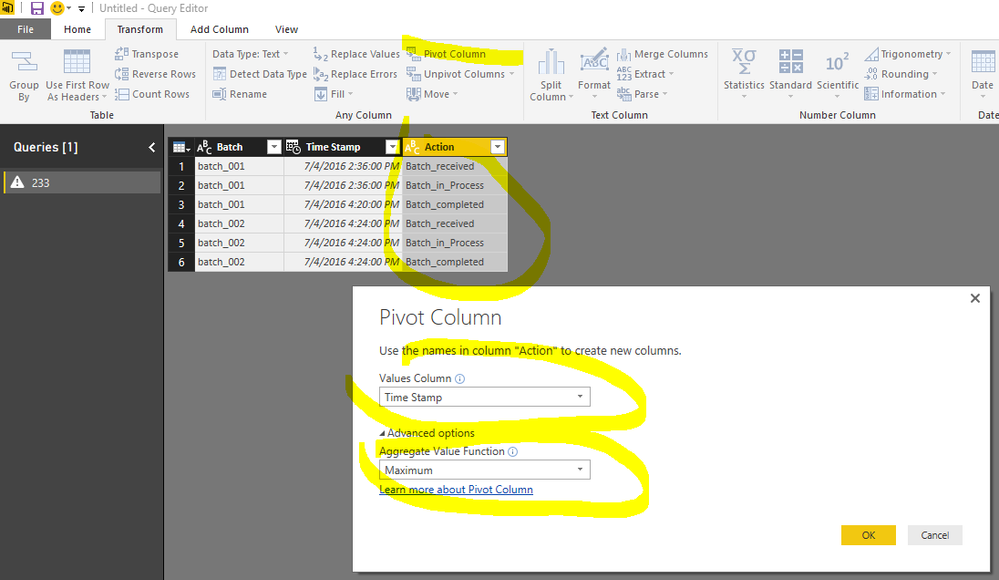
Go to the "edit queries" window and pivot.


Capture.PNG


Capture.PNG

View solution in original post

1 REPLY 1
Eric_Zhang
Microsoft Employee
Microsoft Employee

@mcsolrac


Go to the "edit queries" window and pivot.


Capture.PNG


Capture.PNG

Helpful resources

Announcements
Power BI DataViz World Championships

Power BI Dataviz World Championships

The Power BI Data Visualization World Championships is back! Get ahead of the game and start preparing now!

November Power BI Update Carousel

Power BI Monthly Update - November 2025

Check out the November 2025 Power BI update to learn about new features.

FabCon Atlanta 2026 carousel

FabCon Atlanta 2026

Join us at FabCon Atlanta, March 16-20, for the ultimate Fabric, Power BI, AI and SQL community-led event. Save $200 with code FABCOMM.