FabCon is coming to Atlanta
Join us at FabCon Atlanta from March 16 - 20, 2026, for the ultimate Fabric, Power BI, AI and SQL community-led event. Save $200 with code FABCOMM.
Register now!- Power BI forums
- Get Help with Power BI
- Desktop
- Service
- Report Server
- Power Query
- Mobile Apps
- Developer
- DAX Commands and Tips
- Custom Visuals Development Discussion
- Health and Life Sciences
- Power BI Spanish forums
- Translated Spanish Desktop
- Training and Consulting
- Instructor Led Training
- Dashboard in a Day for Women, by Women
- Galleries
- Data Stories Gallery
- Themes Gallery
- Contests Gallery
- QuickViz Gallery
- Quick Measures Gallery
- Visual Calculations Gallery
- Notebook Gallery
- Translytical Task Flow Gallery
- TMDL Gallery
- R Script Showcase
- Webinars and Video Gallery
- Ideas
- Custom Visuals Ideas (read-only)
- Issues
- Issues
- Events
- Upcoming Events
The Power BI Data Visualization World Championships is back! Get ahead of the game and start preparing now! Learn more
- Power BI forums
- Forums
- Get Help with Power BI
- Desktop
- Re: An aggregate of last value
- Subscribe to RSS Feed
- Mark Topic as New
- Mark Topic as Read
- Float this Topic for Current User
- Bookmark
- Subscribe
- Printer Friendly Page


- Mark as New
- Bookmark
- Subscribe
- Mute
- Subscribe to RSS Feed
- Permalink
- Report Inappropriate Content
An aggregate of latest value
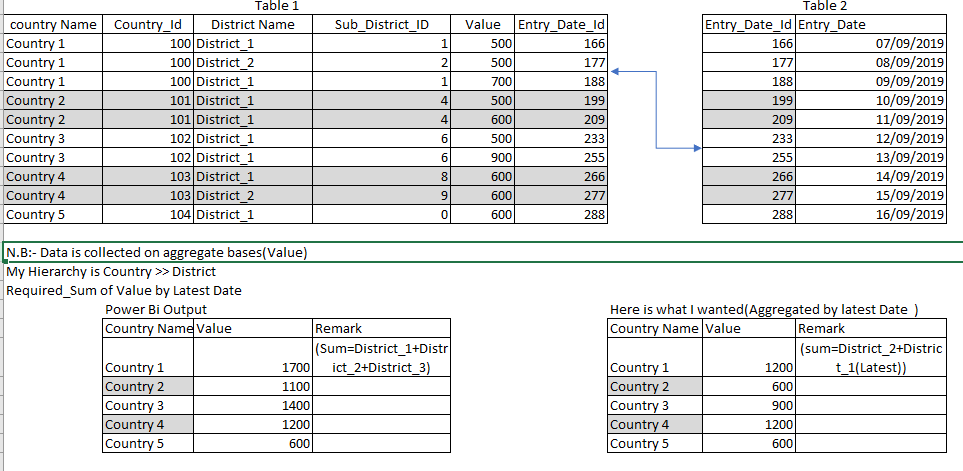
Currently, am working on the report server and am collecting data on cumulative bases which mean every district report it cumulative performances. My database has three different tables one for the performance, one for the date and the other Is for the district. So that my power bi takes the sum of the aggregate of all district under a region. But I need an aggregate of last value from each district summed up, instead of all the value under a district. How can I do that?


- Mark as New
- Bookmark
- Subscribe
- Mute
- Subscribe to RSS Feed
- Permalink
- Report Inappropriate Content
Hi @wesen
Please, can you share some data sample? Also, you can read this article it will help you to get questions answered faster.
https://community.powerbi.com/t5/Community-Blog/How-to-Get-Your-Question-Answered-Quickly/ba-p/38490
Mariusz
Please feel free to connect with me.
- Mark as New
- Bookmark
- Subscribe
- Mute
- Subscribe to RSS Feed
- Permalink
- Report Inappropriate Content
@Mariusz thanks for your quick response and I don't know how much I am clear. I tried to depict it here.
Here is some description of the problem that I mentioned before.
- Mark as New
- Bookmark
- Subscribe
- Mute
- Subscribe to RSS Feed
- Permalink
- Report Inappropriate Content
Hi @wesen
The attached file, let me know if it works for you.
Mariusz
If this post helps, then please consider Accepting it as the solution.
Please feel free to connect with me.
- Mark as New
- Bookmark
- Subscribe
- Mute
- Subscribe to RSS Feed
- Permalink
- Report Inappropriate Content
Hi @wesen
The below will fix the total.
Value 2 =
SUMX(
    GROUPBY(
        'Table 1',
        'Table 1'[District Name],
        'Table 1'[country Name] ),
    CALCULATE(
        SUM( 'Table 1'[Value] ),
        LASTDATE( 'Table 2'[Entry_Date] ) )
)
Mariusz
If this post helps, then please consider Accepting it as the solution.
Please feel free to connect with me.
- Mark as New
- Bookmark
- Subscribe
- Mute
- Subscribe to RSS Feed
- Permalink
- Report Inappropriate Content
@Mariusz It works for imported mode and thanks to you. But am using direct query mode(In power bi server) in which I'm unable to get DAX for GROUP BY AND LAST DATE. Can you suggest me any other solution?
Thanks a lot,
- Mark as New
- Bookmark
- Subscribe
- Mute
- Subscribe to RSS Feed
- Permalink
- Report Inappropriate Content
Hi @wesen
Unfortunately, I'm not familiar with PIRS, I tried to find DAX functions supported and there is not much around.
The below is using SUMMARIZE instead of GROUPBY and MAX Instead LASTDATE, check if thats any better.
Value 3 =
VAR _tbl =
    ADDCOLUMNS(
        SUMMARIZE(
            'Table 1',
            'Table 1'[District Name],
            'Table 1'[country Name] ),
        "Max Date", CALCULATE( MAX( 'Table 2'[Entry_Date] ) )
    )
RETURN
    CALCULATE(
        SUM( 'Table 1'[Value] ),
        TREATAS(
            _tbl,
            'Table 1'[District Name],
            'Table 1'[country Name],
            'Table 2'[Entry_Date]
        )
    )
Mariusz
If this post helps, then please consider Accepting it as the solution.
Please feel free to connect with me.
- Mark as New
- Bookmark
- Subscribe
- Mute
- Subscribe to RSS Feed
- Permalink
- Report Inappropriate Content
Hi@Mariusz
I attached a link to the file. Can you share it with someone who is an expert in power bi report server
Sample data from direct quire mode
Thank you for your support,
Much Appreciate
Thank you.

Helpful resources

Power BI Dataviz World Championships
The Power BI Data Visualization World Championships is back! Get ahead of the game and start preparing now!

Power BI Monthly Update - December 2025
Check out the December 2025 Power BI Holiday Recap!

FabCon Atlanta 2026
Join us at FabCon Atlanta, March 16-20, for the ultimate Fabric, Power BI, AI and SQL community-led event. Save $200 with code FABCOMM.

| User | Count |
|---|---|
| 41 | |
| 38 | |
| 36 | |
| 31 | |
| 28 |


| User | Count |
|---|---|
| 129 | |
| 88 | |
| 79 | |
| 68 | |
| 63 |


