cancel
Showing results for 
Search instead for 
Did you mean: 

The Power BI Data Visualization World Championships is back! Get ahead of the game and start preparing now! Learn more

Reply
Anonymous
Not applicable

Amend measure to sum previous week rather than current week

Hi all, I am looking to produce a table or matrix that sums the number of sales over each of the last 4 weeks. I gather to do this I require 4 measures, one for each week - below gives most recent week, can anyone advise how to amend it for previous week? I am guessing it needs a -1 somewhere but not sure where.


Week_Sum = CALCULATE(SUM(Sale_trace_data[Case Count]),FILTER(ALLSELECTED(Sale_trace_data), YEAR(Sale_trace_data[Date Created]) =YEAR(MAX(Sale_trace_data[Date Created]))&&WEEKNUM(Sale_trace_data[Date Created]) =WEEKNUM(MAX(Sale_trace_data[Date Created]))))
 
I would also like the table or matrix to have a 'see records' function but I only get 'see data', can anyone advise why this is? Thank you
1 ACCEPTED SOLUTION
Jihwan_Kim
Super User
Super User

Hi, @Anonymous 

I suggest having a dim-date table.


In my opinion, if you have the dim-date table with the WEEK OFFSET column, that can make it easy to create a simple measure.

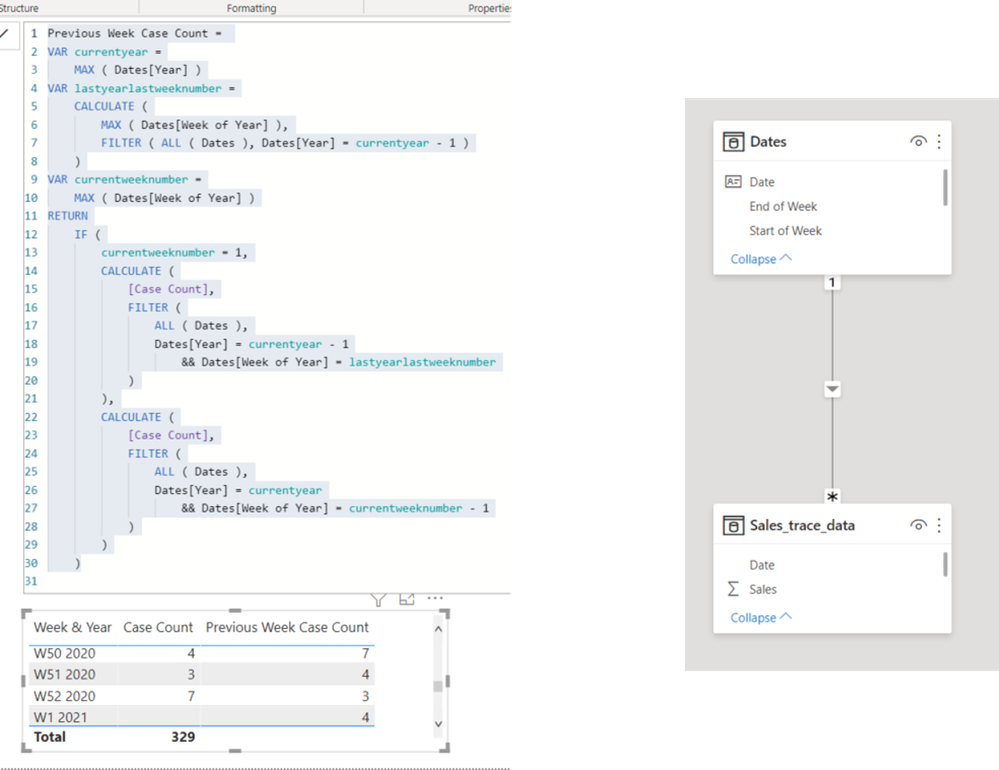
However, if you do not have a week offset column in your dim date table, please try something similar to the below.
Picture6.png


Previous Week Case Count =
VAR currentyear =
MAX ( Dates[Year] )
VAR lastyearlastweeknumber =
CALCULATE (
MAX ( Dates[Week of Year] ),
FILTER ( ALL ( Dates ), Dates[Year] = currentyear - 1 )
)
VAR currentweeknumber =
MAX ( Dates[Week of Year] )
RETURN
IF (
currentweeknumber = 1,
CALCULATE (
[Case Count],
FILTER (
ALL ( Dates ),
Dates[Year] = currentyear - 1
&& Dates[Week of Year] = lastyearlastweeknumber
)
),
CALCULATE (
[Case Count],
FILTER (
ALL ( Dates ),
Dates[Year] = currentyear
&& Dates[Week of Year] = currentweeknumber - 1
)
)
)


Hi, My name is Jihwan Kim.


If this post helps, then please consider accept it as the solution to help other members find it faster, and give a big thumbs up.


Linkedin: linkedin.com/in/jihwankim1975/

Twitter: twitter.com/Jihwan_JHKIM


If this post helps, then please consider accepting it as the solution to help other members find it faster, and give a big thumbs up.


Click here to visit my LinkedIn page

Click here to schedule a short Teams meeting to discuss your question.

View solution in original post

2 REPLIES 2
Anonymous
Not applicable

Thanks that is very kind. 

Jihwan_Kim
Super User
Super User

Hi, @Anonymous 

I suggest having a dim-date table.


In my opinion, if you have the dim-date table with the WEEK OFFSET column, that can make it easy to create a simple measure.

However, if you do not have a week offset column in your dim date table, please try something similar to the below.

Picture6.png


Previous Week Case Count =
VAR currentyear =
MAX ( Dates[Year] )
VAR lastyearlastweeknumber =
CALCULATE (
MAX ( Dates[Week of Year] ),
FILTER ( ALL ( Dates ), Dates[Year] = currentyear - 1 )
)
VAR currentweeknumber =
MAX ( Dates[Week of Year] )
RETURN
IF (
currentweeknumber = 1,
CALCULATE (
[Case Count],
FILTER (
ALL ( Dates ),
Dates[Year] = currentyear - 1
&& Dates[Week of Year] = lastyearlastweeknumber
)
),
CALCULATE (
[Case Count],
FILTER (
ALL ( Dates ),
Dates[Year] = currentyear
&& Dates[Week of Year] = currentweeknumber - 1
)
)
)


Hi, My name is Jihwan Kim.


If this post helps, then please consider accept it as the solution to help other members find it faster, and give a big thumbs up.


Linkedin: linkedin.com/in/jihwankim1975/

Twitter: twitter.com/Jihwan_JHKIM


If this post helps, then please consider accepting it as the solution to help other members find it faster, and give a big thumbs up.


Click here to visit my LinkedIn page

Click here to schedule a short Teams meeting to discuss your question.

Helpful resources

Announcements
Power BI DataViz World Championships

Power BI Dataviz World Championships

The Power BI Data Visualization World Championships is back! Get ahead of the game and start preparing now!

December 2025 Power BI Update Carousel

Power BI Monthly Update - December 2025

Check out the December 2025 Power BI Holiday Recap!

FabCon Atlanta 2026 carousel

FabCon Atlanta 2026

Join us at FabCon Atlanta, March 16-20, for the ultimate Fabric, Power BI, AI and SQL community-led event. Save $200 with code FABCOMM.