cancel
Showing results for 
Search instead for 
Did you mean: 

Get Fabric certified for FREE! Don't miss your chance! Learn more

Reply
afbraga66
Helper III
Helper III

Ambiguous paths in data model

Hello,


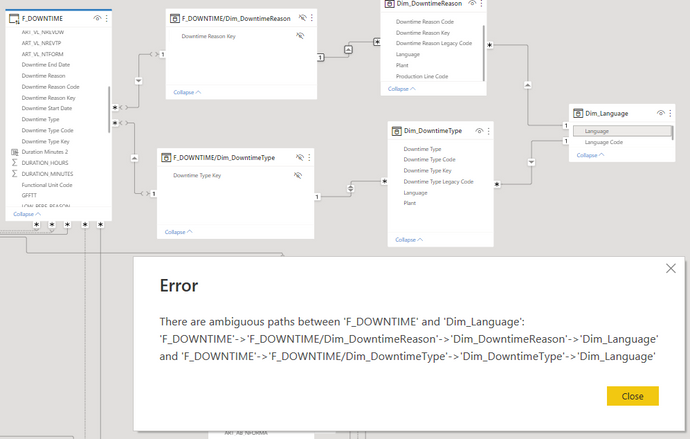
Currently on my data model, I am facing a situation in which I'm not seeing a decent way to handle it. I want to leverage language filtering in the model. For this I created a dimension (Dim_Language) which will filter other dimensions(Dim_DowntimeReason,Dim_DowntimeType), which in turn filter the fact table (F_DOWNTIME). Since I have the language the relationship between the dimensions and fact tables becomes a many-to-many relationship. To solve this I created bridge tables. So far so good. My issue now is that I want to filter the fact table with the dimensions, but if I enable the BOTH direction on the relationship betwen F_DOWNTIME/Dim_DowntimeReason 1->* Dim_DowntimeReason, I get the error below.

How would you approach this situation?


Thank you.

Best regards,

André


afbraga66_0-1669391785579.png


1 ACCEPTED SOLUTION
amitchandak
Super User
Super User

@afbraga66 , Dim_language has two path to f_downtime.


In such case we do not join dim to both the dim and use it value to filter the measure

or join to one and use filter in measure to filter that


How to filter the slicer of a disconnected table: https://youtu.be/cV5WfaQt6C8


or

https://docs.microsoft.com/en-us/dax/treatas-function

Share with Power BI Enthusiasts: Full Power BI Video (20 Hours) YouTube
Microsoft Fabric Series 60+ Videos YouTube
Microsoft Fabric Hindi End to End YouTube

View solution in original post

3 REPLIES 3
amitchandak
Super User
Super User

@afbraga66 , Dim_language has two path to f_downtime.


In such case we do not join dim to both the dim and use it value to filter the measure

or join to one and use filter in measure to filter that


How to filter the slicer of a disconnected table: https://youtu.be/cV5WfaQt6C8


or

https://docs.microsoft.com/en-us/dax/treatas-function

Share with Power BI Enthusiasts: Full Power BI Video (20 Hours) YouTube
Microsoft Fabric Series 60+ Videos YouTube
Microsoft Fabric Hindi End to End YouTube

Hey @amitchandak 


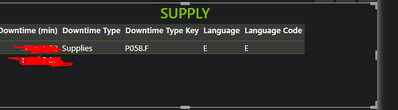
So I tried to add TREATAS() to my measure, but it is not working correctly when I filter the Language Code.

 
Downtime (min) =
CALCULATE(
    SUM(F_DOWNTIME[Duration Minutes 2]),
    USERELATIONSHIP(Dim_AREA[%Key1_(EMPRESA.COD_AREA)],F_DOWNTIME[%FKey1_(EMPRESA.COD_AREA)]),
    USERELATIONSHIP(Dim_Calendar[Manufacturing Date],F_DOWNTIME[Manufacturing Date]),
    USERELATIONSHIP(Dim_PLANT[Plant Code], F_DOWNTIME[Plant Code]),
    KEEPFILTERS(NOT F_DOWNTIME[Downtime Type Code] IN {"1","2","4","5","Z","Y"}),
    TREATAS(VALUES(Dim_Language[Language Code]),Dim_DowntimeType[Language]),
    TREATAS(VALUES(Dim_Language[Language Code]),Dim_DowntimeReason[Language])
)
 
It returns:
afbraga66_1-1669636310978.png

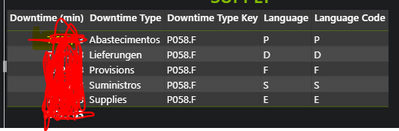
If I remove the last TREATAS() it works:

afbraga66_2-1669636435416.png

Can you help me understand?

Thank you,

André.


Hey @amitchandak 


Afterall it was some data issues. I have managed to find what was causing it.

Thanks for help.


Best regards,

André

Helpful resources

Announcements
Join our Fabric User Panel

Join our Fabric User Panel

Share feedback directly with Fabric product managers, participate in targeted research studies and influence the Fabric roadmap.

February Power BI Update Carousel

Power BI Monthly Update - February 2026

Check out the February 2026 Power BI update to learn about new features.

FabCon Atlanta 2026 carousel

FabCon Atlanta 2026

Join us at FabCon Atlanta, March 16-20, for the ultimate Fabric, Power BI, AI and SQL community-led event. Save $200 with code FABCOMM.