
cancel
Showing results for 
Search instead for 
Did you mean: 

The Power BI Data Visualization World Championships is back! It's time to submit your entry. Live now!

Reply
giorajo
Helper I
Helper I

Always Displaying Same Value

I got a matrix displaying the name of clients in the rows and the sales per month on the column. 


Screen Shot 2020-08-27 at 3.25.54 AM.png


I got a Year slicer for this matrix. I have a measure that gets the December sales of the previous year.


What I intend to do is add another column to display the sales for the month divided by the said December sales for the previous year. My problem is that the December sales is cannot be used monthly columns.


I hope my question makes sense. Thank you in advance.


1 ACCEPTED SOLUTION
dedelman_clng
Community Champion
Community Champion

Hi @giorajo 


Try this code


Total Sales = CALCULATE(SUM(Sales[Sales]))

Sales Rel to Prev Dec =
VAR __PrevYear =
    YEAR ( MAX ( DateTab[Date] ) ) - 1
VAR __PrevDec =
    CALCULATE (
        [Total Sales],
        DATESBETWEEN (
            DateTab[Date],
            DATE ( __PrevYear, 12, 1 ),
            DATE ( __PrevYear, 12, 31 )
        )
    )
RETURN
    CALCULATE ( DIVIDE ( [Total Sales], __PrevDec ), 0 )


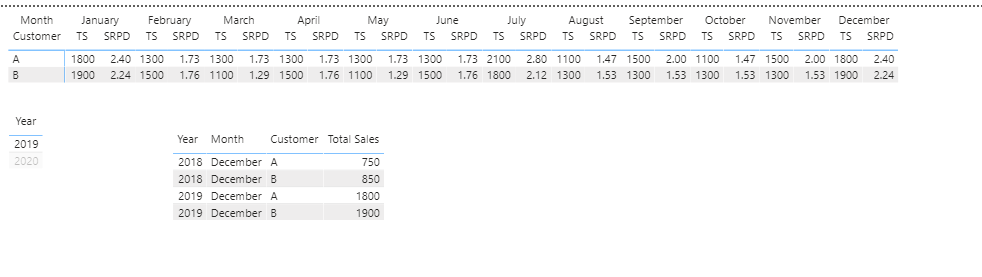
2019 (vs Dec 2018)

2020-08-26 15_12_42-scratch3 - Power BI Desktop.png


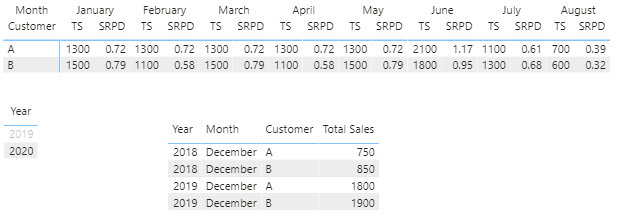
2020 (vs Dec 2019)

2020-08-26 15_12_53-scratch3 - Power BI Desktop.png


Hope this helps

David

View solution in original post

4 REPLIES 4
Ashish_Mathur
Super User
Super User

Hi,

Share the link from where i can download your PBI file.


Regards,
Ashish Mathur
http://www.ashishmathur.com
https://www.linkedin.com/in/excelenthusiasts/
Anonymous
Not applicable

Hi @giorajo 

you have to create a measure for each month and user it in the table chart

Jan_Dec = [Jan]/[Calc_December]

Feb_Dec = [Feb]/[Calc_December]

...

Jan_Dec = [Dec]/[Calc_December]

dedelman_clng
Community Champion
Community Champion

Hi @giorajo 


Try this code


Total Sales = CALCULATE(SUM(Sales[Sales]))

Sales Rel to Prev Dec =
VAR __PrevYear =
    YEAR ( MAX ( DateTab[Date] ) ) - 1
VAR __PrevDec =
    CALCULATE (
        [Total Sales],
        DATESBETWEEN (
            DateTab[Date],
            DATE ( __PrevYear, 12, 1 ),
            DATE ( __PrevYear, 12, 31 )
        )
    )
RETURN
    CALCULATE ( DIVIDE ( [Total Sales], __PrevDec ), 0 )


2019 (vs Dec 2018)

2020-08-26 15_12_42-scratch3 - Power BI Desktop.png


2020 (vs Dec 2019)

2020-08-26 15_12_53-scratch3 - Power BI Desktop.png


Hope this helps

David

Thank you very much, @dedelman_clng !

Helpful resources

Announcements
Power BI DataViz World Championships

Power BI Dataviz World Championships

The Power BI Data Visualization World Championships is back! It's time to submit your entry.

January Power BI Update Carousel

Power BI Monthly Update - January 2026

Check out the January 2026 Power BI update to learn about new features.

FabCon Atlanta 2026 carousel

FabCon Atlanta 2026

Join us at FabCon Atlanta, March 16-20, for the ultimate Fabric, Power BI, AI and SQL community-led event. Save $200 with code FABCOMM.