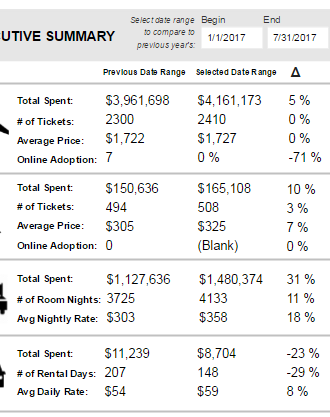
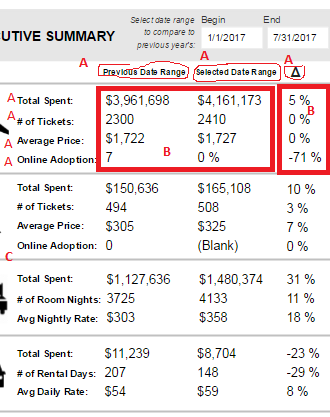
Hi! Thanks to anyone who can help in advance. I have to replicate a visual that makes the most sense as a multi-row card - and this works, but cards can't be right justified. Due to my client needing it to be right justified, I am unsure how to best accomplish this. I need to have columns for "Previous Date Range" and "Selected Data Range," and rows for spend LY/spend (sum), Bookings LY/Bookings (sum), Avg Seg Price LY/Avg Seg Price, and Online LY/% Online Spend. Is there a different way to make the measures to get the data organized this way with a table or matrix that I'm blanking on?
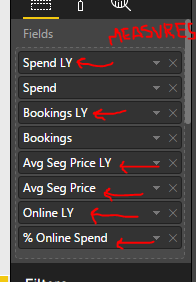
I have attached screenshots of the visual, and the data used (most are measures that I created). From my database, I have Spend, Bookings, and Online/OfflineT. I have a basic calendar table. The multi-row card is repeated multiple times because I have filtered it on a different metric for each (air, rail, hotel, etc). Because I need to be able to filter the current data and compare to same period last year, I created measures for this. I have a slicer to select date range, and then not filter out the previous date range.
Data from data source, summed: Spend, Bookings, Online/OfflineT (this is a 1 for booked online or 0 for booked offline)
Created Measures:
Spend LY = CALCULATE(SUM(Query1[Spend]),DATEADD('Calendar'[Date],-12,MONTH))
Bookings LY = CALCULATE(SUM(Query1[Bookings]),DATEADD('Calendar'[Date],-12,MONTH))
Avg Seg Price LY = DIVIDE(CALCULATE(SUM(Query1[Spend]), DATEADD('Calendar'[Date], -12,MONTH)), CALCULATE(SUM(Query1[Bookings]), DATEADD('Calendar'[Date], -12,MONTH)),0)
Avg Seg Price = DIVIDE(SUM(Query1[Spend]),SUM(Query1[Bookings]),0)
Online LY = CALCULATE(SUM(Query1[Online/OfflineT]),DATEADD('Calendar'[Date],-12,MONTH))
(For the Delta Change)
% Change (Spend) = DIVIDE(SUM(Query1[Spend])-CALCULATE(SUM(Query1[Spend]), DATEADD('Calendar'[Date],-12,MONTH)), CALCULATE(SUM(Query1[Spend]), DATEADD('Calendar'[Date],-12,MONTH)))
% Change (Bookings) = DIVIDE(SUM(Query1[Bookings])-CALCULATE(SUM(Query1[Bookings]), DATEADD('Calendar'[Date], -12,MONTH)), CALCULATE(SUM(Query1[Bookings]), DATEADD('Calendar'[Date],-12,MONTH)))
% Online Spend = DIVIDE(CALCULATE(SUM(Query1[Spend]), Query1[Online/OfflineT]=1), SUM(Query1[Spend]),0)
% Change (Avg$) = DIVIDE(DIVIDE(SUM(Query1[Spend]),SUM(Query1[Bookings]),0)-DIVIDE(CALCULATE(SUM(Query1[Spend]), DATEADD('Calendar'[Date],-12,MONTH)), CALCULATE(SUM(Query1[Bookings]), DATEADD('Calendar'[Date],-12,MONTH)),0), DIVIDE(CALCULATE(SUM(Query1[Spend]),DATEADD('Calendar'[Date],-12,MONTH)), CALCULATE(SUM(Query1[Bookings]), DATEADD('Calendar'[Date],-12,MONTH)),0))
% Change (Online) = DIVIDE(SUM(Query1[Online/OfflineT])-CALCULATE(SUM(Query1[Online/OfflineT]), DATEADD('Calendar'[Date], -12,MONTH)), CALCULATE(SUM(Query1[Online/OfflineT]), DATEADD('Calendar'[Date],-12,MONTH)))