cancel
Showing results for 
Search instead for 
Did you mean: 

The Power BI Data Visualization World Championships is back! Get ahead of the game and start preparing now! Learn more

Reply
Anonymous
Not applicable

Alternative LookupValue function to create virtual relationship.

Developing my first power bi data model. Below tables are part of my data model.


FxRatePeriod

Currency

Rate

Jan-22

Euro

1.05

Jan-22

GBP

1.2

Feb-22

Euro

1.03

Feb-22

GBP

1.1


TrxID

Currency

OrigAmount

001

Euro

75

002

Euro

85

003

GBP

78

004

GBP

34


Measures: convertedAmount = OrigAmount*Rate

                PrevMonthRateConvertedAmount = OrigAmount*PrevMonthRatePeriod


I need measure that can be dynamically calculated based on FxRate period selected by users.  

I can make it work using LookupValue and wanted to know if there is better way doing it perhaps TREATAS as performances might become an issue.


Any suggestion greatly appreciated.

1 ACCEPTED SOLUTION
DataInsights
Super User
Super User

@Anonymous,


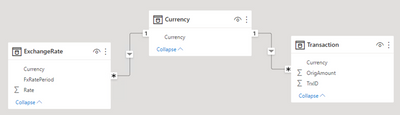
This solution uses a Currency table that functions as a bridge table between the ExchangeRate and Transaction tables. The Currency table can be created in DAX or Power Query. The column ExchangeRate[FxRatePeriod] uses the first day of the month.
 

DataInsights_0-1652128612682.png


Measures:


ConvertedAmount = 
SUMX (
    'Transaction',
    VAR vRate =
        MAXX ( RELATEDTABLE ( ExchangeRate ), ExchangeRate[Rate] )
    RETURN
        'Transaction'[OrigAmount] * vRate
)
PrevMonthRateConvertedAmount = 
SUMX (
    'Transaction',
    VAR vCurrency = 'Transaction'[Currency]
    VAR vPeriod =
        EDATE ( SELECTEDVALUE ( ExchangeRate[FxRatePeriod] ), -1 )
    VAR vTable =
        FILTER (
            ALL ( ExchangeRate ),
            ExchangeRate[Currency] = vCurrency
                && ExchangeRate[FxRatePeriod] = vPeriod
        )
    VAR vRate =
        MAXX ( vTable, ExchangeRate[Rate] )
    RETURN
        'Transaction'[OrigAmount] * vRate
)


Visual:


DataInsights_1-1652128825161.png


Did I answer your question? Mark my post as a solution!

Proud to be a Super User!


View solution in original post

1 REPLY 1
DataInsights
Super User
Super User

@Anonymous,


This solution uses a Currency table that functions as a bridge table between the ExchangeRate and Transaction tables. The Currency table can be created in DAX or Power Query. The column ExchangeRate[FxRatePeriod] uses the first day of the month.


DataInsights_0-1652128612682.png


Measures:


ConvertedAmount = 
SUMX (
    'Transaction',
    VAR vRate =
        MAXX ( RELATEDTABLE ( ExchangeRate ), ExchangeRate[Rate] )
    RETURN
        'Transaction'[OrigAmount] * vRate
)
PrevMonthRateConvertedAmount = 
SUMX (
    'Transaction',
    VAR vCurrency = 'Transaction'[Currency]
    VAR vPeriod =
        EDATE ( SELECTEDVALUE ( ExchangeRate[FxRatePeriod] ), -1 )
    VAR vTable =
        FILTER (
            ALL ( ExchangeRate ),
            ExchangeRate[Currency] = vCurrency
                && ExchangeRate[FxRatePeriod] = vPeriod
        )
    VAR vRate =
        MAXX ( vTable, ExchangeRate[Rate] )
    RETURN
        'Transaction'[OrigAmount] * vRate
)


Visual:


DataInsights_1-1652128825161.png


Did I answer your question? Mark my post as a solution!

Proud to be a Super User!


Helpful resources

Announcements
Power BI DataViz World Championships

Power BI Dataviz World Championships

The Power BI Data Visualization World Championships is back! Get ahead of the game and start preparing now!

December 2025 Power BI Update Carousel

Power BI Monthly Update - December 2025

Check out the December 2025 Power BI Holiday Recap!

FabCon Atlanta 2026 carousel

FabCon Atlanta 2026

Join us at FabCon Atlanta, March 16-20, for the ultimate Fabric, Power BI, AI and SQL community-led event. Save $200 with code FABCOMM.