- Power BI forums
- Get Help with Power BI
- Desktop
- Service
- Report Server
- Power Query
- Mobile Apps
- Developer
- DAX Commands and Tips
- Custom Visuals Development Discussion
- Health and Life Sciences
- Power BI Spanish forums
- Translated Spanish Desktop
- Training and Consulting
- Instructor Led Training
- Dashboard in a Day for Women, by Women
- Galleries
- Data Stories Gallery
- Themes Gallery
- Contests Gallery
- QuickViz Gallery
- Quick Measures Gallery
- Visual Calculations Gallery
- Notebook Gallery
- Translytical Task Flow Gallery
- TMDL Gallery
- R Script Showcase
- Webinars and Video Gallery
- Ideas
- Custom Visuals Ideas (read-only)
- Issues
- Issues
- Events
- Upcoming Events
We've captured the moments from FabCon & SQLCon that everyone is talking about, and we are bringing them to the community, live and on-demand. Starts on April 14th. Register now
- Power BI forums
- Forums
- Get Help with Power BI
- Desktop
- Re: Alphabetical 'between' argument?
- Subscribe to RSS Feed
- Mark Topic as New
- Mark Topic as Read
- Float this Topic for Current User
- Bookmark
- Subscribe
- Printer Friendly Page


- Mark as New
- Bookmark
- Subscribe
- Mute
- Subscribe to RSS Feed
- Permalink
- Report Inappropriate Content
Alphabetical 'between' argument?
I've a data set where categories in a column have letter prefixes (e.g. A. Butter, B. Milk, C. Yogurt), and then are summarised by a total for those categories in another row (e.g. 'Dairy'). What i want to do (either through Power Query or DAX) is to construct an argument and create a column like below, to show which main category each subcategory actually belongs to (pseudo-code):
If [Product letter] >= "A" and [Product letter] <= "C" then "Dairy" else
If [Product letter] >= "D" and [Product letter] <= "F" then "Meat" etc etc
I've seperated out the letters, but does PBI have this kind of text operator - to recognise that 'C' comes after 'B' for example?
Thanks
Solved! Go to Solution.


- Mark as New
- Bookmark
- Subscribe
- Mute
- Subscribe to RSS Feed
- Permalink
- Report Inappropriate Content
hI @GlassShark1
Download this sample PBIX file
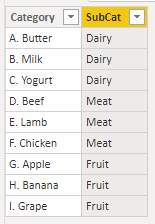
You can create a column using this DAX
SubCat = SWITCH(

    TRUE(),

    MID([Category], 1,1) IN {"A", "B", "C"}, "Dairy",

    MID([Category], 1,1) IN {"D", "E", "F"}, "Meat",

    "Fruit"
)
Regards
Phil
Did I answer your question? Then please mark my post as the solution.
If I helped you, click on the Thumbs Up to give Kudos.
Blog :: YouTube Channel :: Connect on Linkedin
Proud to be a Super User!
- Mark as New
- Bookmark
- Subscribe
- Mute
- Subscribe to RSS Feed
- Permalink
- Report Inappropriate Content
Hi @GlassShark1
Please @ mention me in replies or I won't be notified of your reply. Type @ then select my name.
MID is a bit of a misleading in this case as it's returning the first character from the string, so just A, B etc. This is required to check against the list of characters with the IN operator.
SWITCH acts like a multi-nested IF. Using TRUE as the 1st expression allows you to then match any subsequent expressions, and if they evaluate to TRUE then that result is chosen. In this case I'm checking the first letter from each string and when a match is found, the appropriate sub-cat string is returned.
Please see fiel linked to above for a Power Query solution.
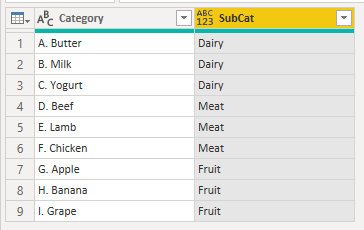
The code for this is in the Table2 query. It works in a similar way to the DAX solution, getting the first character from the Category and checking that against a string e.g."ABC" then returning the appropriate Subcat.
regards
Phil
Did I answer your question? Then please mark my post as the solution.
If I helped you, click on the Thumbs Up to give Kudos.
Blog :: YouTube Channel :: Connect on Linkedin
Proud to be a Super User!
- Mark as New
- Bookmark
- Subscribe
- Mute
- Subscribe to RSS Feed
- Permalink
- Report Inappropriate Content
Eventually figured it out in Power Query - something like the below works with lists:
Dairy_List = {"A".."C"},
Meat_List = {"D".."E"},
<rest of the code>
#"Stepforthis" = Table.AddColumn(#"LastStep", "Main Category", each
if List.Contains(Dairy_List,[Letter]) then "Dairy" else
if List.Contains(Meat_List,[Letter]) then "Meat" else
"Whatever"
)
Thanks 🙂
- Mark as New
- Bookmark
- Subscribe
- Mute
- Subscribe to RSS Feed
- Permalink
- Report Inappropriate Content
Eventually figured it out in Power Query - something like the below works with lists:
Dairy_List = {"A".."C"},
Meat_List = {"D".."E"},
<rest of the code>
#"Stepforthis" = Table.AddColumn(#"LastStep", "Main Category", each
if List.Contains(Dairy_List,[Letter]) then "Dairy" else
if List.Contains(Meat_List,[Letter]) then "Meat" else
"Whatever"
)
Thanks 🙂
- Mark as New
- Bookmark
- Subscribe
- Mute
- Subscribe to RSS Feed
- Permalink
- Report Inappropriate Content
Hi @GlassShark1
Please @ mention me in replies or I won't be notified of your reply. Type @ then select my name.
MID is a bit of a misleading in this case as it's returning the first character from the string, so just A, B etc. This is required to check against the list of characters with the IN operator.
SWITCH acts like a multi-nested IF. Using TRUE as the 1st expression allows you to then match any subsequent expressions, and if they evaluate to TRUE then that result is chosen. In this case I'm checking the first letter from each string and when a match is found, the appropriate sub-cat string is returned.
Please see fiel linked to above for a Power Query solution.
The code for this is in the Table2 query. It works in a similar way to the DAX solution, getting the first character from the Category and checking that against a string e.g."ABC" then returning the appropriate Subcat.
regards
Phil
Did I answer your question? Then please mark my post as the solution.
If I helped you, click on the Thumbs Up to give Kudos.
Blog :: YouTube Channel :: Connect on Linkedin
Proud to be a Super User!
- Mark as New
- Bookmark
- Subscribe
- Mute
- Subscribe to RSS Feed
- Permalink
- Report Inappropriate Content
Thank you @PhilipTreacy - learned alot from you this morning! Wouldn't all SWITCH formulas start with TRUE() then? Still wrestling with this bit. Maybe i'm struggling because it's a boolean? I'll keep trying to figure it out anyway - thanks again 🙂
- Mark as New
- Bookmark
- Subscribe
- Mute
- Subscribe to RSS Feed
- Permalink
- Report Inappropriate Content
Hi @GlassShark1
Not all SWITCH use TRUE() but you see it a lot.
You could use SWITCH to test a value e.g.
SWITCH(

   MyVal,

   1, "Alpha",

   2, "Beta",

   3, "Gamma",

   0
)
Regards
Phil
Did I answer your question? Then please mark my post as the solution.
If I helped you, click on the Thumbs Up to give Kudos.
Blog :: YouTube Channel :: Connect on Linkedin
Proud to be a Super User!
- Mark as New
- Bookmark
- Subscribe
- Mute
- Subscribe to RSS Feed
- Permalink
- Report Inappropriate Content
hI @GlassShark1
Download this sample PBIX file
You can create a column using this DAX
SubCat = SWITCH(

    TRUE(),

    MID([Category], 1,1) IN {"A", "B", "C"}, "Dairy",

    MID([Category], 1,1) IN {"D", "E", "F"}, "Meat",

    "Fruit"
)
Regards
Phil
Did I answer your question? Then please mark my post as the solution.
If I helped you, click on the Thumbs Up to give Kudos.
Blog :: YouTube Channel :: Connect on Linkedin
Proud to be a Super User!
- Mark as New
- Bookmark
- Subscribe
- Mute
- Subscribe to RSS Feed
- Permalink
- Report Inappropriate Content
Brilliant - i did think about lists but really not sure about them in PBI yet. Thanks 🙂
I'm just trying to break this down so i understand it. Does the MID argument add anything? Seems fine without it?
I've never used SWITCH before - the docs seem to say it basically uses comma seperated expressions then the outomes if those expressions are true which makes sense. What is the TRUE() element doing at the begining though? I would read this as 'expression1', so i'm not sure how it works...
Annoyingly i've now twigged i probably need a solution in Power Query anyway, as i need to use the outcomes of this to make a DIM table...this will doubtless be useful though - thank you!

Helpful resources

New to Fabric Survey
If you have recently started exploring Fabric, we'd love to hear how it's going. Your feedback can help with product improvements.

Power BI DataViz World Championships - June 2026
A new Power BI DataViz World Championship is coming this June! Don't miss out on submitting your entry.

Join our Fabric User Panel
Share feedback directly with Fabric product managers, participate in targeted research studies and influence the Fabric roadmap.

Power BI Community Update - March 2026
Check out the March 2026 Power BI update to learn about new features.

| User | Count |
|---|---|
| 57 | |
| 38 | |
| 33 | |
| 19 | |
| 16 |


| User | Count |
|---|---|
| 68 | |
| 66 | |
| 41 | |
| 34 | |
| 25 |


