cancel
Showing results for 
Search instead for 
Did you mean: 

Get Fabric Certified for FREE during Fabric Data Days. Don't miss your chance! Request now

Reply
kfulch
New Member

All measures showing the same number despite date filters

Hi there,

I've created a Power BI dashboard using website data imported from Google Analytics, and I'm trying to show the different metrics by year to date, month to date and this week. So I've added the measures as cards and put a relative date filter on each card to show items when the value is in this year, month and week - however each of the cards are still showing the same figure. I've tried refreshing the data and nothing has changed. Is there something really obvious that I'm doing wrong? 

Thanks in advanced for any assistance! 


UPDATE: It might also help to mention this only seems to happen with the number of 'Users' metric, it's working correctly for metrics like sessions, page views and bounce rate. 

4 REPLIES 4
V-lianl-msft
Community Support
Community Support

Make sure you are applying visual level filters. If you apply page or report level filters, each visual level filter is affected.

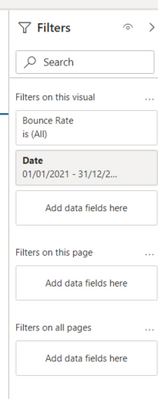
Hi there, I'm definitely just applying visual level filters. This is what my filters look like for the year to date view:


kfulch_0-1632301734881.png


Thanks for trying to help anyway!


UPDATE: It might also help to mention this only seems to happen with the number of 'Users' metric, it's working correctly for metrics like sessions, page views and bounce rate. 

amitchandak
Super User
Super User

@kfulch , relative date filter in the visual level filter?

All relative date slicer will use the current date as the reference point. So unless there is period difference it will not work


In case you have used slicer for card. Make sure interactions are done properly


Can you share a sample pbix after removing sensitive data.


Share with Power BI Enthusiasts: Full Power BI Video (20 Hours) YouTube
Microsoft Fabric Series 60+ Videos YouTube
Microsoft Fabric Hindi End to End YouTube

Hey, yep it's definitely in the visual level filter. And there's definitely a period difference - the relative dates are for the current year, month and week so there should be a difference in the data. The data is all sensitive unfortunately but thank you for trying to help!


UPDATE: It might also help to mention this only seems to happen with the number of 'Users' metric, it's working correctly for metrics like sessions, page views and bounce rate. 

Helpful resources

Announcements
November Power BI Update Carousel

Power BI Monthly Update - November 2025

Check out the November 2025 Power BI update to learn about new features.

Fabric Data Days Carousel

Fabric Data Days

Advance your Data & AI career with 50 days of live learning, contests, hands-on challenges, study groups & certifications and more!

FabCon Atlanta 2026 carousel

FabCon Atlanta 2026

Join us at FabCon Atlanta, March 16-20, for the ultimate Fabric, Power BI, AI and SQL community-led event. Save $200 with code FABCOMM.

Top Solution Authors
Top Kudoed Authors