Join us at FabCon Atlanta from March 16 - 20, 2026, for the ultimate Fabric, Power BI, AI and SQL community-led event. Save $200 with code FABCOMM.
Register now!The Power BI Data Visualization World Championships is back! It's time to submit your entry. Live now!
Hi everyone , I have a question, i have a report with live connection and in my report i have tvo charts, one linechart for value and second as stack for event.
My question is how can i align those two visual without adding zero, so they show same x axis(date) when i using slider for filter date dange?
Hi, @Anonymous
Not very clear.
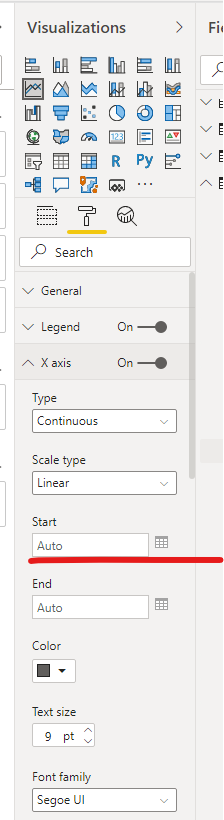
Do you mean that you have a line chart and a stacked bar chart and you hope show same x axis(date) when you use slicer to filter date dange?If so ,I think you can format the start of you x axis here.
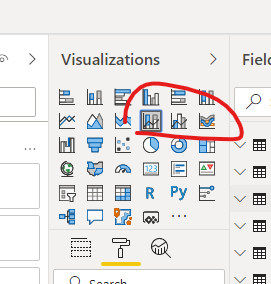
You can aslo try to create a line and stacked column chart or line and clustered column chart if you have a same field on x axis.
If I missunderstand,please explain it in more detail with reated screenshot .
Best Regards,
Community Support Team _ Eason
hi, i need to use legend in the visual, thats why i can't have stack and linechart. The value and event is from two diffrent table with diffrent dates that why those two dates is not align
Hi , @Anonymous
Does the view "line chart and clustered column chart" also fail to meet your requirements?
So far, apart from manually setting the starting point axis, I have not found other solutions to keep the axis of the two visual objects aligned.
Best Regards,
Community Support Team _ Eason
yes ,but thanks
The Power BI Data Visualization World Championships is back! It's time to submit your entry.
Check out the January 2026 Power BI update to learn about new features.
| User | Count |
|---|---|
| 61 | |
| 48 | |
| 35 | |
| 25 | |
| 23 |
| User | Count |
|---|---|
| 134 | |
| 110 | |
| 59 | |
| 39 | |
| 32 |