This time we’re going bigger than ever. Fabric, Power BI, SQL, AI and more. We're covering it all. You won't want to miss it.
Learn moreLevel up your Power BI skills this month - build one visual each week and tell better stories with data! Get started
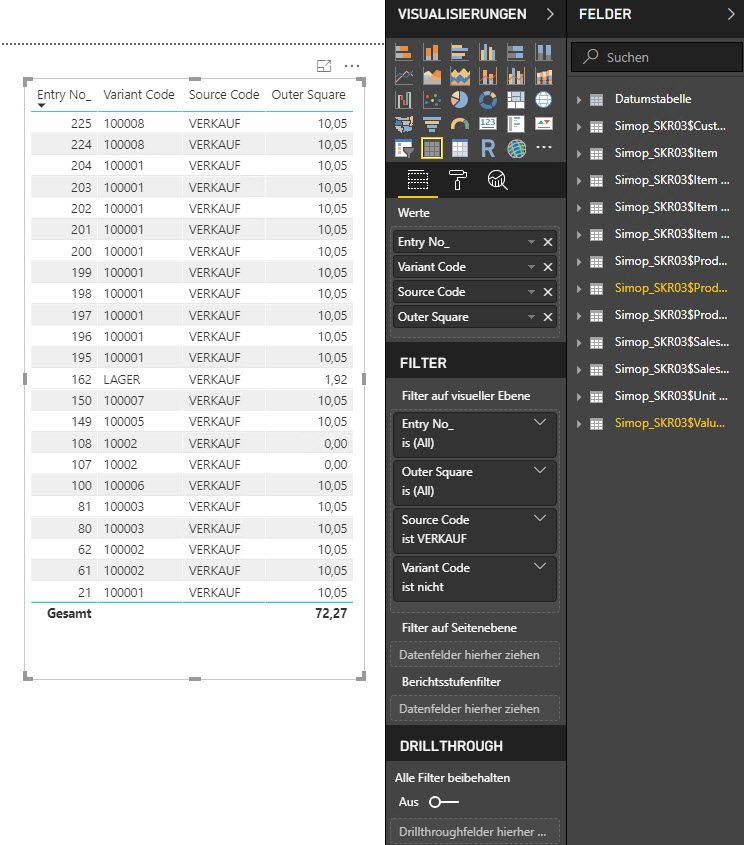
I have an issue with the following table I created in Power BI.
Why is the sum of Outer Square only calculated per Variant Code and not among all entries?
Solved! Go to Solution.
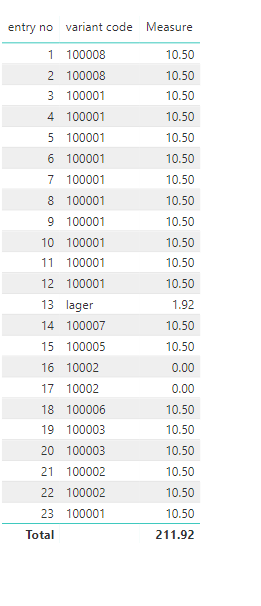
Ok, this simple measure did work:
Hi @Anonymous
If only the total sum is incorrect, other values in the [Outer Square] column is right, you could write a measure for a temparay solution.
Measure = IF(HASONEVALUE('value'[entry no]),MAX([outer square]),SUMX(ALL('value'),[outer square]))
To find why cause this problem, please provide detailed information, so i can reproduce your problem.
which table do the columns [entry no], [variant code], [outer square] from?
which are the key columns(create relationship based on) among three tables?
Best Regards
maggie
I didn't get it with a measure - but I can provide my pbix:
https://1drv.ms/u/s!Ai9Gkt_8r-5VlA4MEhngEGiiacPu
The issue is about the table on the bottom right side.
I added the quantity, so I don't have to many entries per variant code.
Ok, this simple measure did work:
That depends on whether Outer Square is a column or a measure. If it is a measure, see my post about it here: https://community.powerbi.com/t5/DAX-Commands-and-Tips/Dealing-with-Measure-Totals/td-p/63376
Also, this Quick Measure, Measure Totals, The Final Word should get you what you need:
https://community.powerbi.com/t5/Quick-Measures-Gallery/Measure-Totals-The-Final-Word/m-p/547907
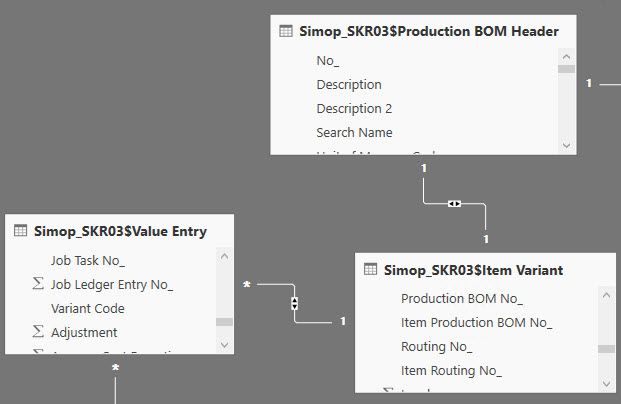
I didn't work with measures yet. In this case it's just two tables connected through a third table:
Check out the April 2026 Power BI update to learn about new features.
Sign up to receive a private message when registration opens and key events begin.
If you have recently started exploring Fabric, we'd love to hear how it's going. Your feedback can help with product improvements.
| User | Count |
|---|---|
| 34 | |
| 29 | |
| 29 | |
| 21 | |
| 18 |
| User | Count |
|---|---|
| 68 | |
| 45 | |
| 33 | |
| 24 | |
| 23 |