
cancel
Showing results for 
Search instead for 
Did you mean: 

We've captured the moments from FabCon & SQLCon that everyone is talking about, and we are bringing them to the community, live and on-demand. Starts on April 14th. Register now

Reply
Anonymous
Not applicable

Aggregation Error

Hello!


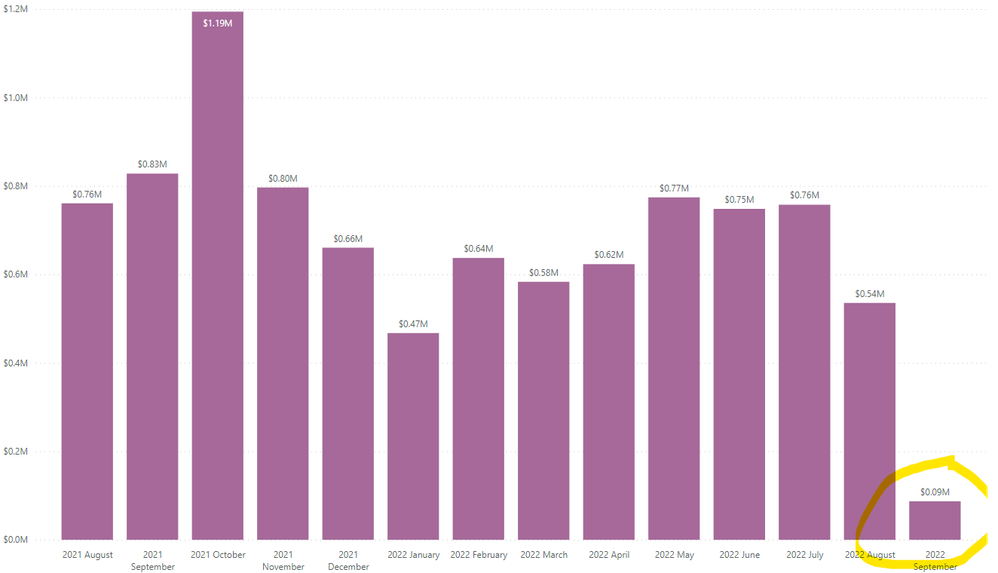
I have a sales fact table which list sales by id, income date, and income amount. I am plotting said columns in standard bar charts available with PowerBI. However, the visualizations show incorrect aggregations. I am able to get the correct aggregations in Power Query and directly in SQL, along with pandas, but here it is completely incorrect. Any ideas? I have followed all data model best practices, one way filtering, one to many relationships, but nothing is pointing to what could be an error?


Screenshot 2022-10-19 200932.pngScreenshot 2022-10-19 201006.pngScreenshot 2022-10-19 201023.png

1 REPLY 1
Shaurya
Memorable Member
Memorable Member

Hi @Anonymous,


Please check if there isn't any filter on the visual for current month related numbers. Check for any filter context that might be applied on the measures for calculating these numbers.


Mark this post as a solution if that works for you!
Consider taking a look at my blog: How to Export Telemetry Data from Azure IoT Central into Power BI

Helpful resources

Announcements
New to Fabric survey Carousel

New to Fabric Survey

If you have recently started exploring Fabric, we'd love to hear how it's going. Your feedback can help with product improvements.

Power BI DataViz World Championships carousel

Power BI DataViz World Championships - June 2026

A new Power BI DataViz World Championship is coming this June! Don't miss out on submitting your entry.

Join our Fabric User Panel

Join our Fabric User Panel

Share feedback directly with Fabric product managers, participate in targeted research studies and influence the Fabric roadmap.

March Power BI Update Carousel

Power BI Community Update - March 2026

Check out the March 2026 Power BI update to learn about new features.