Don't miss your chance to take the Fabric Data Engineer (DP-600) exam for FREE! Find out how by watching the DP-600 session on-demand now through April 28th.
Learn moreJoin the FabCon + SQLCon recap series. Up next: Power BI, Real-Time Intelligence, IQ and AI, and Data Factory take center stage. All sessions are available on-demand after the live show. Register now
Hey All,
I have a table basic data table like below;
| Consents | ||
| ID | Status | Consent Date |
| 1 | Active | 22/01/2019 |
| 1 | Active | 28/01/2019 |
| 1 | Expired | 28/12/2018 |
| 2 | Revoked | 09/01/2019 |
| 2 | Revoked | 06/03/2019 |
| 3 | Active | 26/03/2019 |
| 4 | Expired | 08/02/2019 |
| 4 | Expired | 17/12/2018 |
| 5 | Active | 18/03/2019 |
| 5 | Active | 25/02/2019 |
| 5 | Revoked | 13/12/2018 |
| 5 | Expired | 24/03/2019 |
| 5 | Active | 06/03/2019 |
| 6 | Revoked | 12/02/2019 |
| 6 | Expired | 08/01/2019 |
| 6 | Revoked | 29/03/2019 |
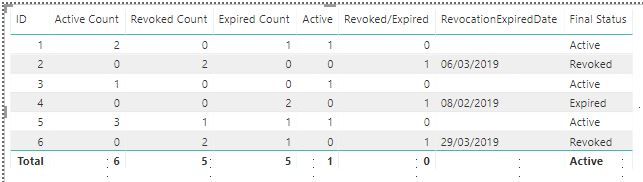
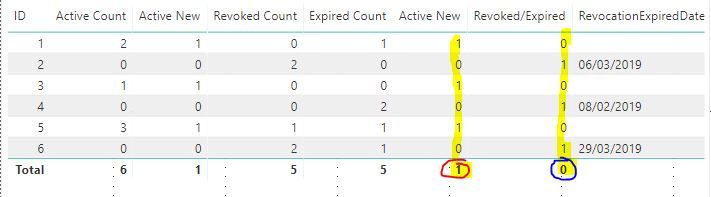
Currently this data table produces the below using the quoted measure below, which counts the number of statuses for each unique ID.
Active Count = CALCULATE(COUNTROWS(Consents),Consents[Status]="Active")+0
I have added two additional measures:
Active = IF([Active Count]>0,1,0)
Revoked/Expired = IF(AND([Active Count]=0,OR([Revoked Count]>0,[Expired Count]>0)),1,0)
however they are not aggregating a total, how can i acheive this?
Thanks
Sam
Solved! Go to Solution.
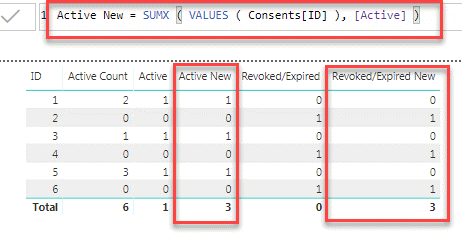
Not fully sure if you understood me correctly. Please see the below screenshot of what I meant:
Is this what you are looking for?
You probably have to iterate over ID and sum up:
Active New = SUMX ( VALUES ( Table[ID] ), [Active] )
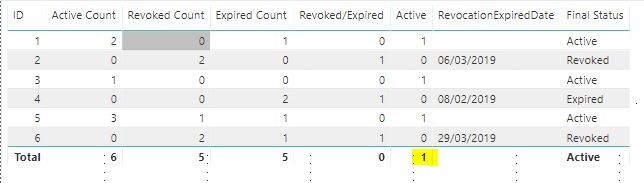
I dont htink i was very clear, i need the sum of the Active column :
This should sum to a total of 3, is there anyway i can replicat this?
yes.. create a new measure as I mentioned above and use that instead of Active..
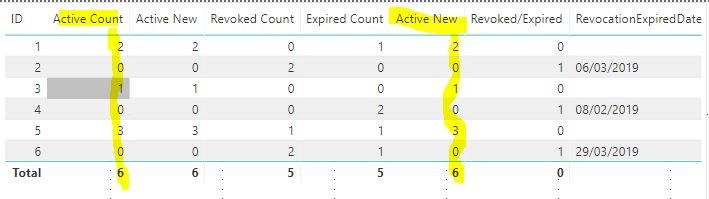
This replicates the active count measure i already have in place;
I am after a table which produces the following;
Where the totals should come to 3 on each Active New & Revoked/Expired.
thanks
Not fully sure if you understood me correctly. Please see the below screenshot of what I meant:
Is this what you are looking for?
Check out the April 2026 Power BI update to learn about new features.
If you have recently started exploring Fabric, we'd love to hear how it's going. Your feedback can help with product improvements.
A new Power BI DataViz World Championship is coming this June! Don't miss out on submitting your entry.
| User | Count |
|---|---|
| 43 | |
| 37 | |
| 34 | |
| 21 | |
| 16 |
| User | Count |
|---|---|
| 65 | |
| 64 | |
| 31 | |
| 26 | |
| 25 |