cancel
Showing results for 
Search instead for 
Did you mean: 

Get Fabric Certified for FREE during Fabric Data Days. Don't miss your chance! Request now

Reply
Kevin_Gitonga
Helper I
Helper I

Aggregating Distinct Count measure and Aggregating IF measure

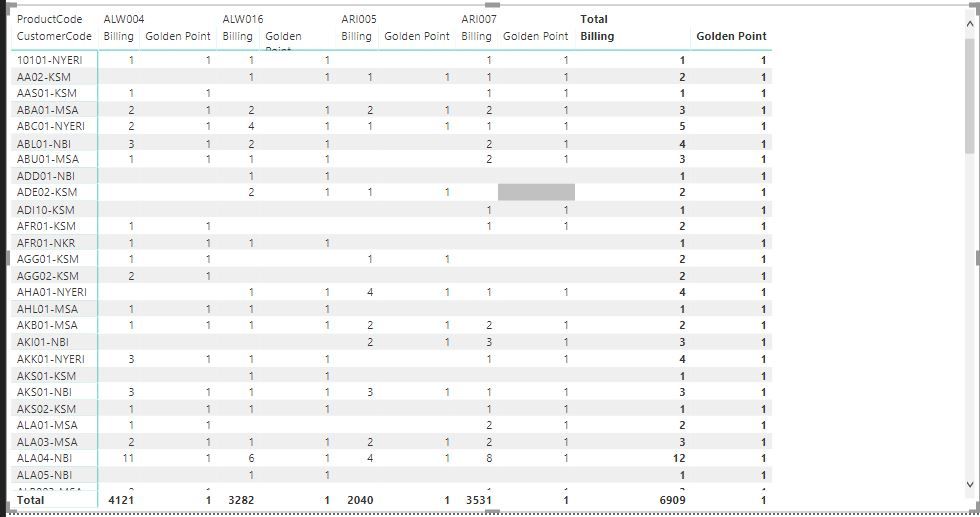
I have the following matrix table with the columns being products and the rows being the customer codes. What I want is to find the billings which is the distinct count of orders.I used the following for billing

Billing = DISTINCTCOUNT(Sales[InvNumber])

From that I am supposed to find golden points which is where if the billing(distinct count of orders) is more than 1 then Golden is one otherwise the golden point is 0.I used the following

Golden Point = if([Billing]>=1,1,0)

The problem is both these two measures do not show the row totals accurately as shown below.Total billing is not adding up and the Golden points is showing 1 for all in the totals column

Matrix table.JPG


Kindly help me on how I can make the row totals to be accurate.

3 ACCEPTED SOLUTIONS
v-jiascu-msft
Microsoft Employee
Microsoft Employee

Hi @Kevin_Gitonga,


Try these two measures, please.


Measure =
SUMX (
    SUMMARIZE (
        'table',
        'table'[ProductCode],
        'table'[CustomerCode],
        "Billing", DISTINCTCOUNT ( 'table'[InvNumber] )
    ),
    [Billing]
)
Total Golden Point =
SUMX (
    SUMMARIZE (
        'table',
        'table'[ProductCode],
        'table'[CustomerCode],
        "Golden Point", IF ( DISTINCTCOUNT ( 'table'[InvNumber] ) >= 1, 1, 0 )
    ),
    [Billing]
)


Best Regards,

Community Support Team _ Dale
If this post helps, then please consider Accept it as the solution to help the other members find it more quickly.

View solution in original post

Hi,


Try this measure


Billing = if(HASONEVALUE(Data[ProductCode]),DISTINCTCOUNT(Data[InvNumber]),SUMX(SUMMARIZE(VALUES(Data[ProductCode]),[ProductCode],"ABCD",DISTINCTCOUNT(Data[InvNumber])),[ABCD]))

Hope this helps.


Regards,
Ashish Mathur
http://www.ashishmathur.com
https://www.linkedin.com/in/excelenthusiasts/

View solution in original post

Hi,

The Golden Points measure can be revised to:

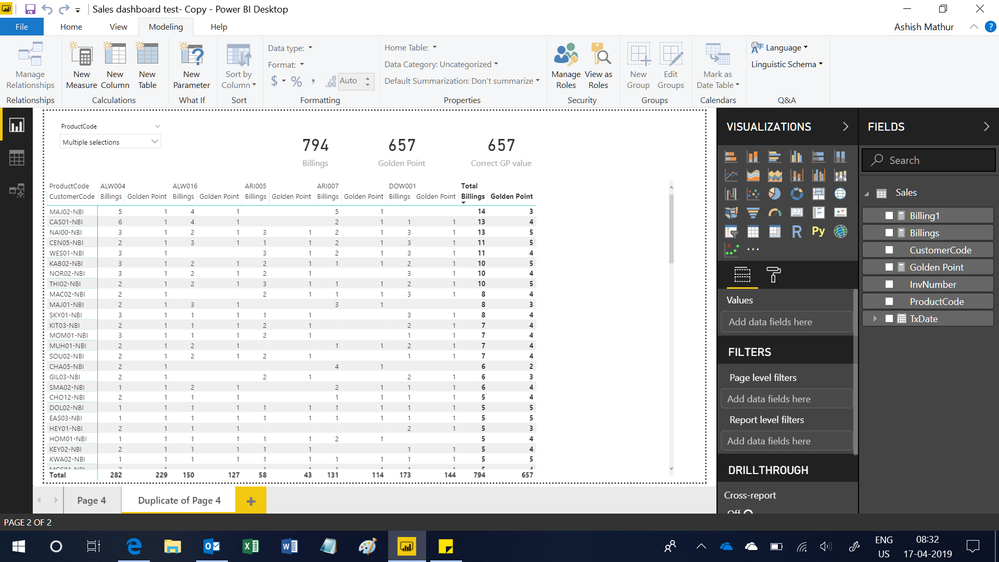
Golden Point = SUMX(SUMMARIZE(GENERATE(VALUES(Sales[CustomerCode]),VALUES(Sales[ProductCode])),[CustomerCode],[ProductCode],"ABCD",if(DISTINCTCOUNT(Sales[InvNumber])>=1,1,0)),[ABCD])

Hope this helps.

Untitled.png


Regards,
Ashish Mathur
http://www.ashishmathur.com
https://www.linkedin.com/in/excelenthusiasts/

View solution in original post

23 REPLIES 23

You are welcome.


Regards,
Ashish Mathur
http://www.ashishmathur.com
https://www.linkedin.com/in/excelenthusiasts/

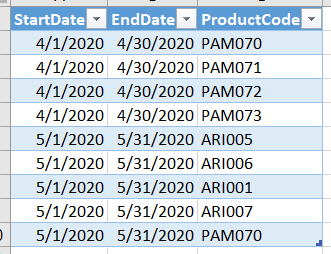
@Ashish_MathurI have a query on this, am I able to filter the products used in this formula using the values in another table.

Golden Point = SUMX(SUMMARIZE(GENERATE(VALUES(Sales[CustomerCode]),VALUES(Sales[ProductCode])),[CustomerCode],[ProductCode],"ABCD",if(DISTINCTCOUNT(Sales[InvNumber])>=1,1,0)),[ABCD])

 The products to filter in the formula are based on this table where different periods have diffrent products used in the Golden point formula above.

SBD.PNG

Hi,

I am not clear with your question.  Please share a simple dataset, explain the business context and show the expected result.


Regards,
Ashish Mathur
http://www.ashishmathur.com
https://www.linkedin.com/in/excelenthusiasts/

Helpful resources

Announcements
November Power BI Update Carousel

Power BI Monthly Update - November 2025

Check out the November 2025 Power BI update to learn about new features.

Fabric Data Days Carousel

Fabric Data Days

Advance your Data & AI career with 50 days of live learning, contests, hands-on challenges, study groups & certifications and more!

FabCon Atlanta 2026 carousel

FabCon Atlanta 2026

Join us at FabCon Atlanta, March 16-20, for the ultimate Fabric, Power BI, AI and SQL community-led event. Save $200 with code FABCOMM.

Top Solution Authors
Top Kudoed Authors