Join us at FabCon Atlanta from March 16 - 20, 2026, for the ultimate Fabric, Power BI, AI and SQL community-led event. Save $200 with code FABCOMM.
Register now!The Power BI Data Visualization World Championships is back! Get ahead of the game and start preparing now! Learn more
Hi,
I have a calculated column of days an event is going on. The list is anything between 0 to 200. I want to aggregate that to groups like 0-5 Days, 6-10 Days, 11-30 Days, 31-60 Days, 61-90 Days and Over 90 Days. So anything between 0 and 5 would get the group 0-5 Days, etc. I want to use that to calculate how many events are taking longer than 0-5 Days for example:
Example of the visual I'l trying to create: https://ibb.co/XjKqLZp
Thank you in advance,
Frank
Solved! Go to Solution.
@Anonymous
you can create a column.
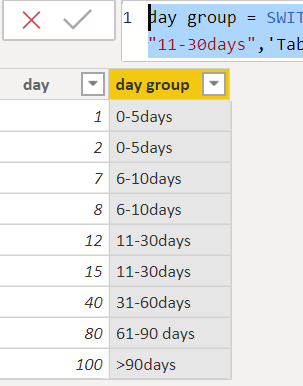
day group = SWITCH(TRUE(),'Table (2)'[day]<=5,"0-5days",'Table (2)'[day]<=10,"6-10days",'Table (2)'[day]<=30,"11-30days",'Table (2)'[day]<=60,"31-60days",'Table (2)'[day]<=90,"61-90 days",">90days")Then create a measure
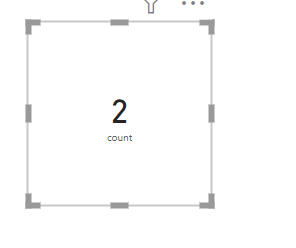
count = COUNTX(FILTER('Table (2)','Table (2)'[day group]="0-5days"),'Table (2)'[day])
Proud to be a Super User!
@Anonymous
you can create a column.
day group = SWITCH(TRUE(),'Table (2)'[day]<=5,"0-5days",'Table (2)'[day]<=10,"6-10days",'Table (2)'[day]<=30,"11-30days",'Table (2)'[day]<=60,"31-60days",'Table (2)'[day]<=90,"61-90 days",">90days")Then create a measure
count = COUNTX(FILTER('Table (2)','Table (2)'[day group]="0-5days"),'Table (2)'[day])
Proud to be a Super User!
This worked after I added a space between the condition and the value <=5 , "0-5 Days" ....
Thank you for the suggestion. I tried im getting this error: Unexpected expression '"0-5days"'. (I changed the table and column name to the correct)
Hi @Anonymous ,
Please share some screenshots or a dummy .pbix file, so we can help you find the cause of the problem. Please remove sensitive information.
Best Regards,
Icey
The Power BI Data Visualization World Championships is back! Get ahead of the game and start preparing now!
Check out the November 2025 Power BI update to learn about new features.
| User | Count |
|---|---|
| 59 | |
| 43 | |
| 42 | |
| 23 | |
| 17 |
| User | Count |
|---|---|
| 190 | |
| 122 | |
| 96 | |
| 66 | |
| 47 |