cancel
Showing results for 
Search instead for 
Did you mean: 

July 7 - July 17 | Round 2 of the Power BI Dataviz World Championships. Don't miss your chance! Learn more

Reply
vfernandes0408
Frequent Visitor

Aggregate Value Another Table

Hi,
i need aggregate two table.
I need get value on table 2 if dont exist information on table 1 and mount table 3 with aggregate values


https://photos.app.goo.gl/zGldGWhb8uN8erYf1

1 ACCEPTED SOLUTION
Anonymous
Not applicable

Hi @vfernandes0408

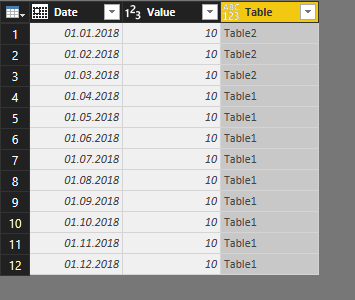
Something like that?

06-03-2018 20-17-03.png

Here is the code for this:

let
    Source = Table.NestedJoin(Table1,{"Date"},Table2,{"Date"},"Tabelle2",JoinKind.LeftOuter),
    #"Expanded {0}" = Table.ExpandTableColumn(Source, "Tabelle2", {"Date", "Value", "Type"}, {"Tabelle2.Date", "Tabelle2.Value", "Tabelle2.Type"}),
    #"Added Custom" = Table.AddColumn(#"Expanded {0}", "Table", each if [Tabelle2.Date] = null then "Table1" else "Table2"),
    #"Removed Other Columns" = Table.SelectColumns(#"Added Custom",{"Date", "Value", "Table"})
in
    #"Removed Other Columns"

View solution in original post

6 REPLIES 6
Anonymous
Not applicable

Hi @vfernandes0408
I don't know if I get your question right, but here is an answer,
You could merge the 2 tables (1+2) by using the Query Editor.
The code is:

let
    Source = Table.NestedJoin(Tabelle1,{"Date", "Value", "Type"},Tabelle2,{"Date", "Value", "Type"},"Tabelle2",JoinKind.LeftOuter),
    #"Expanded {0}" = Table.ExpandTableColumn(Source, "Tabelle2", {"Date", "Value", "Type"}, {"Tabelle2.Date", "Tabelle2.Value", "Tabelle2.Type"}),
    #"Added Custom" = Table.AddColumn(#"Expanded {0}", "Table", each if [Tabelle2.Date] = null then "Table1" else "Table2"),
    #"Removed Other Columns" = Table.SelectColumns(#"Added Custom",{"Date", "Value", "Type", "Table"})
in
    #"Removed Other Columns"

Please tell, if the code is ok for you.

I try to explain with more details.


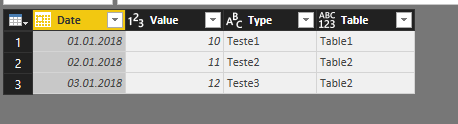
i have a table 1 where I have type test1, test2 and test3 and in table2 I have type test2 and test3. I need a formula that if the columns of date, value, and type columns do not have the value in table1 it takes on table2 and can not repeat the value of table1


Anonymous
Not applicable

Hi again
I post you the result I got with my query in the Query Editor:
05-03-2018 21-12-24.png

Maybe I didn't get you right?

this function works but i explain wrong.


i make image with explain


https://photos.google.com/share/AF1QipNi1Eh8BrzUck0uYkiNFBcbF3hyp7p20Qb8M5PY2jfunWGDugApQXKp4mDqDNVC...


If the date 01/04/2018 doesnt have on table2 i get value on table 1

Anonymous
Not applicable

Hi @vfernandes0408

Something like that?

06-03-2018 20-17-03.png

Here is the code for this:

let
    Source = Table.NestedJoin(Table1,{"Date"},Table2,{"Date"},"Tabelle2",JoinKind.LeftOuter),
    #"Expanded {0}" = Table.ExpandTableColumn(Source, "Tabelle2", {"Date", "Value", "Type"}, {"Tabelle2.Date", "Tabelle2.Value", "Tabelle2.Type"}),
    #"Added Custom" = Table.AddColumn(#"Expanded {0}", "Table", each if [Tabelle2.Date] = null then "Table1" else "Table2"),
    #"Removed Other Columns" = Table.SelectColumns(#"Added Custom",{"Date", "Value", "Table"})
in
    #"Removed Other Columns"

thanks a lot.

I find some errors but i correct and now works fine

Helpful resources

Announcements
FabCon and SQLCon Barcelona 2026

FabCon & SQLCon – Barcelona 2026

Join us in Barcelona for FabCon and SQLCon, the Fabric, Power BI, SQL, and AI community event. Save €200 with code FABCMTY200.

60 days of Data Days Carousel

Data Days 2026

Join Data Days 2026: 60 days of free live/on-demand sessions, challenges, study groups, and certification opportunities.

Power BI DataViz World Championships carousel

Power BI DataViz World Championships - June 2026

A new Power BI DataViz World Championship is coming this June! Don't miss out on submitting your entry.

Top Solution Authors