Learn from the best! Meet the four finalists headed to the FINALS of the Power BI Dataviz World Championships! Register now
Hi All,
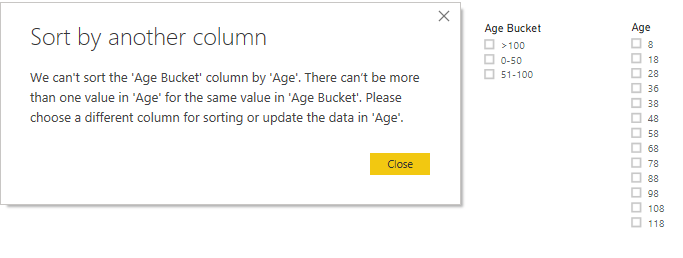
I have Age column. I created a Age bucket column wwith the help of Conditional column in Query Editor. When i tried to sort the Age Bucket column with Age column it is throwing error. For Age Bucket when i keep that in slicer i want 0-50 to show at top followed by 51-100 annd then >100 but now the problem is >100 is showing at top.
Thanks in Advance
Solved! Go to Solution.
You can create a brand new table "Sequences" with these values
| Age | Seq |
| 0-50 | 1 |
| 51-100 | 2 |
| >100 | 3 |
Now, goto relationships and then create a relationship with your existing tables Age column with newly created Age column.
Then, go to your Old table use the below Dax.
seq = related([Sequences(seq)]
Now, click on the Age column in the old table, then try Sort.
You can create a brand new table "Sequences" with these values
| Age | Seq |
| 0-50 | 1 |
| 51-100 | 2 |
| >100 | 3 |
Now, goto relationships and then create a relationship with your existing tables Age column with newly created Age column.
Then, go to your Old table use the below Dax.
seq = related([Sequences(seq)]
Now, click on the Age column in the old table, then try Sort.
Yes!! it worked.
Thanks!!
I have done that, but the sort is not working, still sorting by letter/Age (in this example)
I have this values:
Current
1-30
31-60
61-90
91-180
181-360
360-720
720+
I have created another sheet in my source to add a order value (1 to 8), but when I relate them and go to the table and request to sort by the order value, it doesn't do anything, what else can I try?
A new Power BI DataViz World Championship is coming this June! Don't miss out on submitting your entry.
Share feedback directly with Fabric product managers, participate in targeted research studies and influence the Fabric roadmap.
| User | Count |
|---|---|
| 45 | |
| 35 | |
| 30 | |
| 15 | |
| 15 |
| User | Count |
|---|---|
| 58 | |
| 56 | |
| 38 | |
| 21 | |
| 21 |