This time we’re going bigger than ever. Fabric, Power BI, SQL, AI and more. We're covering it all. You won't want to miss it.
Learn moreJoin the FabCon + SQLCon recap series. Up next: Power BI, Real-Time Intelligence, IQ and AI, and Data Factory take center stage. All sessions are available on-demand after the live show. Register now
Hello,
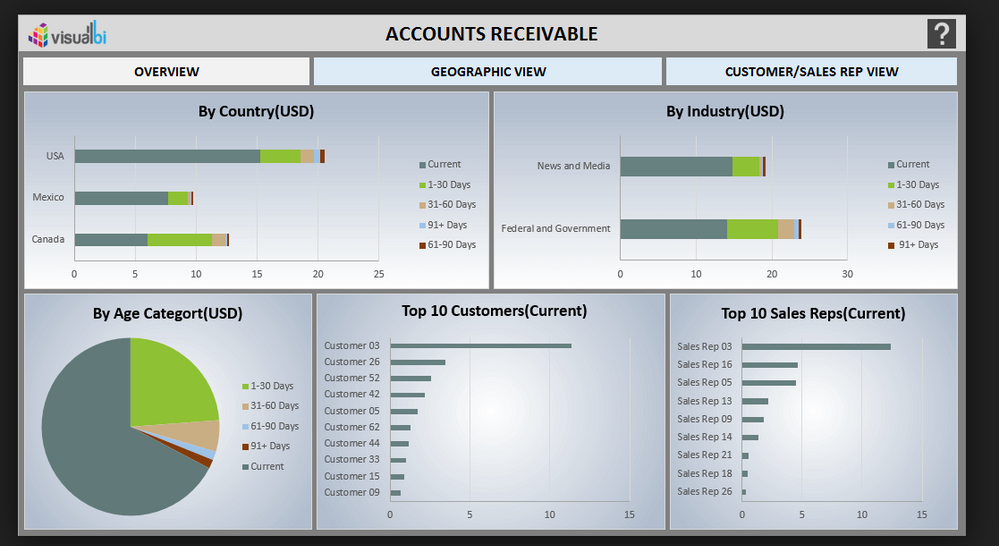
I have been trying to visualise my data in a better way and I came across this on the suggestions. However, I do not know how to make boxes as shown in the picture below. Is that a figure or a text box? And how would you make them visually nice like that?
Thanks!
Solved! Go to Solution.
Hey,
here you will find some downloadable samples:
Regards,
Tom
Hi @Anonymous,
Check this templates (not quite as this one but some similar) at the Power BI Tips website, they also have some explanation on how they do things, basically it's an image that is created and then placed as background.
Regards,
MFelix
Regards
Miguel Félix
Proud to be a Super User!
Check out my blog: Power BI em PortuguêsHey,
here you will find some downloadable samples:
Regards,
Tom
If you are referring to the OVERVIEW, GEOGRAPHIC VEW and CUSTOMER/SALES REP VIEW boxes, you could create those in any kind of image creation program, even Paint. Insert them as images and then use the Action setting to tie them to Bookmarks.
Check out the April 2026 Power BI update to learn about new features.
If you have recently started exploring Fabric, we'd love to hear how it's going. Your feedback can help with product improvements.
A new Power BI DataViz World Championship is coming this June! Don't miss out on submitting your entry.
| User | Count |
|---|---|
| 40 | |
| 37 | |
| 31 | |
| 23 | |
| 15 |
| User | Count |
|---|---|
| 76 | |
| 59 | |
| 31 | |
| 31 | |
| 25 |