cancel
Showing results for 
Search instead for 
Did you mean: 

The Power BI Data Visualization World Championships is back! Get ahead of the game and start preparing now! Learn more

Reply
Anonymous
Not applicable

Advanced Filter to always show one value irrespective of the filter selection

Hi, 


I have 2 field which is as below;

Type Value
HP1
HP2
HP3
HP4
HP5
HP6
HP7
HP8
HP9
HP10
AC0
AC0
AC0
AC0
AC0
AC0
AC0


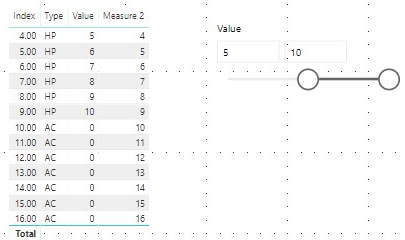
I have a slicer for this and I want to always show AC (and its value which is zero always) iresspective of the slicer selection


Example: If I select slicer from 5 to 10, I want to show all HP values from 5 to 10 plus all AC rows as well


Is there a  DAX code for this or any advance Filter options? Thanks !


1 ACCEPTED SOLUTION
Anonymous
Not applicable

Hi @Aby17,

You can take a look at the following steps if they suitable for your requirement.

1, Add an Index Column to show all AC rows at query editor side.

2, Create a calculated table: 

Slicer store = DISTINCT('Type-Value'[Value])

3, Add new measure:

Measure 2 =
IF (
    SELECTEDVALUE ( 'Type-Value'[Type] ) = "AC",
    SUM ( 'Type-Value'[Index] ),
    IF (
        SUM ( 'Type-Value'[Value] ) IN FILTERS ( 'Slicer store'[Value] ),
        SUM ( 'Type-Value'[Index] ),
        BLANK ()
    )
)

1.png

If above doesn't work, share some sample data and expected output will be help.

Best Regards,

Jack

View solution in original post

2 REPLIES 2
Anonymous
Not applicable

Hi @Aby17,

You can take a look at the following steps if they suitable for your requirement.

1, Add an Index Column to show all AC rows at query editor side.

2, Create a calculated table: 

Slicer store = DISTINCT('Type-Value'[Value])

3, Add new measure:

Measure 2 =
IF (
    SELECTEDVALUE ( 'Type-Value'[Type] ) = "AC",
    SUM ( 'Type-Value'[Index] ),
    IF (
        SUM ( 'Type-Value'[Value] ) IN FILTERS ( 'Slicer store'[Value] ),
        SUM ( 'Type-Value'[Index] ),
        BLANK ()
    )
)

1.png

If above doesn't work, share some sample data and expected output will be help.

Best Regards,

Jack

Hi,


I have a similar problem with one field only. When applying a filter to that field I want the result to always show one of the options, as well as the selected option.


The field options are as below:


Deal Stage 1

Deal Stage 2

Deal Stage 3

Deal Stage 4

Deal Stage 5

(Blank)


When a user selects a certain deal stage I want all values with a (Blank) to also remain in the result. It also needs to be possible to multi-select stages and still include (Blank) in the result.


I'm very new to DAX and any help with this is greatly appreciated!


Helpful resources

Announcements
November Power BI Update Carousel

Power BI Monthly Update - November 2025

Check out the November 2025 Power BI update to learn about new features.

Fabric Data Days Carousel

Fabric Data Days

Advance your Data & AI career with 50 days of live learning, contests, hands-on challenges, study groups & certifications and more!

FabCon Atlanta 2026 carousel

FabCon Atlanta 2026

Join us at FabCon Atlanta, March 16-20, for the ultimate Fabric, Power BI, AI and SQL community-led event. Save $200 with code FABCOMM.

Top Solution Authors
Top Kudoed Authors