Don't miss your chance to take the Fabric Data Engineer (DP-600) exam for FREE! Find out how by watching the DP-600 session on-demand now through April 28th.
Learn moreJoin the FabCon + SQLCon recap series. Up next: Power BI, Real-Time Intelligence, IQ and AI, and Data Factory take center stage. All sessions are available on-demand after the live show. Register now
Hello,
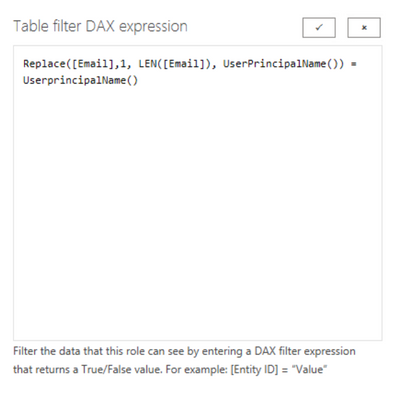
I just started learning Power BI and I bumped into this problem regarding Row Level Security using advance DAX. I have this Table filter DAX expression [Email] = UserprincipalName but it turned out that all of the data in the column I am referring to had a fix suffix (e.g. @mydomain.com) but some of the user audience I want to share the report to authenticates with only @domain.com suffix. I tried creating another column [AlternateEmail] and used SUBSTITUTE function to replace @mydomain.com to @domain.com and set the Table filter DAX expression to [Email] = UserprincipalName() || [AlternateEmail] = UserPrincipalName() but did not work. Can you do advance DAX on the Table filter DAX expression using userprincipalname() function that accepts both?
Thank you in advance
Hi Icey,
Thank you for your response. I appreciate the video and I have done this. It turned out that the audience I want to share it to has multiple domains as there were a lot of branches globally not only @domain.com and @mydomain.com. I am guessing we acquired a bad mapping data, so my approach is a sort of like dynamic filtering on the columns we are using. Is it possible to apply this on the table filter DAX expression?
Hi @alexanderandro ,
Sorry, I'm confused. Isn’t the result returned by your formula always "TRUE"?
Best regards
Icey
If this post helps, then consider Accepting it as the solution to help other members find it faster.
Hi @alexanderandro ,
I have this Table filter DAX expression [Email] = UserprincipalName but it turned out that all of the data in the column
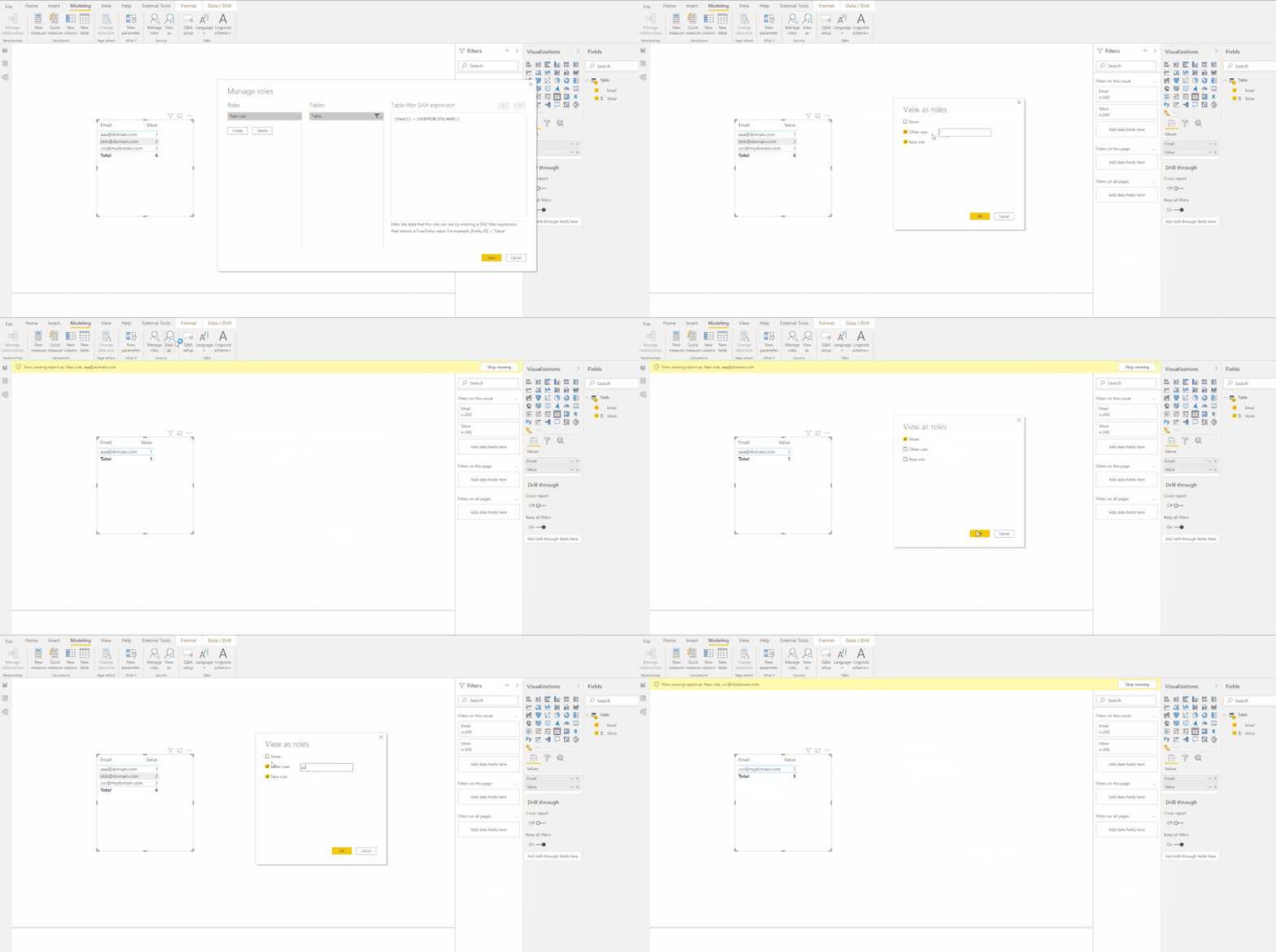
How did you test it? Did you both select "Others" and your new role like below?
Best regards
Icey
If this post helps, then consider Accepting it as the solution to help other members find it faster.
Check out the April 2026 Power BI update to learn about new features.
If you have recently started exploring Fabric, we'd love to hear how it's going. Your feedback can help with product improvements.
A new Power BI DataViz World Championship is coming this June! Don't miss out on submitting your entry.
| User | Count |
|---|---|
| 48 | |
| 40 | |
| 38 | |
| 20 | |
| 17 |
| User | Count |
|---|---|
| 68 | |
| 65 | |
| 30 | |
| 26 | |
| 25 |