cancel
Showing results for 
Search instead for 
Did you mean: 

The Power BI Data Visualization World Championships is back! Get ahead of the game and start preparing now! Learn more

Reply
gmadraj
Frequent Visitor

Adobe Analytics Issue

Hello everyone, 
I am trying to connect to Adobe analytics connector 1.0 with powerBI. 
I need 4 dimensions as filters example-Device, State, Country, Age

And I have 3 measure that I wanna look at it over time example- Conversion_rate, Visitors, purchased a product(event)

Here is my problem-

If I pull all the above dimensions & measures and load it into powerbi model. 
If I start using dimensions are dynamic filters on dashboard and want to look at measure over time(month) the aggregated numbers are so different than what I see in adobe. 
I have tried couple of approaches with creating multiple tables with same measures for each dimension. 
But still couldnt get what I needed. 
Would be really helpful, If anyone has faced the same and have any idea how to fix this.

Thanks 

3 REPLIES 3
ReportGuru
Post Patron
Post Patron

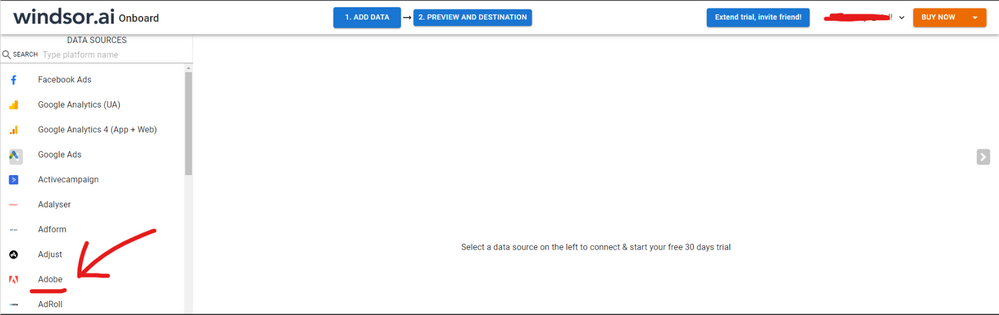
Hi @gmadraj were you able to find a solution? As a workaround, maybe you can consider connecting your Adobe data with a 3rd party tool. I currently use windsor.ai's Adobe connector and I haven't hada any accuracy issue so far. In case you wonder,  to make the connection first search for the Adobe connector in the data sources list:


ADOBE-1.png


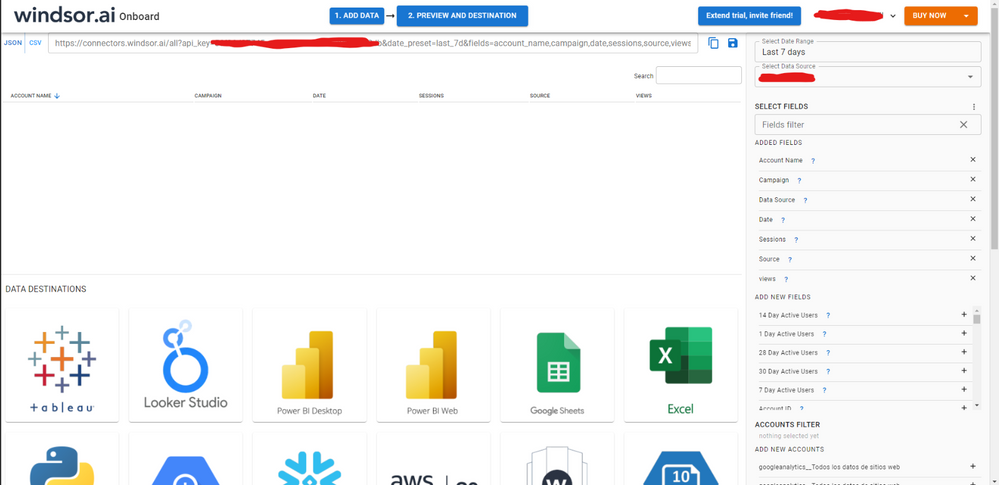
Then, you should enter your Adobe credentials to make the connection. After that, you'll see a preview of your data where you can select the fields you want to see in PBI. 


ADOBE-2.png


Finally, you just have to choose PBI as destination and copy and paste the url that will appear there in PBI desktop --> Get Data --Web > --> Paste the link


SELECT_DESTINATION_NEW.png

Anonymous
Not applicable

Hi, @gmadraj 

According to your description, The data you get in Dashboard is not the same as the original data in Adobe Analytics, you can try the following methods to solve the problem, if it does not help, you can provide the appropriate .pbix without sensitive data or related actions to help me reproduce your problem. feel free to ask anything about this.

  1. Make sure that the data you want to pull into Power BI matches the data in Adobe Analytics, and you can set up a scheduled refresh to synchronize the data.
    2. If the original visualization used to create the tile changes, the tile doesn't change. For example, if the designer pinned a line chart from a report and then changed the line chart to a bar chart, the dashboard tile continues to show a line chart. The data refreshes, but the visualization type doesn't.
  2. Check for any filters or zones applied in Adobe Analytics that may not be replicated in Power BI.
  3. In Power BI, make sure that the relationships between tables are set up correctly. Incorrect relationships can lead to inaccurate aggregations when applying filters.
  4. Try extracting a smaller subset of the data using different dimensions and metrics to determine if the problem is related to a specific dimension or metric

Related Link: Dashboard tiles in Power BI service for business users - Power BI | Microsoft Learn
Best Regards,
Yang
Community Support Team


If there is any post helps, then please consider Accept it as the solution  to help the other members find it more quickly.
If I misunderstand your needs or you still have problems on it, please feel free to let us know. Thanks a lot!

How to get your questions answered quickly --  How to provide sample data in the Power BI Forum

@Anonymous 
I agree with all the points mentioned however I am looking to create dimensions are filters on the dashboard. 
But my problem is I wont be able to create that with just single table and not sure if I can create that with multiple tables also.

Helpful resources

Announcements
Power BI DataViz World Championships

Power BI Dataviz World Championships

The Power BI Data Visualization World Championships is back! Get ahead of the game and start preparing now!

December 2025 Power BI Update Carousel

Power BI Monthly Update - December 2025

Check out the December 2025 Power BI Holiday Recap!

FabCon Atlanta 2026 carousel

FabCon Atlanta 2026

Join us at FabCon Atlanta, March 16-20, for the ultimate Fabric, Power BI, AI and SQL community-led event. Save $200 with code FABCOMM.