cancel
Showing results for 
Search instead for 
Did you mean: 

Level up your Power BI skills this month - build one visual each week and tell better stories with data! Get started

Reply
rafamorim87
Frequent Visitor

Adjust Column Colors

Good morning

Could anyone help me with this question?

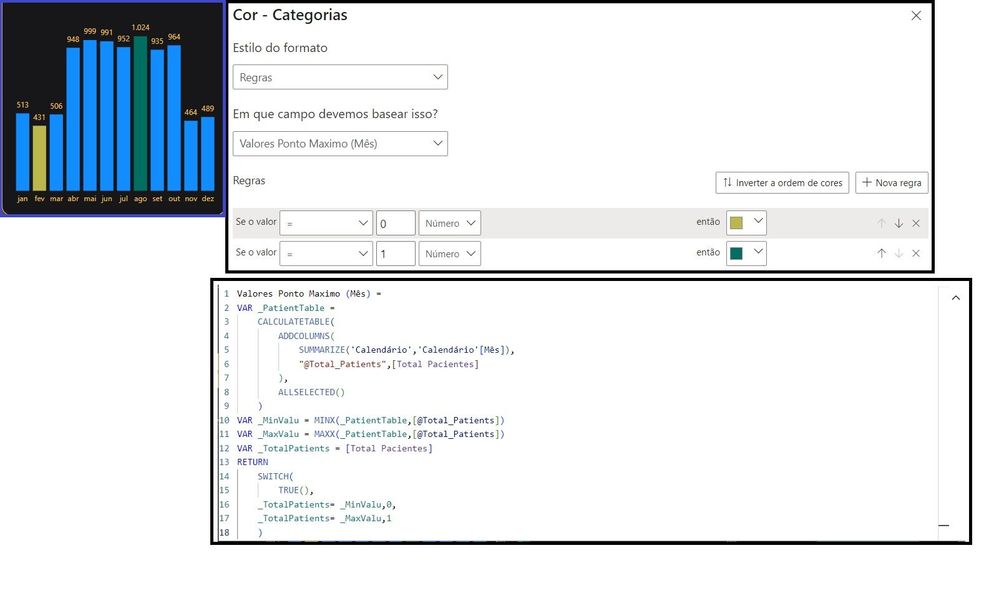
I need to build the table graph so that the largest and smallest values ​​are highlighted with the color I enter and the other columns are highlighted in the color I choose.

I almost managed to do it, but the other columns are blue. And I need to change this color.

I included the assembled graphic in the image, the rules for the colors I created and the measurement I'm using.

I need to change the blue color of the columns, would it be possible?

Thank you in advance.


duvida.jpg

1 ACCEPTED SOLUTION
Ritaf1983
Super User
Super User

Hi @rafamorim87 
You can create all the colors logics with dax ,
For example :

Bar color =
var min_value = CALCULATE(minx(SUMMARIZE('Table','Table'[Team],"_sum values",sum('Table'[values])),[_sum values]),ALLSELECTED('Table'[Team]))
var max_value = CALCULATE(Maxx(SUMMARIZE('Table','Table'[Team],"_sum values",sum('Table'[values])),[_sum values]),ALLSELECTED('Table'[Team]))
Return
SWITCH(TRUE(),
sum('Table'[values])=min_value,"Yellow",
sum('Table'[values])=max_value,"green",
"black")
 
** The color can be In hexacode 
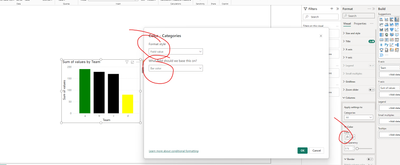
and then just take this measure as a field to conditional formatting :
Ritaf1983_0-1713549205406.png

the pbix is attached

If this post helps, then please consider Accepting it as the solution to help the other members find it more quickly


Regards,
Rita Fainshtein | Microsoft MVP
https://www.linkedin.com/in/rita-fainshtein/
Blog : https://www.madeiradata.com/profile/ritaf/profile

View solution in original post

1 REPLY 1
Ritaf1983
Super User
Super User

Hi @rafamorim87 
You can create all the colors logics with dax ,
For example :

Bar color =
var min_value = CALCULATE(minx(SUMMARIZE('Table','Table'[Team],"_sum values",sum('Table'[values])),[_sum values]),ALLSELECTED('Table'[Team]))
var max_value = CALCULATE(Maxx(SUMMARIZE('Table','Table'[Team],"_sum values",sum('Table'[values])),[_sum values]),ALLSELECTED('Table'[Team]))
Return
SWITCH(TRUE(),
sum('Table'[values])=min_value,"Yellow",
sum('Table'[values])=max_value,"green",
"black")
 
** The color can be In hexacode 
and then just take this measure as a field to conditional formatting :
Ritaf1983_0-1713549205406.png

the pbix is attached

If this post helps, then please consider Accepting it as the solution to help the other members find it more quickly


Regards,
Rita Fainshtein | Microsoft MVP
https://www.linkedin.com/in/rita-fainshtein/
Blog : https://www.madeiradata.com/profile/ritaf/profile

Helpful resources

Announcements
April Power BI Update Carousel

Power BI Monthly Update - April 2026

Check out the April 2026 Power BI update to learn about new features.

Fabric SQL PBI Data Days

Data Days 2026 coming soon!

Sign up to receive a private message when registration opens and key events begin.

New to Fabric survey Carousel

New to Fabric Survey

If you have recently started exploring Fabric, we'd love to hear how it's going. Your feedback can help with product improvements.

Power BI DataViz World Championships carousel

Power BI DataViz World Championships - June 2026

A new Power BI DataViz World Championship is coming this June! Don't miss out on submitting your entry.