FabCon is coming to Atlanta
Join us at FabCon Atlanta from March 16 - 20, 2026, for the ultimate Fabric, Power BI, AI and SQL community-led event. Save $200 with code FABCOMM.
Register now!- Power BI forums
- Get Help with Power BI
- Desktop
- Service
- Report Server
- Power Query
- Mobile Apps
- Developer
- DAX Commands and Tips
- Custom Visuals Development Discussion
- Health and Life Sciences
- Power BI Spanish forums
- Translated Spanish Desktop
- Training and Consulting
- Instructor Led Training
- Dashboard in a Day for Women, by Women
- Galleries
- Data Stories Gallery
- Themes Gallery
- Contests Gallery
- QuickViz Gallery
- Quick Measures Gallery
- Visual Calculations Gallery
- Notebook Gallery
- Translytical Task Flow Gallery
- TMDL Gallery
- R Script Showcase
- Webinars and Video Gallery
- Ideas
- Custom Visuals Ideas (read-only)
- Issues
- Issues
- Events
- Upcoming Events
Get Fabric Certified for FREE during Fabric Data Days. Don't miss your chance! Request now
- Power BI forums
- Forums
- Get Help with Power BI
- Desktop
- Re: Adjacent column groups in matrix
- Subscribe to RSS Feed
- Mark Topic as New
- Mark Topic as Read
- Float this Topic for Current User
- Bookmark
- Subscribe
- Printer Friendly Page

- Mark as New
- Bookmark
- Subscribe
- Mute
- Subscribe to RSS Feed
- Permalink
- Report Inappropriate Content
Adjacent column groups in matrix
I want to make a matrix with with row groups wich are a hierarchy, but the column groups must be adjacent
For example, this table

Must look like this:
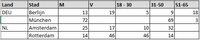
instead of this:

Is this possible with Power BI at this moment?
Help is appreciated, Thanks!
Solved! Go to Solution.
- Mark as New
- Bookmark
- Subscribe
- Mute
- Subscribe to RSS Feed
- Permalink
- Report Inappropriate Content
Hi @Anonymous,
You can refer to following calculate table formula to create a new table with original table records and summarize table records:
Table =
UNION (
    'Sample',
    SELECTCOLUMNS (
        SUMMARIZE (
            'Sample',
            [Land],
            [Stad],
            [geslacht],
            "leeftijdgroep", [geslacht],
            "Aantal", SUM ( 'Sample'[Aantal] )
        ),
        "Client", BLANK (),
        "Land", [Land],
        "Stad", [Stad],
        "geslacht", [geslacht],
        "leeftijdgroep", [leeftijdgroep],
        "Aantal", [Aantal]
    )
)
After these, you can create a table as custom sort order table to define column order.(you can't direct change sort order of matrix column fields)
Sort Table =
SELECTCOLUMNS (
    VALUES ( 'Table'[leeftijdgroep] ),
    "leeftijdgroep", [leeftijdgroep],
    "Index", SWITCH (
        [leeftijdgroep],
        "M", 1,
        "V", 2,
        "18-30", 3,
        "31-50", 4,
        "51-65", 5,
        BLANK ()
    )
)
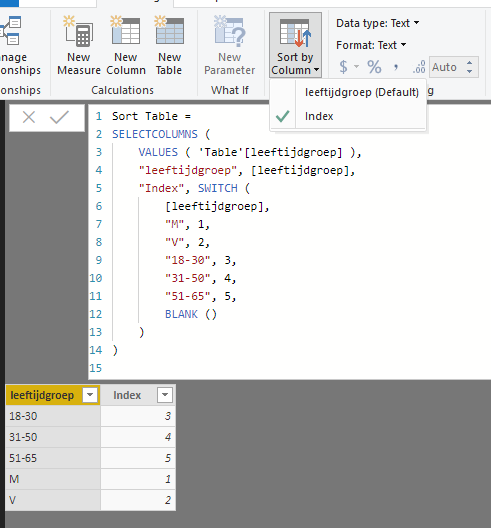
Build relationship from new table to sort table, then create matrix visual.
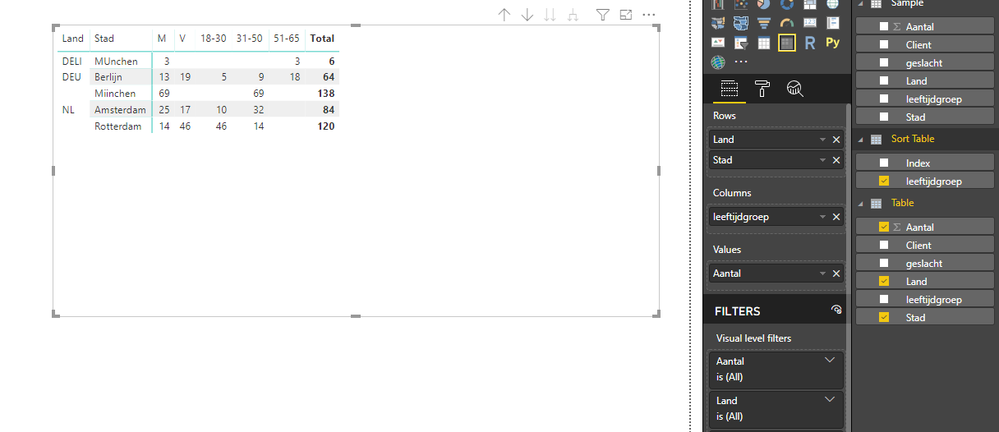
Regards,
Xiaoxin Sheng
- Mark as New
- Bookmark
- Subscribe
- Mute
- Subscribe to RSS Feed
- Permalink
- Report Inappropriate Content
Hi @Anonymous,
You can refer to following calculate table formula to create a new table with original table records and summarize table records:
Table =
UNION (
    'Sample',
    SELECTCOLUMNS (
        SUMMARIZE (
            'Sample',
            [Land],
            [Stad],
            [geslacht],
            "leeftijdgroep", [geslacht],
            "Aantal", SUM ( 'Sample'[Aantal] )
        ),
        "Client", BLANK (),
        "Land", [Land],
        "Stad", [Stad],
        "geslacht", [geslacht],
        "leeftijdgroep", [leeftijdgroep],
        "Aantal", [Aantal]
    )
)
After these, you can create a table as custom sort order table to define column order.(you can't direct change sort order of matrix column fields)
Sort Table =
SELECTCOLUMNS (
    VALUES ( 'Table'[leeftijdgroep] ),
    "leeftijdgroep", [leeftijdgroep],
    "Index", SWITCH (
        [leeftijdgroep],
        "M", 1,
        "V", 2,
        "18-30", 3,
        "31-50", 4,
        "51-65", 5,
        BLANK ()
    )
)
Build relationship from new table to sort table, then create matrix visual.
Regards,
Xiaoxin Sheng
- Mark as New
- Bookmark
- Subscribe
- Mute
- Subscribe to RSS Feed
- Permalink
- Report Inappropriate Content
Thank you, it looks like this is going to solve the problem!


- Mark as New
- Bookmark
- Subscribe
- Mute
- Subscribe to RSS Feed
- Permalink
- Report Inappropriate Content
@Anonymous
On Matrix Trable, put Land as rows and as Columns put Geslacht and Leeftijdgroep.
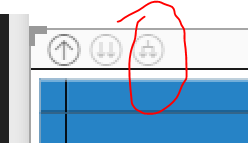
Then on the matrix object on the top left click on the following icon:
- Mark as New
- Bookmark
- Subscribe
- Mute
- Subscribe to RSS Feed
- Permalink
- Report Inappropriate Content
Thanks for your response, but this gives me the output like my screenshot that i dont want as a result 🙂
The leeftijd and geslacht work like a hierarchy, for every "geslacht" it gets sliced in leeftijdsgroepen.
- Mark as New
- Bookmark
- Subscribe
- Mute
- Subscribe to RSS Feed
- Permalink
- Report Inappropriate Content
@Anonymous
Sorry my mistake....
I dont think you can do this with a matrix.
What you can do though is create 5 new measures for each one of the metric fields and add them on a table and not matrix.
- Mark as New
- Bookmark
- Subscribe
- Mute
- Subscribe to RSS Feed
- Permalink
- Report Inappropriate Content
ye was afraid it wasnt possible yet, to bad.
Your solution with the measures is a nice idea, but we work with a corporate tabular model so in our case it wouldt be a solution to create a lot of measures just for 1 visual (in reality it are few more columns we need)
Thanks again for the effort though
Helpful resources

Power BI Monthly Update - November 2025
Check out the November 2025 Power BI update to learn about new features.

Fabric Data Days
Advance your Data & AI career with 50 days of live learning, contests, hands-on challenges, study groups & certifications and more!

FabCon Atlanta 2026
Join us at FabCon Atlanta, March 16-20, for the ultimate Fabric, Power BI, AI and SQL community-led event. Save $200 with code FABCOMM.


