Hi,
I know this topic has been posted about before, but I can't find the exact calculation that I'm looking for, and I a new user, so appreciate your patience.
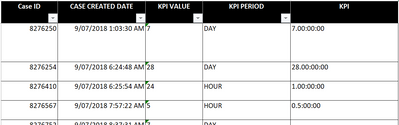
I have a data set which has a "CASE CREATED" date/time in this format; 30/07/2018 02:02:34 PM
Depending on the Case, there is a KPI of working day or hours i.e. 7 working days, or 1 hour. Ive create a coloumn in the same table called KPI which has these values stored as a duration (i.e. 7.00:00:00 or 0.1:00:00)
The end game is to analyse whether the KPI was met. I have the actual dates in a seperate table
Therefore, I was trying to create a coloumn "CASE DUE" which would be the CASE CREATED plus the KPI.
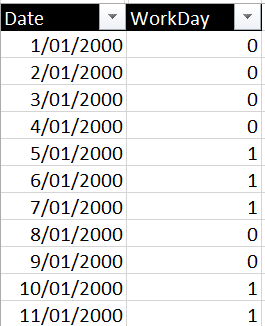
I have a seperate Date table created with a WorkDay field (1 = workday and 0 = non = workday).
I just dont know how to add the CASE CREATED to the KPI but consider the work days element.
Thanks
I'm just unsure how to add the