cancel
Showing results for 
Search instead for 
Did you mean: 

The Power BI Data Visualization World Championships is back! Get ahead of the game and start preparing now! Learn more

Reply
DebbieE
Community Champion
Community Champion

Adding the PowerApp visual but its tiny and you cant top it scrolling

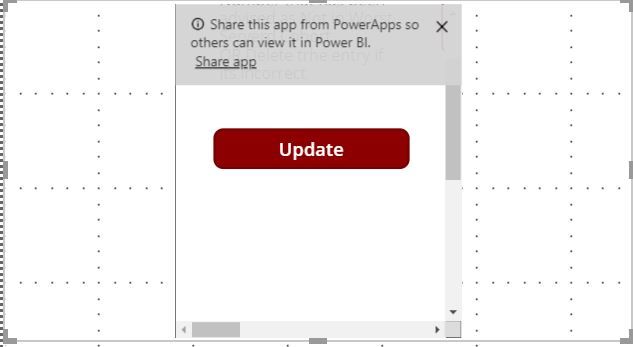
Adding the PowerApp visual that looks fine in powerApps but its coming through all wrong and I cant change it 


PowerApp Issue.JPG I can change the size of the visual but the power All remains as a little block with scroll bars. I cant change this in the middle. I want the Power App in my report without the Scroll bars.


1 ACCEPTED SOLUTION
DebbieE
Community Champion
Community Champion

Note great but before you add the PowerApp you have to drag the visual to be as big as you think it should be. If you leave it as a small box and then add the visual it wont go any bigger.


I think this is a bug but at least there is a work around

View solution in original post

1 REPLY 1
DebbieE
Community Champion
Community Champion

Note great but before you add the PowerApp you have to drag the visual to be as big as you think it should be. If you leave it as a small box and then add the visual it wont go any bigger.


I think this is a bug but at least there is a work around

Helpful resources

Announcements
Power BI DataViz World Championships

Power BI Dataviz World Championships

The Power BI Data Visualization World Championships is back! Get ahead of the game and start preparing now!

December 2025 Power BI Update Carousel

Power BI Monthly Update - December 2025

Check out the December 2025 Power BI Holiday Recap!

FabCon Atlanta 2026 carousel

FabCon Atlanta 2026

Join us at FabCon Atlanta, March 16-20, for the ultimate Fabric, Power BI, AI and SQL community-led event. Save $200 with code FABCOMM.