cancel
Showing results for 
Search instead for 
Did you mean: 

The Power BI Data Visualization World Championships is back! Get ahead of the game and start preparing now! Learn more

Reply
Anonymous
Not applicable

Adding data from Sharepoint ends with Error

Hi, I need a help with adding excel files from Sharepoint to PBI. I have sucessfully chosen desired file from a list on the sharepoint but then I am getting transformation error:

An error occurred in the ‘Transform File’ query. Expression.Error: The key didn't match any rows in the table.

Details:

    Key=

        Item=status change

        Kind=Sheet

    Table=[Table]


In Advance data editor I have these steps which were automatically created by PBI during load:

let
Source = SharePoint.Files("https://xxx.sharepoint.com/sites/Report/", [ApiVersion = 15]),
#"Filtered Hidden Files1" = Table.SelectRows(Source, each [Attributes]?[Hidden]? <> true),
#"Invoke Custom Function1" = Table.AddColumn(#"Filtered Hidden Files1", "Transform File", each #"Transform File"([Content])),
#"Renamed Columns1" = Table.RenameColumns(#"Invoke Custom Function1", {"Name", "Source.Name"}),
#"Removed Other Columns1" = Table.SelectColumns(#"Renamed Columns1", {"Source.Name", "Transform File"}),
#"Expanded Table Column1" = Table.ExpandTableColumn(#"Removed Other Columns1", "Transform File", Table.ColumnNames(#"Transform File"(#"Sample File")))
in
#"Expanded Table Column1"


Please any idea how to fix it?

1 ACCEPTED SOLUTION
Anonymous
Not applicable

Hi,

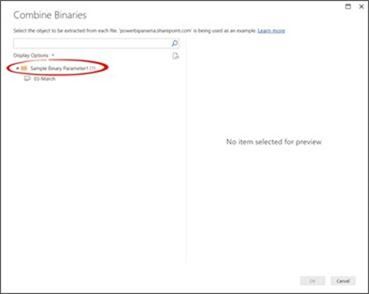
thanks for answers. the problem was solved by selecting Sample parameters instead of Spreadsheet as adviced in the guide https://powerbi.microsoft.com/en-us/blog/combining-excel-files-hosted-on-a-sharepoint-folder/1d53c839-6492-474c-ba35-4fd41ec3c895.jpg


View solution in original post

5 REPLIES 5
mahoneypat
Microsoft Employee
Microsoft Employee

In one or more of your excel workbooks, the tab is not called "status change" (probably says "Sheet1").  You can either fix the excel file(s) ...

or set up a relative reference in the Example File query in place of the row causing the error (the one with Item = status change.  For example, if this is the only Sheet in the workbooks, you can filter to Kind = Sheet and then use #"Filtered Rows"{0}[Content] to get the content from the first row of the previous row (no matter what the worksheet is called).  This assumes you do the last step was #"Filtered Rows".


If this works for you, please mark it as solution.  Kudos are appreciated too.  Please let me know if not.

Regards,

Pat


Did I answer your question? Mark my post as a solution! Kudos are also appreciated!

To learn more about Power BI, follow me on Twitter or subscribe on YouTube.


@mahoneypa HoosierBI on YouTube


Anonymous
Not applicable

Hi,

thanks for answers. the problem was solved by selecting Sample parameters instead of Spreadsheet as adviced in the guide https://powerbi.microsoft.com/en-us/blog/combining-excel-files-hosted-on-a-sharepoint-folder/1d53c839-6492-474c-ba35-4fd41ec3c895.jpg


Hi @Anonymous ,


Glad to hear the issue is solved. You can accept your reply as solution, that way, other community members could easily find the answer when they get same issues.


Best Regards,
Yingjie Li

v-yingjl
Community Support
Community Support

Hi @Anonymous ,

Seems like you have a query in which a row is selected based on a key value 'status change 'and that value does not exist.

To fix it make sure the key value exist or adjust the code so it does not point to a non-existing key value.


Best Regards,
Yingjie Li

If this post helps then please consider Accept it as the solution to help the other members find it more quickly.


Helpful resources

Announcements
Power BI DataViz World Championships

Power BI Dataviz World Championships

The Power BI Data Visualization World Championships is back! Get ahead of the game and start preparing now!

December 2025 Power BI Update Carousel

Power BI Monthly Update - December 2025

Check out the December 2025 Power BI Holiday Recap!

FabCon Atlanta 2026 carousel

FabCon Atlanta 2026

Join us at FabCon Atlanta, March 16-20, for the ultimate Fabric, Power BI, AI and SQL community-led event. Save $200 with code FABCOMM.