cancel
Showing results for 
Search instead for 
Did you mean: 

Get Fabric certified for FREE! Don't miss your chance! Learn more

Reply
Anonymous
Not applicable

Adding column from different table to fact table while using a measure isn't working properly

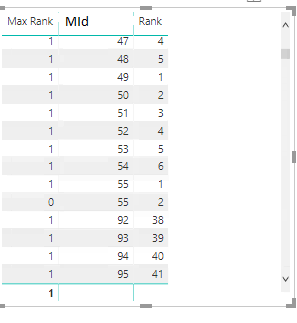
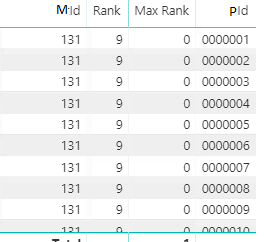
Hi there,  I'm new to power BI and I am having an issue when adding a column to a table linked my fact table while my caculated measure is being used. The measure works fine until I do this, and using this linked tables works fine until I use the measure.  I've searched around the last few days trying to solve it myself and trying to find a solution but am unable to find anything. Does anyone have a solution or can they point me in the right direction? 


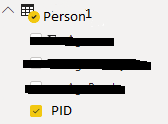
edit:  The values that read "PId" should be PersonId and are not a PK. Person 1 and 2 are views if that helps.

The Dax Query is

Max Rank = VAR inMax =CALCULATE(MIN(MFact[Rank]), ALLEXCEPT((MFact),MFact[MId] ))

RETURN
IF(inMax= CALCULATE(MIN(MFact[Rank])),1,0 )

Thanks

It works when just using columns from MFactIt works when just using columns from MFactIt doesn't work properly when I add a  column from "Person1" or "Person2"It doesn't work properly when I add a column from "Person1" or "Person2"Mfact.pngperson2.pngperson1.png

1 ACCEPTED SOLUTION
v-chuncz-msft
Community Support
Community Support

@Anonymous 


You may Use performance analyzer in Power BI Desktop to check query and take a look at SUMMARIZECOLUMNS.

Community Support Team _ Sam Zha
If this post helps, then please consider Accept it as the solution to help the other members find it more quickly.

View solution in original post

2 REPLIES 2
v-chuncz-msft
Community Support
Community Support

@Anonymous 


You may Use performance analyzer in Power BI Desktop to check query and take a look at SUMMARIZECOLUMNS.

Community Support Team _ Sam Zha
If this post helps, then please consider Accept it as the solution to help the other members find it more quickly.
Anonymous
Not applicable

I just realised my DAX Query wasn't added to the post. I had to mask a lot of these tables.

Helpful resources

Announcements
Sticker Challenge 2026 Carousel

Join our Community Sticker Challenge 2026

If you love stickers, then you will definitely want to check out our Community Sticker Challenge!

January Power BI Update Carousel

Power BI Monthly Update - January 2026

Check out the January 2026 Power BI update to learn about new features.

FabCon Atlanta 2026 carousel

FabCon Atlanta 2026

Join us at FabCon Atlanta, March 16-20, for the ultimate Fabric, Power BI, AI and SQL community-led event. Save $200 with code FABCOMM.