Join us at FabCon Atlanta from March 16 - 20, 2026, for the ultimate Fabric, Power BI, AI and SQL community-led event. Save $200 with code FABCOMM.
Register now!The Power BI Data Visualization World Championships is back! Get ahead of the game and start preparing now! Learn more
Hi All, I have the following matrix
Row: Group name (A, B, C, D)
Columns: Company Name ( Apple, Google, Tesla). HERE I want to add an average column.
Values: Any numbers
| Group | Apple | Tesla | AVERAGE | |
| A | 1 | 2 | 3 | |
| B | 2 | 3 | 2 | |
| C | 3 | 4 | 3 | |
| D | 4 | 5 | 1 |
I want to add an average column that looks at te average for the companies selected. How can I do this?
Solved! Go to Solution.
@Anonymous , isinscope can help, Make sure you have measure and Avg Measure then
a measure like
if(isinscope(Table[group]) && not(isinscope(Table[Company])), [Avg Measure], [measure])
Add column subtotal in matrix, this should give avg in column sub total
https://www.kasperonbi.com/use-isinscope-to-get-the-right-hierarchy-level-in-dax/
@Anonymous , isinscope can help, Make sure you have measure and Avg Measure then
a measure like
if(isinscope(Table[group]) && not(isinscope(Table[Company])), [Avg Measure], [measure])
Add column subtotal in matrix, this should give avg in column sub total
https://www.kasperonbi.com/use-isinscope-to-get-the-right-hierarchy-level-in-dax/
What would the measure and av measure be?
@Anonymous ,
measure = sum(Table[Value])
Avg Measure = Average(Table[Value])
or
Avg Measure = Divide(sum(Table[Value]), distinctcount(Table[Company]))
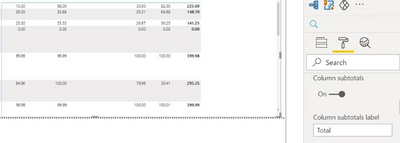
Hi Amit. this is working now however the sub-total is s
howing the sum and not the average
The Power BI Data Visualization World Championships is back! Get ahead of the game and start preparing now!
| User | Count |
|---|---|
| 38 | |
| 37 | |
| 33 | |
| 32 | |
| 29 |
| User | Count |
|---|---|
| 132 | |
| 88 | |
| 82 | |
| 68 | |
| 64 |