Get certified for free when you join Fabric Data Days 2026 and dive into Fabric, Power BI, SQL, AI, and other essential data skills.
Join nowJuly 7 - July 17 | Round 2 of the Power BI Dataviz World Championships. Don't miss your chance! Learn more
I am not able to add text to a button or a shape which i want to link with an bookmark action later. Please help how can i get the option on Button text, when I click on the shape inserted or the blank Button added, the visualisation pane just goes off and i am unable to get that back
Solved! Go to Solution.
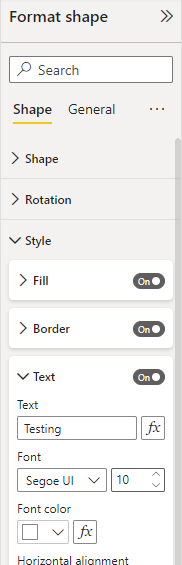
When you click on your shape or button. In the format shape pane you can choose to enable text for the object. See example of shape text below
It's hard to tell without a screenshot to go from.
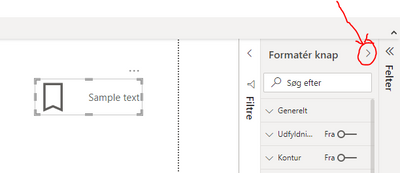
Maybe the pane is collapsed and you need to reopen it again?
You can add a text to the Button by using Style→Text option:
If this post helps, please consider accepting it as the solution to help the other members find it more quickly.
Appreciate your Kudos!!
Join us in Barcelona for FabCon and SQLCon, the Fabric, Power BI, SQL, and AI community event. Save €200 with code FABCMTY200.
Join Fabric Data Days 2026: 60 days of free live/on-demand sessions, challenges, study groups, and certification opportunities.
| User | Count |
|---|---|
| 63 | |
| 41 | |
| 39 | |
| 38 | |
| 38 |